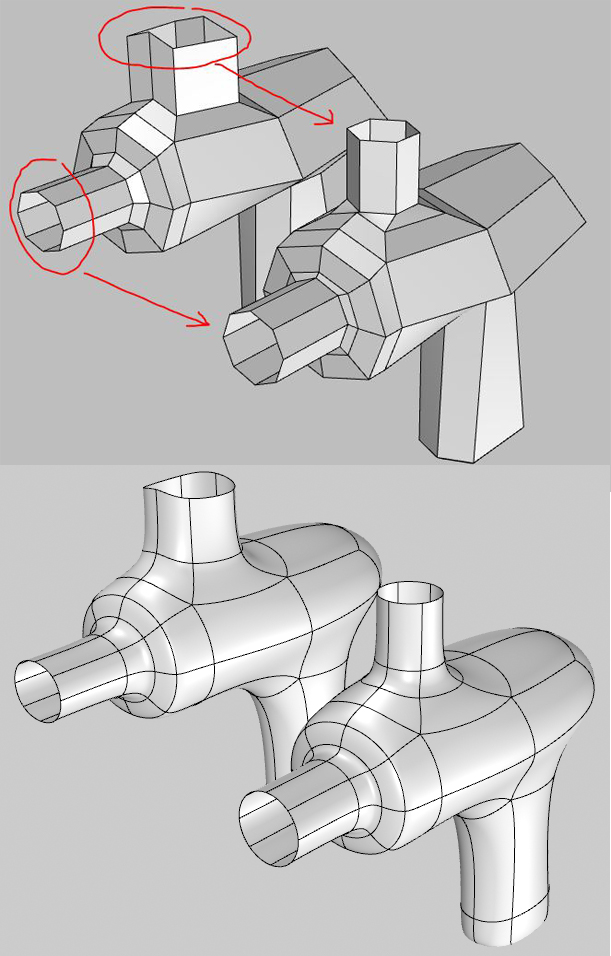
Still trying to work with imported SubD models and not having a way to toggle between low poly and SubD back and forth, while making edits makes work very very very slow and/or inaccurate.
I don’t know how does it work in TSplines, but I know in Max/Modo/etc. the default toggle is quite terrible. We have been overnighting it with scripts for over a decade now. Let me explain how those default tools work, still today:
you can always toggle when you are not selecting a sub-object. Otherwise it just toggles your selected subobject. So if you select a polygon face of a cube it will only smooth/subdivide that selected face! Not the whole cube.
also you cannot toggle mid-transform. If you do, your transform tool (move/rotate/gimbal) gets dropped.
The whole point of toggling is that you want to see your entire mesh toggling between smooth/faceted mode. Also you wants to toggle between these two states while you are doing a transform operation and keep going with it (for example a gumball move).
Do you mean to say you can “only” toggle the whole object if a sub-object is not selected? I think so but wanted to clarify that what you want is the entire SubD to be toggled regardless of the current sub-object selection.
I don’t know how this feature will work yet in Rhino as I haven’t seen a first run at it yet myself. I have used the ability in Blender though and understand the value. Once there’s something to try in the WIP we can talk more about specifics.
Haven’t used Rhino SubD yet, but with T-Splines, is essential for efficacy with anything complex, especially forms built from multiple elements to be joined into a singular mass. (Efficacy may include imported geometry too)
Essential because, with complex forms and/or extensive manipulation, topography can get sloppy yielding a mess. One learns to ‘read’ box mode to rectifying any counterproductive ‘slop’ as well as box topography consistent with aims. RAPID toggling is the means.
A familiar analogy to not having toggle of SubD/Cage would be if we tried to modify curves without seeing its control points to move them directly and therefore not being able to see their linear/flow/angle relationship.
Personally I find mode 2 visually chaotic and rarely use. Ability to edit topography in box mode (when needed) and rapid toggle between 1-Box and 3-Smooth works best for me.
Nice idea, I filed it as https://mcneel.myjetbrains.com/youtrack/issue/RH-55054 . You can do it now though with a selection filter to grab all the verts and then use Pull to a cylindrical srf. It’d be faster with a command though and I also asked for a radius value.
Are you pulling the control points or the vertices? If you use SelectionFilter > SubObjects > Verts you should get a better result with uneven edge lengths. Post the model if it’s not working and I’ll take a look.
I mgt be doing something wrong
here’s the file PullTest.3dm (53.4 KB)
edit: cant seem to select verts _Pull is active (wont work w pre-selection either)
The object was a mesh still so the verts and ctrl pts were the same thing. In this example I would say the vertices of a subd from it or the ctrl pts of that subd would both not pull to a perfect circle well. However, a little Osnap positioning of the points gets it there. I did it on the mesh and then converted.
Any and all efforts to add numerical inputs where possible, to SubD processes, that mimic what’s possible with NURBS modeling, will help move the needle.