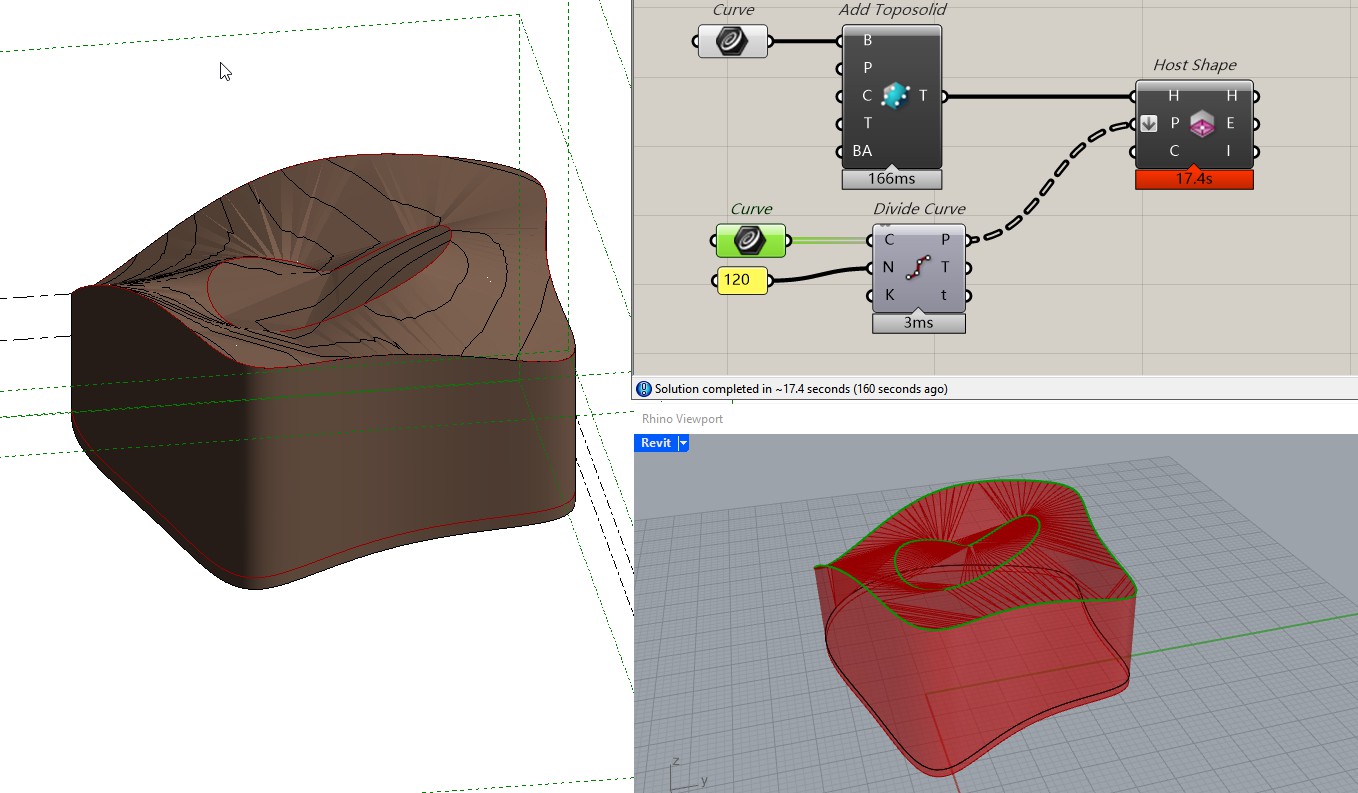
Hello friends! I am having issues with toposolid creation with Rhino Inside Revit. I placed internal points, as well as boundary points for a proposed toposolid, and it shoud sit at around 700 ft elevation. However the result shows it tries to tie back the projected boundary lines sits at 0 ft and i get this weird result. I cannot figure it out, somehow the elevation points on the boundary is not constraining the toposolid. Can y’all please help?
The script is attached, my work flow is to draw the toposolid in revit as a slab, then bring it in GH to get the boundary at 0 ft. then use the same boundary to project on the mesh surface created by contours to get the points on and inside of the boundary, then feed the boundary and points to the add toposolid component and here I am. Any help is appreciated!!!
Hi Jessen, I made a simpler version of the issue, please see attached. Ideally I want to make a tortilla toposolid but again the edge is tying back to the boundary curve at 0 elevation.
Thank you Jessesn! The host shape won’t work as well, still got those ‘drops’, but I figure it out! It’s the original boundary shape, looks like we need to include each line/curve segment end point and feed them into the component.
Previously I just used a divide length on the boundary curve to get points at a fixed interval, and the result will miss many actual end points in the boundary. I guess the end points in the boundary will also determine the toposolid elevation but some of them were sitting at 0, therefore we had that weird result. If all end points are covered and assigned to the correct elevation the result will be clean.