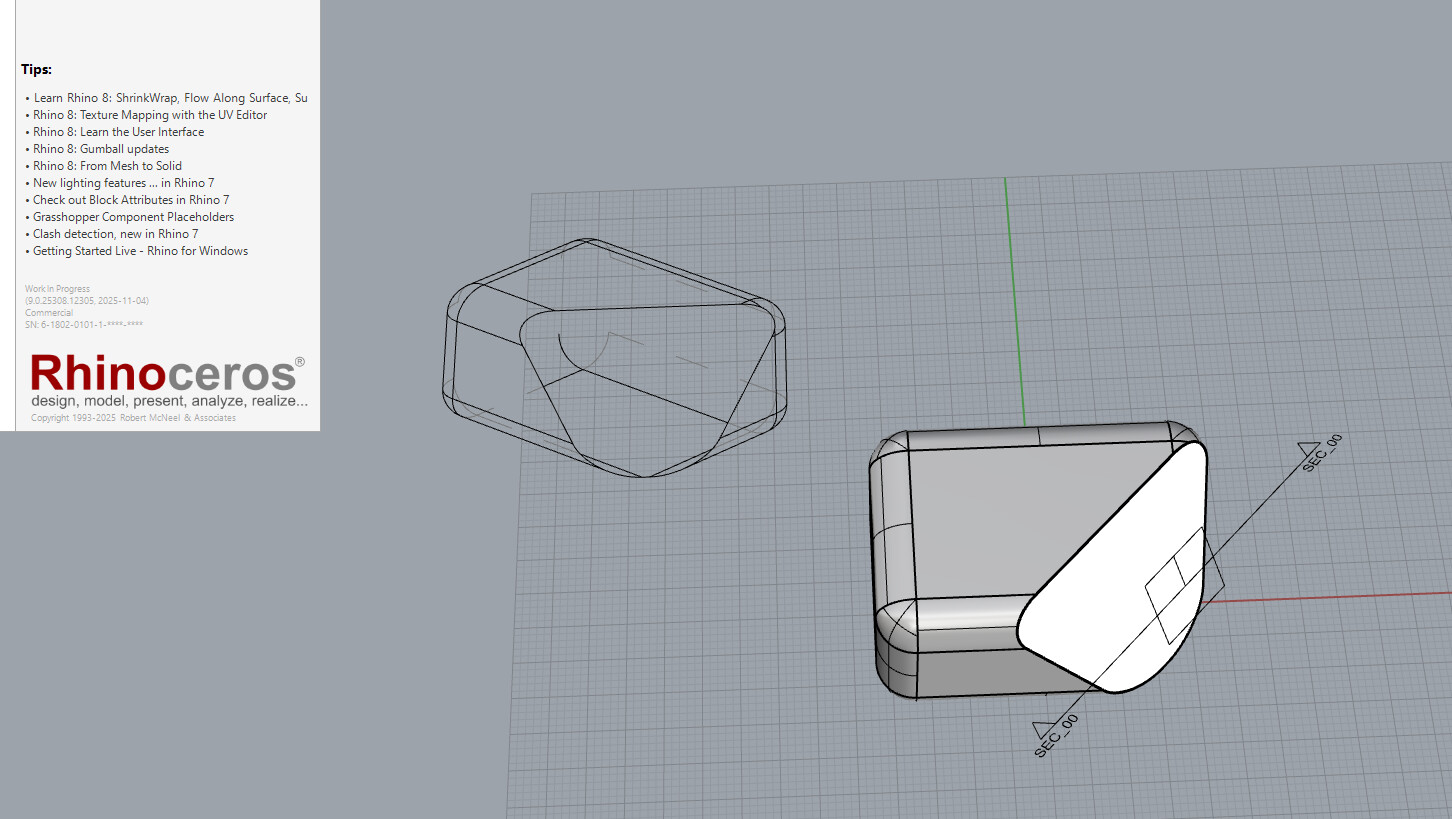
Hi all, wanted to share a prototype (work-in-progress) to create static copies of clipping-drawings and place the output in source layers. It does not support dynamic update with model changes. The likely application of this feature is to enhance NestedClippingDrawings command that currently extract static copy of sections (without background). However, it might be applicable to maintain source layers to ClippingDrawings command.
Thank you for continuing looking at ClippingDrawings.
If this is a prototype of possible development way of ClippingDrawing in order to keep layer structure, here are some comments:
Hopefully this is just at prototype stage? Autoupdate will be added after?
Is it possible to extract tangent edges (from background) as a separate set of curves?
The biggest disadvantage of having Drawing’s elements at the same layer is taking out the ability to easily separate Hidden status of 3D objects and ClippingDrawings. You will not be able to turn on/off ClippingDrawing in Model space and Details under Layout.
I would still propose creation of separate set of same layers under main ClippinDrawing’s layer. This will make drafting process much easier.
I agree — that’s definitely a limitation. But at the same time, this approach feels much more elegant than generating a full layer set for every section.
I wonder if detail visibility could be coordinated via the clipping plane’s “Views Clipped” toggles in the Properties panel? That would make particular sense when projecting in-place. In my workflow, I’d use this in combination with _SaveClippingSectionViews to place the result in a layout detail — and I wouldn’t run into issues where the section drawing gets cut by its own clipping plane.
I can see a usage fro architects that may want to do versions of 2D drawing before implementing it into 3D or just complete the 2D drawings in an easier way.
I can’t see this applied to Product design where the drawing are much more stictly related to the 3D models.
This may be useful to move the drawing into the Layout, but without the associativity to me look it’s not so helpful.
The likely application of this feature is to enhance NestedClippingDrawings command that currently extract static copy of sections (without background). However, the same idea might apply to answer the request to add add source layers to ClippingDrawings , so thank you for the feedback.
If this feature is added to ClippingDrawings, then yes, auto-update should be supported.
I don’t believe there is SDK support to sort by tangent edge at the moment. @Matthew_Sorensen might have insights.
Would it help if there is a command, say “HideInModel”, that enables hiding drawings in model while remain visible in detail? As for hiding sub-categories (like hidden-lines), the prototype attempts to solve through grouping. but of course this is not as easy as hiding layers, and I understand this to be an important shortcoming.
I also appreciate the elegance of removing the need to duplicate layers, and the ability to directly select, copy and modify drawings.
Layout visibility can be perhaps resolved by adding support to Hide-In-Model (similar to HideInDetail command). I’ll look into this. Also we probably need to resolve selecting nested groups (without having to explode the top-level group).
This is a first prototype and I really appreciate your feedback. Thanks.
I think it’s available, since there is possibility to do this and this. Somehow it is allowed to recognize tangent edges of a polysurface.
We need to have freedom of independent changing linetype and lineweight of silhouette, tangent, hidden and sharp edges-related curves. Also, easily controlling visibility of such groups of curves. Which is partially already implemented by you for silhouette curves.
Thanks again for keeping interest to ClippingDrawing development. This eventually should make drafting rich and flexible, and dynamic at the same time.
Also, @rajaa , could you please add an option to switch between positioning “In place” and with specified insertion point of ClippingDrawing while editing it?
Currently, if the drawing is already set to “In place“, I can’t put it somewhere else. And vice versa. If it’s placed somewhere, I can’t bring it to In place state.
Anyways, That’s a great improvement for Drafting possibilities of Rhino. Great job!
Thanks! If you have not seen it, I’d like to refer you to the full list of SectioningTools improvements here. Your feedback was very helpful to this development, so thank you.
You can switch between the 2 by re-running ClippingDrawings command. Does this work for you?
Yep, that works. Didn’t think the re-running will replace existing ClippingDrawing, but this is what I was talking about. Thank you!
The only tiny thin is missing from my workflow is either Hatch-like-Texture (already existing YT) or at least Clipping drawings to support PointClouds (same, existing YT).
The last one is gone to the Future features as Make2D also doesn’t do that and I assume it’s a bit harder to implement rather than just curves on sirfaces. But that’s fine. Will be there eventually.
Currently we have two ways to make the initial clipping object: ClippingPlane and ClippingSections.
1st one is more preferred for me as it gives more freedom in initial orientation of the plane.
But it is lacking the dedicated NamedView auto association. At the same time ClippingSection gives this ability, but I can’t, for example create the plane by 3 points, etc.
Is it possible either give this options to ClippingSections or add auto creation of NamedView to ClippingPlane?
The “Up” orientation matters when creating clipping drawings, this is why “ClippingSections” command opted to a more well-defined way to create the clipping-plane orientation with the “Dir” option.
You can always start with a clipping plane, then generate the name view by running “SaveClippingSectionViews”, and you can select the clipping-plane and assign a name to it in its properties, and objects it cutes. This makes it equivalent to running ClippingSections command.
I have one more wish for the ClippingDrawings functionality.
Is it possible to include Text objects to the consideration?
Currently, Make2d has it, but it is just reorienting the Text object. I would prefer the proper view of a text (deformed according to the point of view).
This option could be useful, when you have some marking, engraving on the product, which would be easily editable in 3D space (even connected to User text) and properly oriented (squeezed) to the ClippingPlane orientation on the resulting ClippingDrawing.
Technically, this should be a simple explosion of the Text object under the hood of the command and working with resulting curves as it’s already implemented.