Sorry if this has already been answered, but is it possible to orient a parallel camera view to a ClippingPlane? I know it can be done with a CPlane
Thanks,
Erik
Sorry if this has already been answered, but is it possible to orient a parallel camera view to a ClippingPlane? I know it can be done with a CPlane
Thanks,
Erik
Hi Erik - for now, a macro will do it
! CPlane Object Pause Plan CPlane Previous
-Pascal
Interesting approach. So CPlane to the selected geometry which could be a CPlane. May I ask how this is different than the SetCPlanetoObject command?
Thank you.
erik
Nevermind, I see the difference, it sets the projection to parallel. Nice approach. Thanks!
Hi Erik - there isn’t a SetCplaneToObject command - the button and menu items use the macro
_CPlane _Object
-Pascal
Ahh ok was not aware. Thank you again!
If some still looking
Command : _Plan
@wim @laurent_delrieu @pascal(retired  )
)
We cant use this macro with the new clipping plane can we? is there a quick workaround?
Pls give it a try with _CPlane _Object Pause _Plan
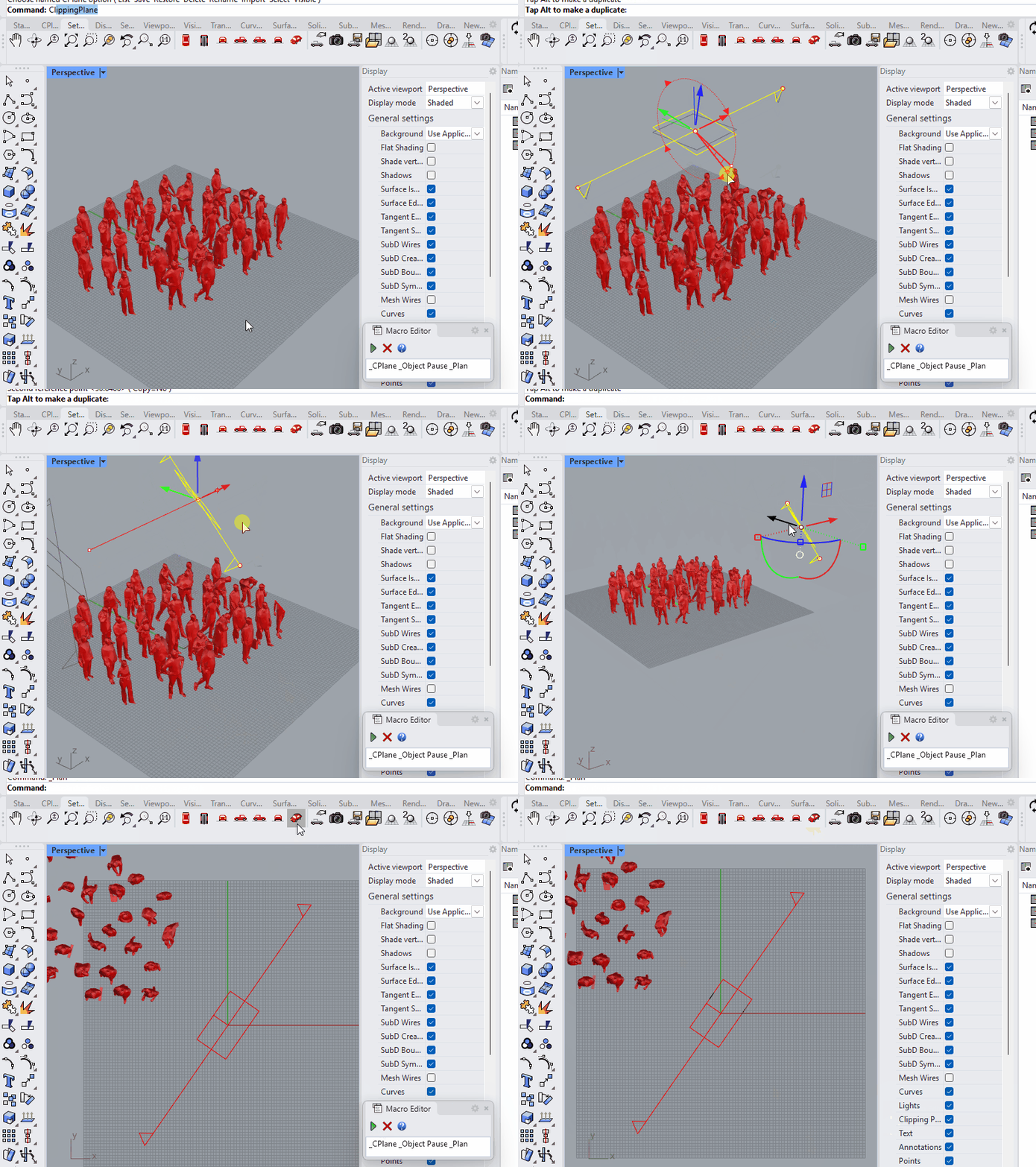
CPlane doesnt set to my clipping plane
Hi Guido -
That video doesn’t show your AutoCPlane settings. Also please provide the output from the Rhino SystemInfo command.
-wim
Hi Guido -
Of course.
Post your AutoCPlane settings and output from SystemInfo.
-wim
Auto Align CPlane ( Enabled=No Mode=Object Locked=No Sticky=Yes )
Rhino 8 SR21 2025-7-7 (Rhino 8, 8.21.25188.17001, Git hash:master @ 2e05bb7e11ec03aa58cc543d92330d59df05d32b)
License type: Commercial, build 2025-07-07
License details: Cloud Zoo

Windows 10 (10.0.19045 SR0.0) or greater (Physical RAM: 32GB)
.NET 8.0.15

Computer platform: DESKTOP

Standard graphics configuration.
  Primary display and OpenGL: NVIDIA GeForce RTX 2080 (NVidia) Memory: 8GB, Driver date: 3-14-2025 (M-D-Y). OpenGL Ver: 4.6.0 NVIDIA 572.83
    > Accelerated graphics device with 4 adapter port(s)
        - Windows Main Display attached to adapter port #0
        - Secondary monitor attached to adapter port #1

OpenGL Settings
  Safe mode: Off
  Use accelerated hardware modes: On
  GPU Tessellation is: On
  Redraw scene when viewports are exposed: On
  Graphics level being used: OpenGL 4.6 (primary GPU's maximum)

  Anti-alias mode: 4x
  Mip Map Filtering: Linear
  Anisotropic Filtering Mode: High

  Vendor Name: NVIDIA Corporation
  Render version: 4.6
  Shading Language: 4.60 NVIDIA
  Driver Date: 3-14-2025
  Driver Version: 32.0.15.7283
  Maximum Texture size: 32768 x 32768
  Z-Buffer depth: 24 bits
  Maximum Viewport size: 32768 x 32768
  Total Video Memory: 8 GB

Rhino plugins that do not ship with Rhino
  C:\Program Files\Enscape\Enscape.Rhino.Plugin-net48\Enscape.Rhino8.Plugin.dll	"Enscape.Rhino8.Plugin"	4.4.0.452
  C:\ProgramData\McNeel\Rhinoceros\7.0\Plug-ins\Datasmith Rhino Exporter (d1fdc795-b334-4933-b680-088119cdc6bb)\DatasmithRhino7.rhp	"Datasmith Exporter"	5.3.2.0

Rhino plugins that ship with Rhino
  C:\Program Files\Rhino 8\Plug-ins\Commands.rhp	"Commands"	8.21.25188.17001
  C:\Program Files\Rhino 8\Plug-ins\WebBrowser.rhp	"WebBrowser"
  C:\Program Files\Rhino 8\Plug-ins\rdk.rhp	"Renderer Development Kit"
  C:\Program Files\Rhino 8\Plug-ins\RhinoScript.rhp	"RhinoScript"
  C:\Program Files\Rhino 8\Plug-ins\IdleProcessor.rhp	"IdleProcessor"
  C:\Program Files\Rhino 8\Plug-ins\SectionTools.rhp	"SectionTools"
  C:\Program Files\Rhino 8\Plug-ins\RhinoRenderCycles.rhp	"Rhino Render"	8.21.25188.17001
  C:\Program Files\Rhino 8\Plug-ins\rdk_etoui.rhp	"RDK_EtoUI"	8.21.25188.17001
  C:\Program Files\Rhino 8\Plug-ins\NamedSnapshots.rhp	"Snapshots"
  C:\Program Files\Rhino 8\Plug-ins\MeshCommands.rhp	"MeshCommands"	8.21.25188.17001
  C:\Program Files\Rhino 8\Plug-ins\RhinoCycles.rhp	"RhinoCycles"	8.21.25188.17001
  C:\Program Files\Rhino 8\Plug-ins\Toolbars\Toolbars.rhp	"Toolbars"	8.21.25188.17001
  C:\Program Files\Rhino 8\Plug-ins\3dxrhino.rhp	"3Dconnexion 3D Mouse"
  C:\Program Files\Rhino 8\Plug-ins\Displacement.rhp	"Displacement"
Cheers
Hi Guido -
That needs to be set to Enabled=Yes for this to work.
-wim

I still can’t get it to work this way