the logic in your definition is clear and Nautilis CDD component is very useful.
i tried to run the script but i don’t know if i am doing something wrong but it does not converge.
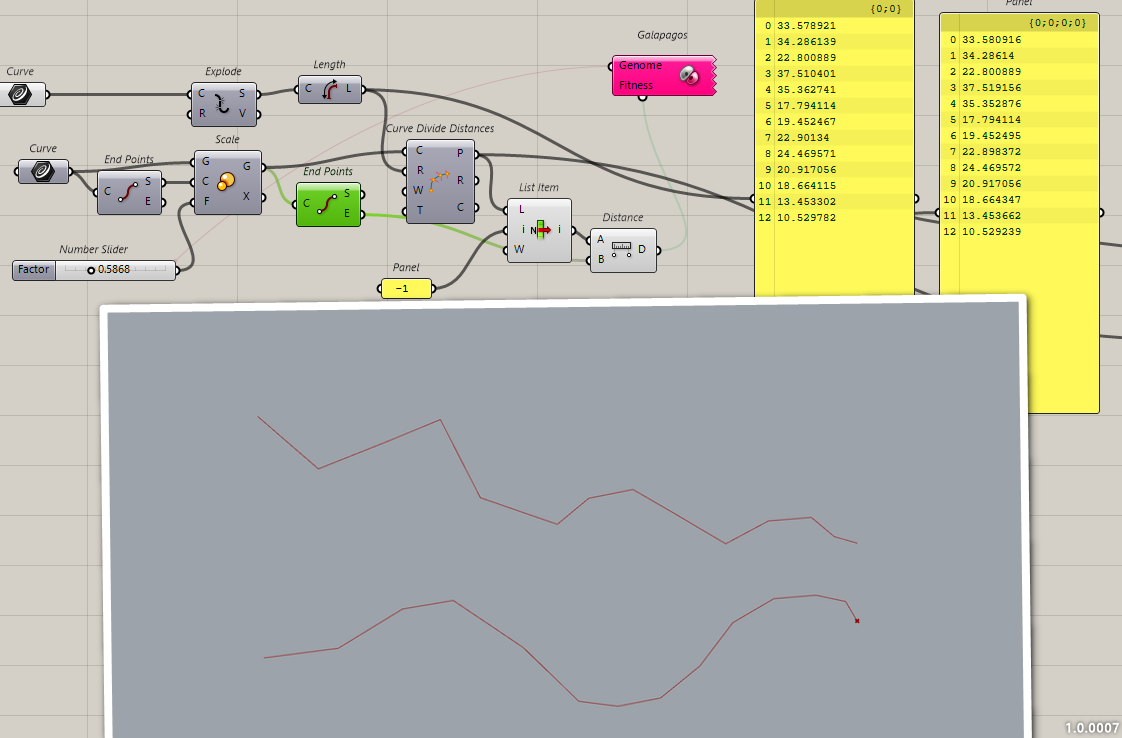
Galapagos stops generating solutions almost immediately without reaching convergence and when the list lenght of adapted polyline is lower to the number of segments of the original one
i also tried to control list lenghts and add to the fitness function yet it should not be necessary but result does not change
i dont know if i should reset it or what ,i haven’t used it many times but i never faced this problem
Hello
I used Maggic Eddy yesterday, and I swapped with my tool. I surely forgot to test it with Galapagos.
I just see that my tool if the factor is too low it puts a point at the end of the curve so it stops Galapagos.
I advise you to use Magic Eddy tool for now or use this script that add some tricks to be sure to have the good segments lengths and the good ending
Hi @cloudsvisitor77
The input curves appear to be missing from that definition.
I suspect it will be caused by the starting positions you are choosing.
You are right @DanielPiker , I am sorry , i havent internialized the crv !
Attached please find the definition with curves
crv 2 is working correclty
crv 3 and crv 4 are not working
Thus meaning that the 3 goals are all achieved but the OnCurve Goal does not consider the domain of the curve so the points can fullfil the goal but making a step backward on the curve rather than keep moving forward, this depending i think on where is located the closest point that fullfil the “LenghtRatio” Goal.
unless there isn’t a additional goal to control the order of point on the reference curve we’d need an additional input on the LenghtRatio Goal ( true or false ) to decide wether the points can move back and forward or if they have to be consecutive and always growing with reference to “t” of the reference curve, does it make sense ?
A simple fix here - the balance between the constraint to curve and LengthRatio goals was off.
Fixing that it converges to the correct result: crv_scale.gh (22.7 KB)
Another way to approach this would be to ignore the initial polyline geometry (since it is just the segment length ratios you actually care about), and initialise by dividing the smooth curve at t values in those ratios to make a new polyline. The lengths won’t be correct but would be close enough to give a good starting point for the optimisation, which then gives the accurate result.
(Note that you can set any target ratio between lengths, it doesn’t have to be the ratio they start out with)
These are simple ways with existing built in goals, but it is also true that it can sometimes be helpful to have a goal which enforces point order along a curve so the t value of each point can only ever be higher than the one before. I did write something for this some time back:
Hi @cloudsvisitor77
The Kangaroo dll on a typical Windows Rhino 8 installation will be located in C:\Program Files\Rhino 8\Plug-ins\Grasshopper\Components
I must say though - I’d be surprised if this extra goal is still really necessary here after initialising the polyline in the way described in my last post, unless the target curve is really pathological.