Hello,
Probably it is a stupid question!
I drew some pen marks on the scanned feet to check some measurements. But when I transfer the texture on the desktop (Windows - Rhino 7) the image is not the same.
There is something that can be done?
Thank you!


Hi,
Are you asking about the missing texture? or missing markups?
Would you be able to share the file?
Hi,
I’m asking about the missing texture and having the marks on it!
These are the files transferred from iPhone to my Windows laptop:

CriWB landmarks.3dm (5.2 MB)


I assumed that on Mac it should show… that’s why I specified that on my laptop I have the Windows version…

I have Rhino 7 and on iRhino 3D I’ve saved the files in Rhino7 format
Here is the system info:
Rhino 7 SR37 2024-4-16 (Rhino 7, 7.37.24107.15001, Git hash:master @ d2e42f70b9d3aa58f6053e2998a0db2abcd7555b)
License type: Commercial, build 2024-04-16
License details: Cloud Zoo
Windows 10 (10.0.19045 SR0.0) or greater (Physical RAM: 7.1Gb)
Computer platform: LAPTOP - Plugged in [100% battery remaining]
Non-hybrid graphics configuration.
Primary display and OpenGL: AMD Radeon R7 Graphics (AMD) Memory: 1GB, Driver date: 5-11-2021 (M-D-Y). OpenGL Ver: 4.6.14831 Compatibility Profile Context 21.5.2 27.20.21003.8013
> Integrated accelerated graphics device with 5 adapter port(s)
- Windows Main Display is laptop’s integrated screen or built-in port
Secondary graphics devices.
AMD Radeon R7 M440 (AMD) Memory: 4GB, Driver date: 5-11-2021 (M-D-Y).
> Integrated accelerated graphics device (shares primary device ports)
- This device is not being used
OpenGL Settings
Safe mode: Off
Use accelerated hardware modes: On
Redraw scene when viewports are exposed: On
Graphics level being used: OpenGL 4.6 (primary GPU’s maximum)
Anti-alias mode: 4x
Mip Map Filtering: Linear
Anisotropic Filtering Mode: High
Vendor Name: ATI Technologies Inc.
Render version: 4.6
Shading Language: 4.60
Driver Date: 5-11-2021
Driver Version: 27.20.21003.8013
Maximum Texture size: 16384 x 16384
Z-Buffer depth: 24 bits
Maximum Viewport size: 16384 x 16384
Total Video Memory: 4 GB
Rhino plugins that do not ship with Rhino
Rhino plugins that ship with Rhino
C:\Program Files\Rhino 7\Plug-ins\Commands.rhp “Commands” 7.37.24107.15001
C:\Program Files\Rhino 7\Plug-ins\rdk.rhp “Renderer Development Kit”
C:\Program Files\Rhino 7\Plug-ins\RhinoRenderCycles.rhp “Rhino Render” 7.37.24107.15001
C:\Program Files\Rhino 7\Plug-ins\rdk_etoui.rhp “RDK_EtoUI” 7.37.24107.15001
C:\Program Files\Rhino 7\Plug-ins\rdk_ui.rhp “Renderer Development Kit UI”
C:\Program Files\Rhino 7\Plug-ins\NamedSnapshots.rhp “Snapshots”
C:\Program Files\Rhino 7\Plug-ins\IronPython\RhinoDLR_Python.rhp “IronPython” 7.37.24107.15001
C:\Program Files\Rhino 7\Plug-ins\RhinoCycles.rhp “RhinoCycles” 7.37.24107.15001
C:\Program Files\Rhino 7\Plug-ins\Grasshopper\GrasshopperPlugin.rhp “Grasshopper” 7.37.24107.15001
C:\Program Files\Rhino 7\Plug-ins\Toolbars\Toolbars.rhp “Toolbars” 7.37.24107.15001
C:\Program Files\Rhino 7\Plug-ins\Displacement.rhp “Displacement”
Looks like a Rhino 7 for Windows bug. I assigned it to a developer to have a look.
Looks like it’s a texture mapping issue, the way we generate texture mapping in iRhino is not compatible with Rhino 7, I can fix that in future releases.
For now, you can get your texture back but changing texture mapping from “Surface” to anything else and back to “Surface”

- First select the object
- Go to properties panel
- Go to Texture Mapping
- You’d find “surface” under type

I also resaved the file for you with correct texture:
8defbd5f6bd8eaebad8dc5e06dd13f157f881114.3dm (6.1 MB)
It works! Many thanks!
This issue is now fixed in the latest release.
Hi
I don’t know why but now it doesn’t work even if I make that ‘trick’ with ‘surface’!
Dan1.3dm (5.0 MB)

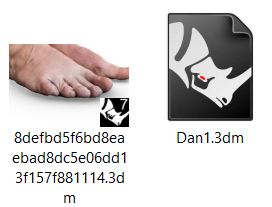
Also, I can see the textures in the previous files including the one you’ve attached in the post no.12. This is how I see the last file attached which works well for you. Also, I’ve seen the icons of the files that work well have an image of the feet while the one that doesn’t work looks like attached. I opened and saved again the file in iRhino but the results is the same. Probably I make something wrong but I don’t know what!
Thank you!

System Info Thino7.txt (2.3 KB)
I tried opening your file in Rhino7 (7.37.24107.15001) for windows as well and textures do show up. @andy do you have any idea what’s going on here?
@PetcuDaniel try resetting your Rendered mode settings to default. You probably have your mesh wire settings set to thick wires, and mesh wires to show to begin with.
So make sure mesh wires are not showing, and/or turn down the mesh wire thickness. Resetting to Rendered mode defaults will do that for you.
With mesh wires on and mesh wires set to 5 or so:

With mesh wires hidden

@mkarimi @nathanletwory
Hi, I just opened again the file and it worked without any intervention from my side! I don’t know what the problem was, but thank you for the advice!
