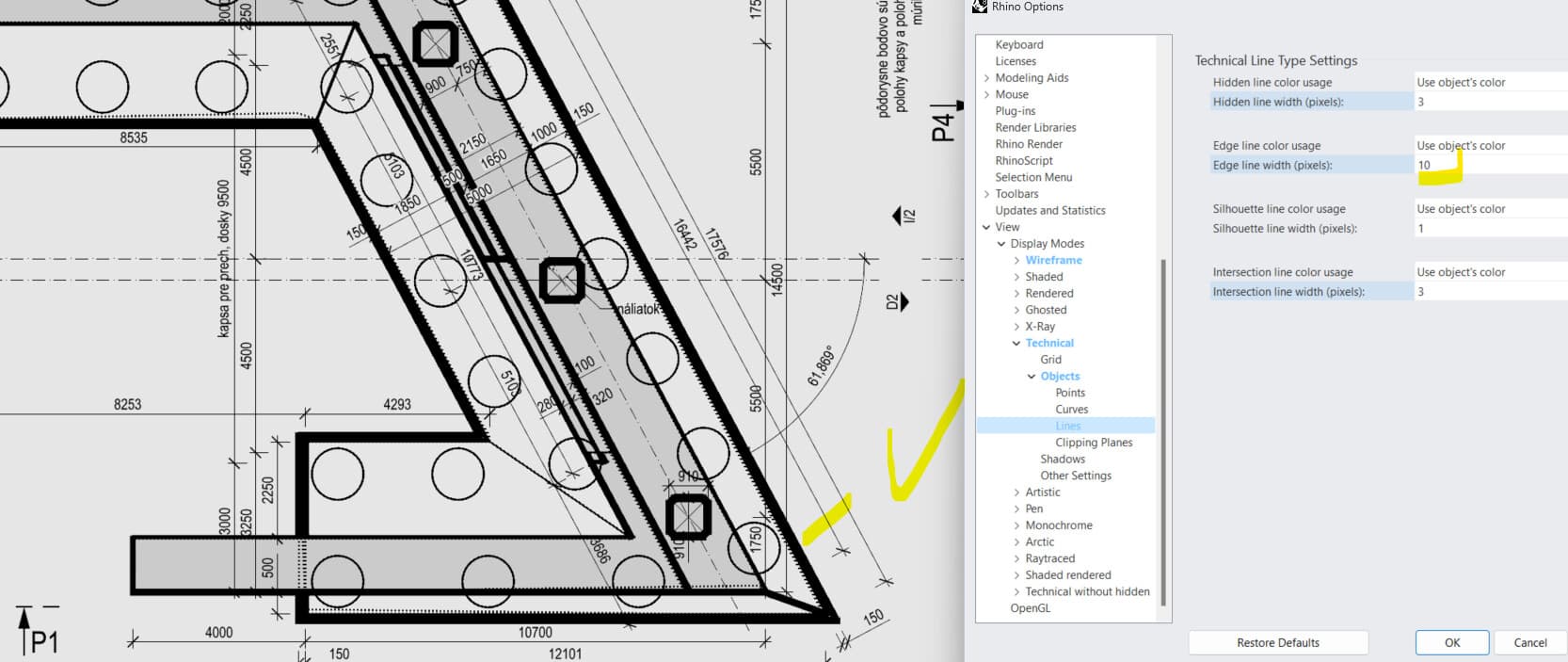
i dont know which version changed it but suddenly my intersection lines in technical display print too thick!


i cant express how furious i am yet again that my pdfs look always different…
Hi Ivan -
You didn’t mention if this is a viewport or the resulting PDF.
Without the SystemInfo, a .3dm file and modified display modes this is impossible to troubleshoot.
-wim
its the resulting pdf. i tried playing with technical line type settings. no effect.
test.3dm (195.7 KB)
Rhino 8 SR16 2025-1-14 (Rhino 8, 8.16.25014.10001
Hi Ivan -
Thanks.
When I print that file, I get the following PDF:
I take it that’s not what you are seeing?
-wim
Page 1.pdf (2.3 KB)
in mine intersection lines are way thicker
i cant print my pdfs and deadline is tomorrow 
Hi Juan,
We haven’t been able to repeat with your example.
Can you ensure you are on the latest and run the Reset command?
have run reset and installed latest update. its the same
Please run SystemInfo in the command line and post the result
Hi Ivan -
Print settings are not saved in the 3dm file and so it’s possible there is some combination of settings that you are using that we haven’t tested.
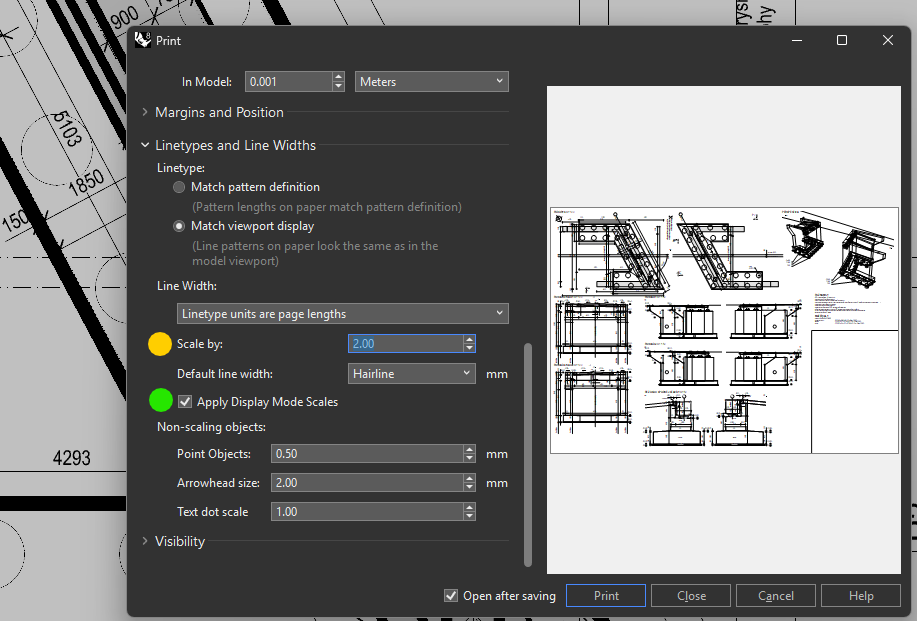
Can you expand all sections in the print dialog and post screen shots of all settings?
-wim
this seem to have no effect now. it used to have… in raster it does in vector it does not. there is something very screwed in the code.
Please send us the entire file privately and your complete system info. In the comments put a link to this thread.
Hi Ivan -
As you point out in that answer, you have already posted that one. Which is why I asked about something completely different and which is not something that travels along a 3md file nor the system info. Oh well…
-wim
Hello, this is still not working.
I can play with thse line width which have effect in layout but are not printed in vector pdf. It used to work.
Rhino 8 SR17 2025-3-4 (Rhino 8, 8.17.25063.13001, Git hash:master @ c65802ca75d5024ddf5b5197f19835a008a846a2)
License type: Commercial, build 2025-03-04
License details: LAN Zoo Network Node
Windows 11 (10.0.22631 SR0.0) or greater (Physical RAM: 64GB)
.NET 7.0.0
Computer platform: LAPTOP - Plugged in [89% battery remaining]
Hybrid graphics configuration.
Primary display: Intel(R) UHD Graphics (Intel) Memory: 1GB, Driver date: 10-6-2023 (M-D-Y).
> Integrated graphics device with 4 adapter port(s)
- Windows Main Display is laptop’s integrated screen or built-in port
Primary OpenGL: NVIDIA RTX 3500 Ada Generation Laptop GPU (NVidia) Memory: 12GB, Driver date: 5-13-2024 (M-D-Y). OpenGL Ver: 4.6.0 NVIDIA 555.85
> Integrated accelerated graphics device with 4 adapter port(s)
- Secondary monitor is laptop’s integrated screen or built-in port
OpenGL Settings
Safe mode: Off
Use accelerated hardware modes: On
GPU Tessellation is: On
Redraw scene when viewports are exposed: On
Graphics level being used: OpenGL 4.6 (primary GPU’s maximum)
Anti-alias mode: 4x
Mip Map Filtering: Linear
Anisotropic Filtering Mode: High
Vendor Name: NVIDIA Corporation
Render version: 4.6
Shading Language: 4.60 NVIDIA
Driver Date: 5-13-2024
Driver Version: 32.0.15.5585
Maximum Texture size: 32768 x 32768
Z-Buffer depth: 24 bits
Maximum Viewport size: 32768 x 32768
Total Video Memory: 12282 MB
Rhino plugins that do not ship with Rhino
C:\Users\ivan_galik\Downloads\blockeditnew20240522\BlockEditNew.rhp “BlockEdit” 1.0.0.0
Rhino plugins that ship with Rhino
C:\Program Files\Rhino 8\Plug-ins\Commands.rhp “Commands” 8.17.25063.13001
C:\Program Files\Rhino 8\Plug-ins\WebBrowser.rhp “WebBrowser”
C:\Program Files\Rhino 8\Plug-ins\rdk.rhp “Renderer Development Kit”
C:\Program Files\Rhino 8\Plug-ins\RhinoScript.rhp “RhinoScript”
C:\Program Files\Rhino 8\Plug-ins\IdleProcessor.rhp “IdleProcessor”
C:\Program Files\Rhino 8\Plug-ins\RhinoRenderCycles.rhp “Rhino Render” 8.17.25063.13001
C:\Program Files\Rhino 8\Plug-ins\RhinoRender.rhp “Legacy Rhino Render”
C:\Program Files\Rhino 8\Plug-ins\rdk_etoui.rhp “RDK_EtoUI” 8.17.25063.13001
C:\Program Files\Rhino 8\Plug-ins\NamedSnapshots.rhp “Snapshots”
C:\Program Files\Rhino 8\Plug-ins\MeshCommands.rhp “MeshCommands” 8.17.25063.13001
C:\Program Files\Rhino 8\Plug-ins\IronPython\RhinoDLR_Python.rhp “IronPython” 8.17.25063.13001
C:\Program Files\Rhino 8\Plug-ins\RhinoCycles.rhp “RhinoCycles” 8.17.25063.13001
C:\Program Files\Rhino 8\Plug-ins\export_PDF.rhp “PDF Export” 8.17.25063.13001
C:\Program Files\Rhino 8\Plug-ins\Toolbars\Toolbars.rhp “Toolbars” 8.17.25063.13001
C:\Program Files\Rhino 8\Plug-ins\3dxrhino.rhp “3Dconnexion 3D Mouse”
C:\Program Files\Rhino 8\Plug-ins\Displacement.rhp “Displacement”
C:\Program Files\Rhino 8\Plug-ins\SectionTools.rhp “SectionTools”
please pay attention to this. its very crucial. @mcneel