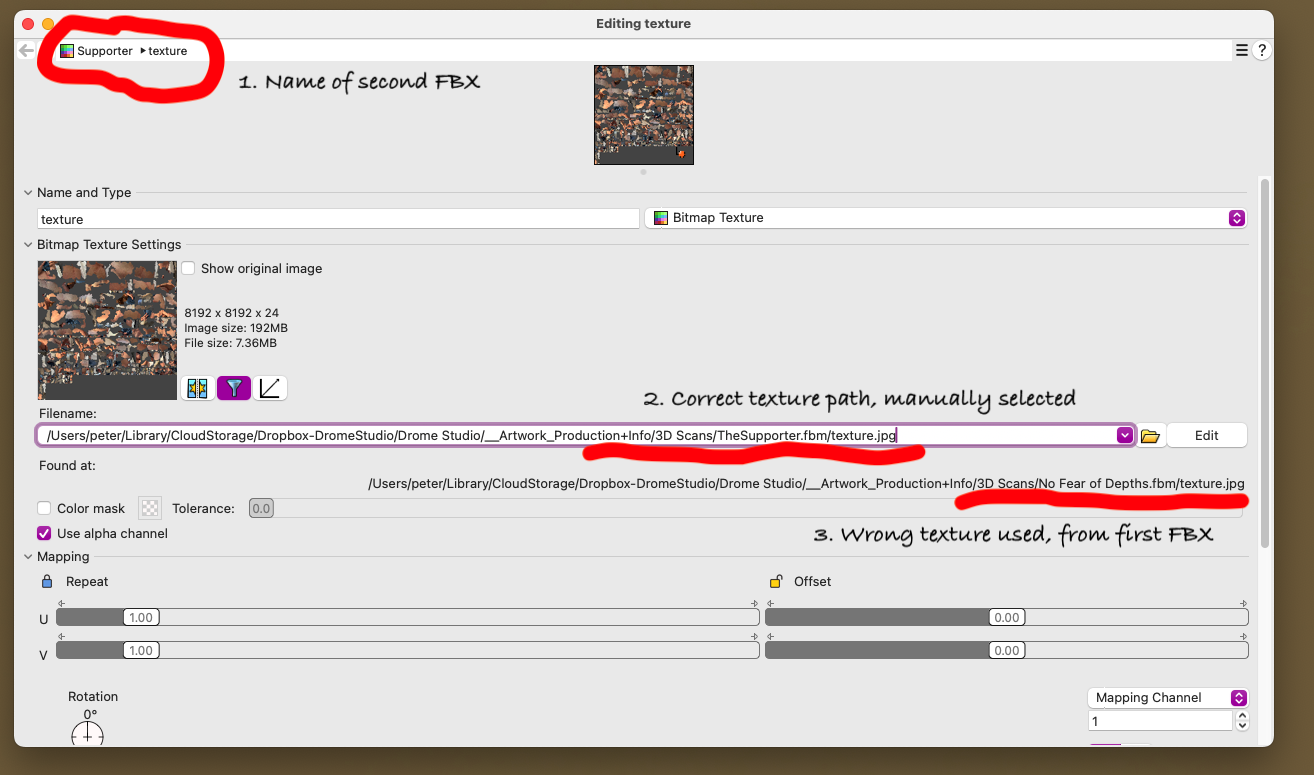
Hi
Any suggestions would be appreciated.
Cheers Peter
nathanletwory
June 4, 2025, 7:10am
2
You need to ensure that for each asset you import the textures have unique names.
Yes, this is a known issue. Indeed renaming the textures is the way to go. Perhaps you can log a request with the A23D site to generate unique names for assets they generate.
There have been topics on this issue. The problem is logged as RH-77168 Rendering Textures: Incorrect mapping for textures with same name
I’ll add this topic to the issue as well.
But for now you need to ensure you don’t have textures with the same name.
A recent topic on the issue Rhino Texture Mapping is WEIRD .
I don’t understand Rhinos texture handling AT ALL! I need some clarification and understanding on how this works. I create props using AI text or image to 3D models.
Here are some screen snaps that show the models separately and yet, when I copy and paste one from on open Rhino file into the other, this is what I get…I really don’t understand what the heck is going on. The mapping links seem to go caddywampus… can anyone shed light on this issue.
I hope that I’ve explained it clearly as it…
edit: I’ve added this topic to the YT issue as well.
Thanks Nathan