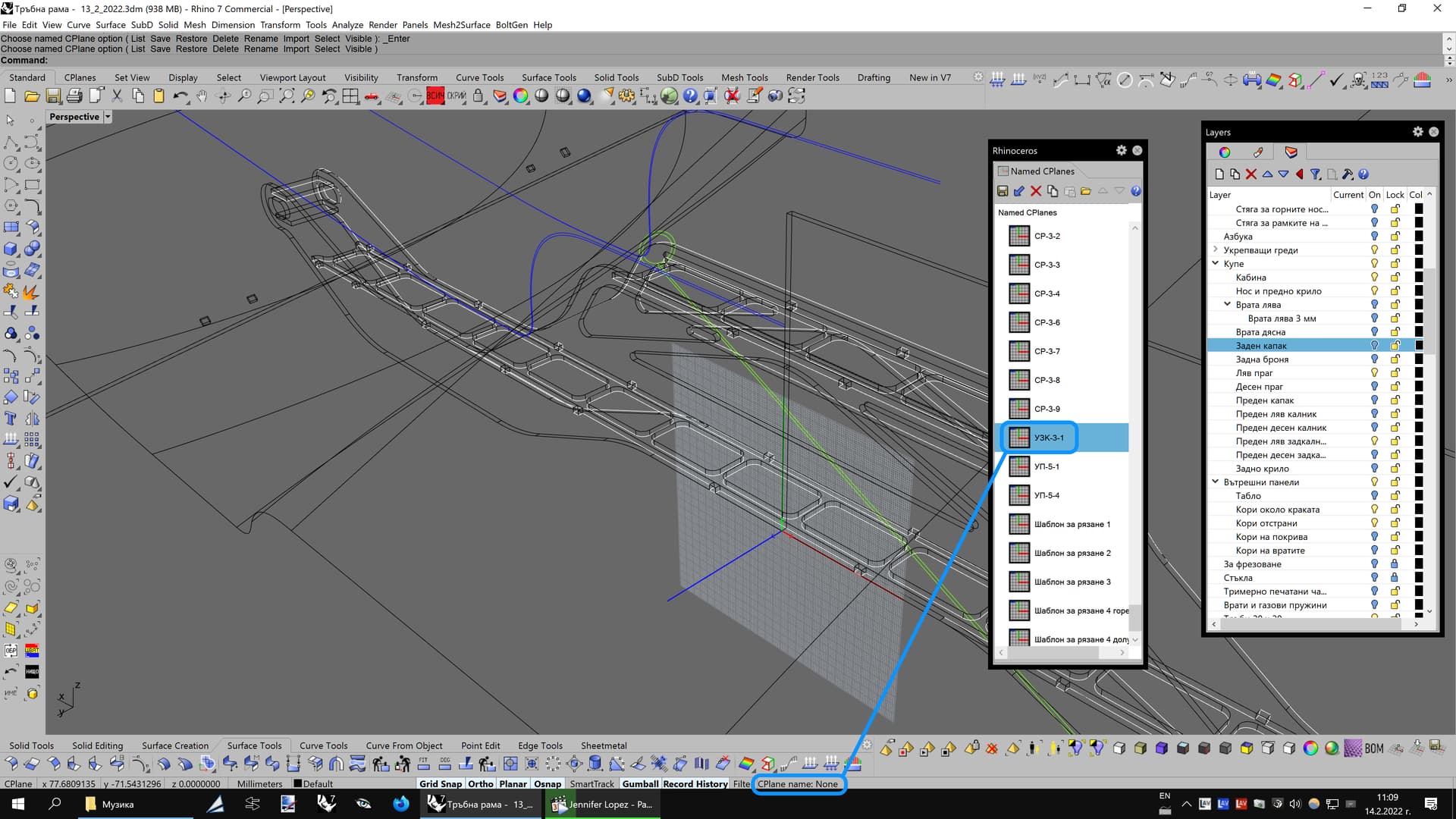
Should I consider this a bug in the Status bar? No matter which CPlane I set as active, the Status bar always says the same: “CPlane name: None”.
1+ on this.
Regards
R.Santos
When I start NamedCPlane command, the construction plane icon is turned on. Is there any way to turn it off?
I just noticed this morning that the name of the active CPlane is now updating in the Status Bar.
Thanks for that, McNeel.
Rhino for WIN Version 7 SR16
(7.16.22067.13001, 2022-03-08)
Regards
R.Santos
Good morning Andrew.
In case this information may help you , if one layer of the NamedCPlane panel is selected, the Icon will be displayed in the Viewport. LMB in the empty area deselect all layers will hide the icon (make sense).

Regards
R.Santos

Hm, this works here but for the Biig Three not until they are explicitly set from the Panel. And for a named cplane, not until it has been restored - that is, not on initially saving - I’ll see if we can get that tuned up.
RH-68003 Status bar info: Current CPlane name is not always shown
-Pascal
Strange, it’s still working as expected here this morning ?
Tested scenarios:
- Double click in the NamedCPlane Panel either on Standard&User set CPlanes
- Restoring NamedCPlane through the cmd prompt
Regards
R.Santos
It always shows the same “CPlane name: None” in the Status bar, no matter how I change the CPlane and how many times. Must be a bug with the code of Rhino 7.
Frankly, I don’t get how it works internally, it started to work here suddenly but I am aware that this feature may not be as reliable as it should be if it is not tuned up.
Btw I find it helpful to control which CPlane is active.
Regards
R.Santos
The bug is still present in the latest Rhino 7 SR19 (7.19.22130.15001, 2022-05-10). 
 No matter how many times I will switch to another CPlane, no matter how many times I save and them open the file, the Status bar still shows “CPlane name: None”…

Hi Bobi- in V8 CPlanes’ names do show up there.

-Pascal
I also noticed that, however, the bug is still present in Rhino 7.
Currently, the Status bar is not fully utilized. Despite that it occupies almost 50% of the entire width of my 4K screen, the Status bar only shows a single status information instead of multiple things such like: object name, object layer, number of selected objects, active CPlane etc. This is a missed opportunity to make the user experience better.
I strongly feel Rhino would be easier to use if each viewport showed the CPlane name from the list of CPlanes that is in it. That’s all, a simple bit of knowledge at a glance, nothing more.
4 years later, this bug is still not fixed in the latest Rhino 7…
It would be nice to at least have the option to display the active CPlane in each viewport, right next to the current View name…