No, we can only deploy V9 once it is an official commercial release.
I can’t open the link. Perhaps it’s a hidden page?
There were some sample images in another topic that showed the new development of the “Global edge continuity” tool for Rhino 9. It’s much different than the one available for Rhino 7. It has the ability to show multiple deviation markers across the edge pair.
Just a little inspiration for the Rhino developers. Notice the “Tri-tangent fillet” shown after the 2:42 minute of the following video:
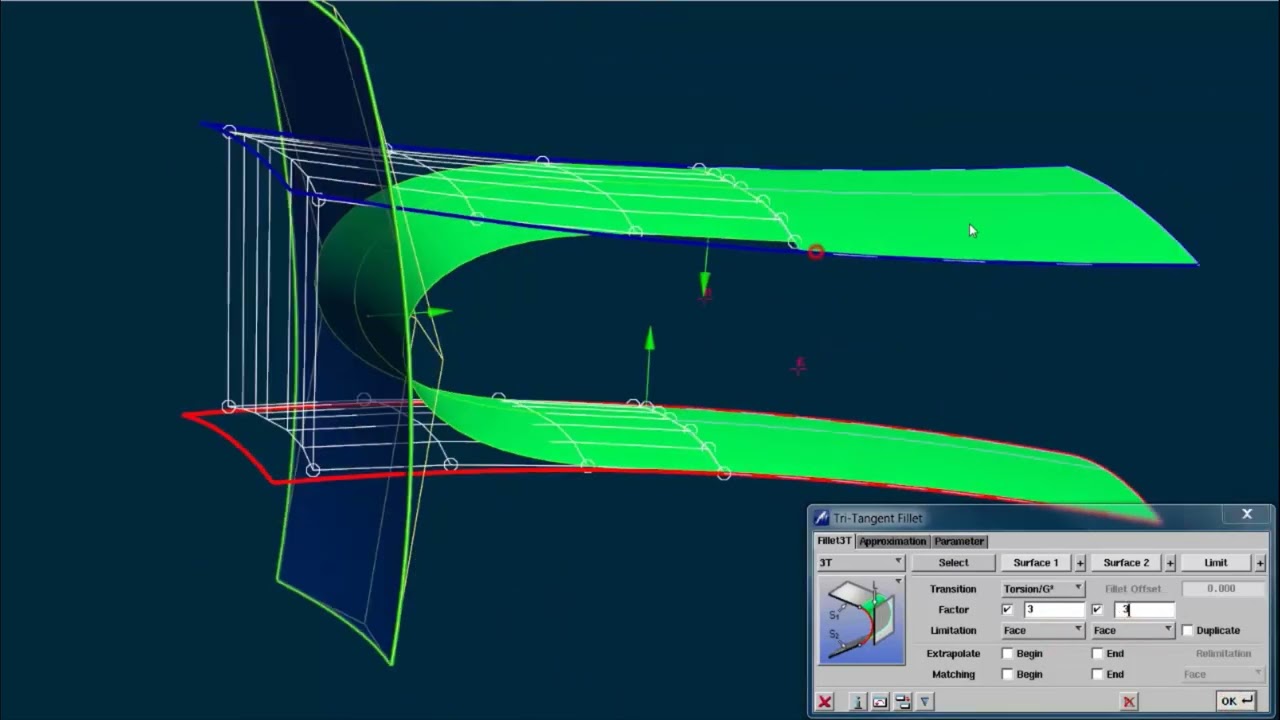
Note that the tool is capable to maintain G2 continuity at either end and the resulting blend surface still touches the target surface.
I can see this also being implemented as an option in the “Blend surface” tool called “Target surface”.
Also, check the magic that happens at the 29th second of the video above. Takes just 1 second in ICEM with its automated tool “Corner blend”. It splits the input surfaces in a very natural way and builds a single-span, high quality surface. Typically the same operation in Rhino takes minutes to do it properly (plus a lot of mouse clicks). 
Not to mention the line handles behind the arrow handles that serve the purpose of moving the entire row of control points gradually, while keeping the tangency of the opposite end intact (meaning that it adjusts all control points but the last two ones).
fixed
I noticed that the link you posted there refers to post #57, whereas the bug with the Layers icon was commented in post #56. 
thanks, fixed that as well.
1 Like
In my opinion, Rhino needs to bring back the “Distance” mode of the new Zebra analysis. From what I see in the screen-shot in the link below, the “Distance” mode creates stripes at equal distance along a set direction (correct me if I’m wrong, because I didn’t had a chance to try this personally).
I have no idea why this mode was scraped… It’s funny that it was categorized as a “bug”…  Just because it can’t expose the discontinuity like the regular zebra stripes, does not mean that it’s useless… The parallel stripes of the “Distance” mode are a highly valuable analysis for product design, car design etc., as they help the user get a better idea about the general shape of the 3d model along its length.
It is confusing if you are not aware of the limitations. But it’s easy to undo that change. We could debate if it should be part of the classic Zebra analysis. On the other hand, making a new interface for just distance lines seems a bit too much as well.
1 Like
The easiest way is to just add the removed functionality, because it’s really helpful in determining the shape of an object. Very useful for car design and general product design. The Zebra analysis is primarily used to examine the surface quality, not necessarily the curvature.
I routninely use Zebra to qualitatively evaluate tangency and curvature continuity.
It would be misleading for stripes in Zebra in V9 to not reliably show curvature discontinuities depending on mode. If a tool is needed for the Distance mode then it should have a different name than Zebra.
As all analysis displays the information / knowledge of how to “read” / interpret them is crucial.
CurvatureAnalysis is a good example. - i also struggled with it several time.
I always try to teach / explain my students the difference between projection and reflection.
As far as i understand traditional zebra is a reflection, while new “zebra distance mode” is a projection.
zebra distance mode is similar to landscape contour s - and of course their densitiy give information about inclination.
I can think of serval cases where this makes sense - for landscape architects, for 2.5d cnc-machine-concepts, for mold making, for a fast check to find flat spots…
I would love to see it being back.

for sure it would not be nice to have distance mode being set as default.
And it will profit from a nice documentation - what can be interpreted and what can t be seen.
I would claim that @menno youtrack should more be read as an important note on limitations and motivate for precise and none-nerdy documentation.
(sorry no v9 wip running on my mac intel…)
cheers
-tom
1 Like
Rhino NURBS surface modellers could also massively benefit from fixed ISO-angle diagnostics.
1 Like
I think the new Zebra in v9 WIP has this “iso angle” - it is called “static” in the dialog. This means that rotating the view does not affect the light lines; changing the direction slider changes the angle.
1 Like
Unfortunately, I can’t try out WIP versions of any software, because my computers are device-managed by corporate/academis IT, and it’s a long-winded bureaucratic process I’d rather not go through, but if V9 macOS, once officially released, gets an ISO-angle equivalent, that sounds rather good.
Small demonstration:

I’m pretty sure that the “Distance” mode will do wonders on car body models, especially with highly curved shapes. Also, boats and airplane fuselages. People rarely need zebra analysis on a simple boxy model.
ISO-angle diagnostics make sense on curved surfaces. Unlike zebra diagnostics, they mercilessly show glaring intra-surface errors, see below. Continuity isn’t everything.


4 Likes
Great example!
Are the ISO-angle diagnostics in development by “McNeel”?