Since I am working on a complex project and struggling with the surface pattern, I’m wondering whether this finding might be some sort of sign.
Instead of choosing a specific pattern and applying it more or less uniformly across the surface (I have already tried Voronoi and hexagonal grids, but I’m not satisfied), I would like to take inspiration from the lizard and mix patterns where the cells may have 4 to 6 segments. Another variable would be the cell dimensions. The combination is not random, though: the cells are aligned and combined according to functional requirements and mechanical properties.
My goal is to bring these natural rules into my project. Please consider the attached file and the points below:
Thinking it through:
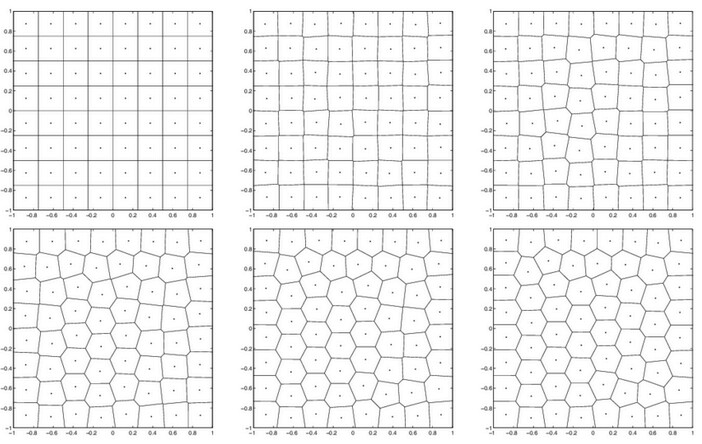
Both hexagonal and square grids can be generated with Voronoi if the vertices are evenly spaced, so what we want is a way to blend from one spacing to the other. This image kind of shows the change:
Thank you for your replies. The paper you shared is really interesting, and your file is inspiring (I’ve never used the BoxProp component :D, if only I had known about it earlier…).
Regarding your questions:
This needs to be highly adaptable. It will actually be applied to a complex shape (the project I’m working on), which is made of several breps, but I preferred starting from a basic surface.
Great question: I would say both. If I look at the shape, the “weaker” areas are visible (Zone 2, in red), so we could place something like a curve to identify those areas. On the other hand, parameters might be the key to — let’s say — highlighting the shape itself (I’m thinking about surface curvature).