Hello -
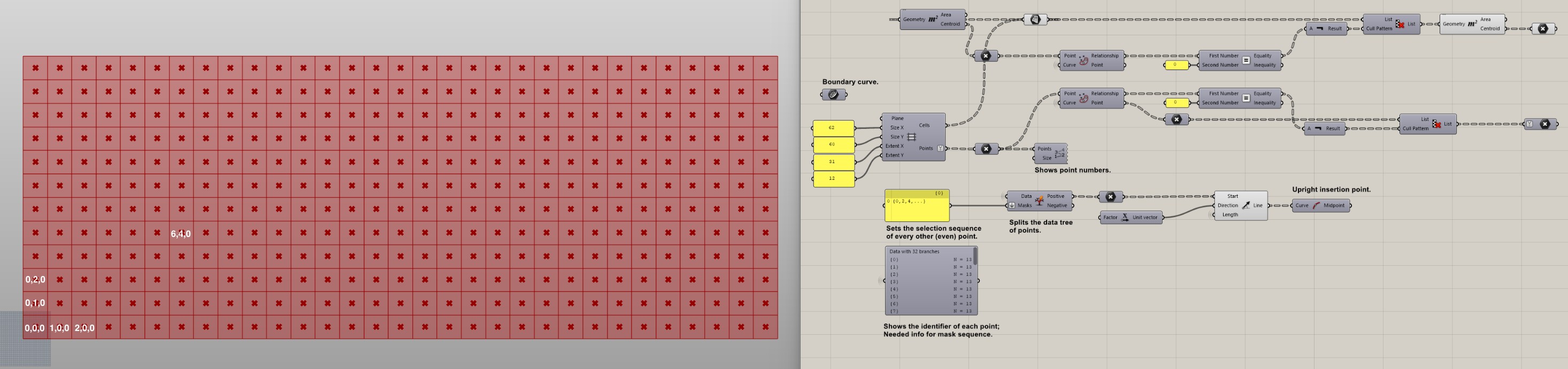
Pretty straight forward. I want to label each grid surface with the correct coordinate point relative to 0,0. Stumped on how to do it.
Hello -
Pretty straight forward. I want to label each grid surface with the correct coordinate point relative to 0,0. Stumped on how to do it.
Look for text-creating tools in grasshopper—easiest one: Text Tag or Text Tag 3D. If your centerpoints are already in the order you need them to be, feed the index number of each one into the text component, using the centerpoints as the text locations.
Next time upload your file 
Area component → Centroid output → deconstruct Point → Concatenate (first input you put the X coordinate, second input you put a comma ", ", third input you put Y coordinate) → Text Tag (Text input you connect the output of Concatenate, Location you put the output of Area Centroid)
Mr Corella is always faster 
You are both great! Here is my script. Just to be clear, I want each label to show a “0,0,0” label at the lowest left most grid box and then follow that same sequence in the x and y (eventually Z) directions across the whole grid (white labels are examples).
UPLOAD.gh (22.2 KB)
@inno I get your logic behind the concatenate operation. It’s working, however I need to translate:
62 = 1
124 = 2
186 = 3
etc. for the X cells, and:
60 = 1
120 = 2
180 = 3
etc. for the Y cells.
Perhaps an expression function can translate the values?
NVM, I just figured it out. Simple math fixed it, long week! Thanks for your help.