I have an inverted text with the mirror command, I want to put it normal again but without moving it from the position where it is-
Ex. 
I want to put it “This is a prove” without move his center
Code C#
I have an inverted text with the mirror command, I want to put it normal again but without moving it from the position where it is-
Ex.
I want to put it “This is a prove” without move his center
Code C#
Hi Dale,
Rhino 5, c#
How about this?
protected override Result RunCommand(RhinoDoc doc, RunMode mode)
{
  var go = new GetObject();
  go.SetCommandPrompt("Select text to flip");
  go.SetCustomGeometryFilter(TextObjectGeometryFilter);
  go.Get();
  if (go.CommandResult() != Result.Success)
    return go.CommandResult();

  var obj_ref = go.Object(0);
  var text_obj = obj_ref.Object() as TextObject;
  if (null == text_obj)
    return Result.Failure;

  var bbox = text_obj.Geometry.GetBoundingBox(true);
  var p0 = (bbox.Corner(false, true, true) + bbox.Corner(true, true, true)) / 2.0;
  var p1 = (bbox.Corner(false, false, true) + bbox.Corner(true, false, true)) / 2.0;
  var plane = text_obj.TextGeometry.Plane;
  var dir = Vector3d.CrossProduct(p1 - p0, plane.Normal);
  var xform = Transform.Mirror(p0, dir);
  plane.Transform(xform);

  var text = text_obj.TextGeometry.Duplicate() as TextEntity;
  text.Plane = plane;

  doc.Objects.Replace(obj_ref, text);
  doc.Views.Redraw();

  return Result.Success;
}

private bool TextObjectGeometryFilter(RhinoObject rhObject, GeometryBase geometry, ComponentIndex ci)
{
  return null != rhObject && null != rhObject as TextObject;
}
– Dale
Hi Dale, this idea is almost perfect, I explain you
This is the text after to do a mirror command,

After to execute your idea,
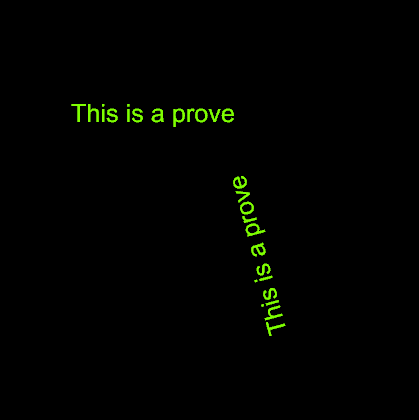
The text was put in normal sense, but tilt angle cannot be changed and it should remain so…,

I’m running into the same issue currently. Did you manage to solve this?
@dale Is there a solution for this?
Hi Dale,
I’m afraid this won’t work. I think I need to have control over that option individually.
I have objects like these: where I use the center of the line to position the center of the text and rotate it along the angle of the line such that the bottom of the text is on the line.
This is what I get with normal Mirror command (yellow line is mirror line, the one in the bottom left is the original) Both texts are in correct position and rotation but the mirrored texts are backwards.
This is how it looks like when I turn on that option such that text reads forward when viewed from behind:
And this is what I’m trying to do by creating a new mirror command
210212 MirrorError.3dm (26.0 KB)
@dale Any idea how to solve this or where I should look into?
Does setting this annotation style option provide you the result you want? This can be assigned on a per-text object basis, by the way.
– Dale
Actually, looking at my own example, it probably won’t.
I was thinking maybe this could work but I haven’t tested it yet:
Not sure if my blurry drawing helps:
I can already see that I’ll run into issues figuring out which axis of the plane it should take in which case but if I could figure that out I think it could work. Do you have any other suggestions?
I think you could also achieve this with remapping the geometry (plane to plane)
quick and dirty example:
from Rhino.Geometry import *
import Rhino
import rhinoscriptsyntax as rs
import scriptcontext as sc
from math import pi as pi

objects = rs.GetObjects("select objects to mirror")
mirrorline = rs.GetLine(mode=1, message1="line please")

mp = Plane(Point3d(mirrorline[0]), Vector3d(mirrorline[1]-mirrorline[0]), Plane.WorldXY.ZAxis)

bb = rs.BoundingBox(objects)

objects = [rs.coercegeometry( object) for object in objects]

bb0 = bb[0]
bb2 = bb[2]

cen = (bb0+bb2)/2

plane = Plane(cen, Plane.WorldXY.ZAxis)

mirrorplane = Plane(cen, Plane.WorldXY.ZAxis)

transform = Transform.Mirror(mp)
mirrorplane.Transform(transform)


transform = Transform.Rotation(pi, mirrorplane.XAxis, mirrorplane.Origin)
mirrorplane.Transform(transform)

transform = Transform.PlaneToPlane(plane, mirrorplane)

for object in objects:
    object.Transform(transform)
    sc.doc.Objects.Add(object)
sc.doc.Views.Redraw()Thanks @Gijs ! I’ll test this when I have some time


