In my render plugin, I always need to know the model units, since it is a physically-based renderer, and requires to know the real sizes of things. However, in PlugIn.CreatePreview we have no document, just an environment, viewport, and lists of objects/lights.
So I am looking to be able to get the scale I need from here:
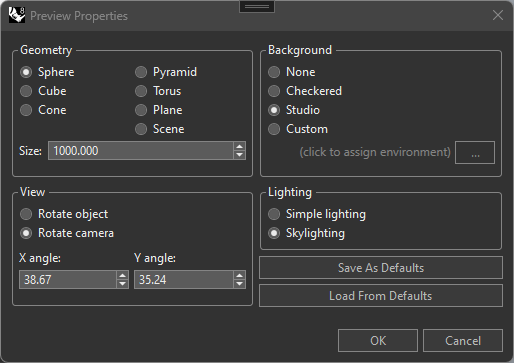
I am guessing I might get this value from RenderMaterial.DefaultPreviewSize, but the sdk says I don’t need to know the material for which I’m rendering a preview:
Maybe I can find out by looping the provided SceneObjects and finding one that matches CreatePreviewArgs.ContentTypeId, but besides this seeming quite a hack, there could be more than one that matches. And that is assuming that RenderMaterial.DefaultPreviewSize is really what I’m after, in the first place.
So I figure I must be missing something, and will appreciate any direction.
[edit: it occurs to me now, I target v6 and something more could have been added in the v7 sdk, I’ll take a look]
Right, at the very moment there is no way to get information about the model unit setting. Let me create a YT item for that so we can get it on the list.
RH-64647 Add a way to query model unit setting through ChangeQueue
add: note though that the size setting you highlighted in your OP is the amount of units. So you’d still need the document model unit setting.
I see the youtrack now says that preview scenes are always in meters, but this is troublesome given the default preview size of 1000 (this is by using file > new > no template):
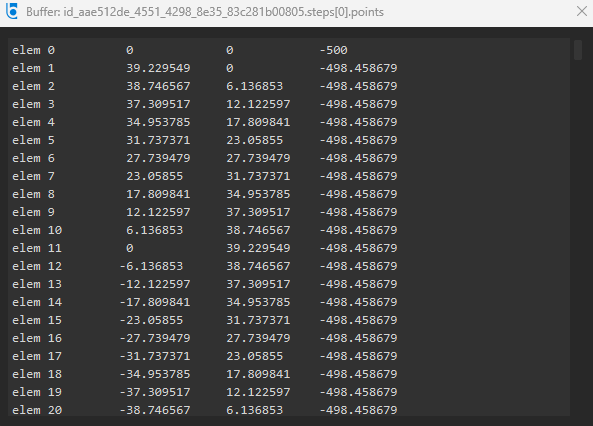
if the scene is in meters, that yields a 1km sphere (these are the actual mesh points):
so even reducing the preview size from 1000 → 1, which most users are not aware they can do at all, we will still end up with a 1m sphere (actual mesh points ranging from -0.5 to 0.5), and lower than size=1 is not allowed
to get around this, what I have been doing up till now is apply an 0.001 scale to the preview scene, to allow it to work for dielectrics, as long as the user manages to get the preview size into the cm range
which they either will or will not do, mainly depending on the template they use – this also makes no sense to me, that the default for the preview scene size should depend on modeling units, since materials are conceptually independent – if I want to preview a gem material, it doesn’t matter if the ring is in a tiny photo studio, or in a case with others in a model of a whole retail store, ruby is ruby
if I had my wish, the preview scenes (the actual 3dms) would be modified such that we would get mesh points where 1m is 1.0 in the mesh points, the preview size would literally be in mm, allowing 1-1000 to handle anything from gemstones up to default 1m wcs mappings, and the default size would not differ based on which template you use
That is because by default with no template the model unit is mm, so 1000 units.
When you start a new file without template, change the model unit to meter, then add a new material. Right-click the material thumbnail and open thumbnail properties. You should find that the size is 1.0
edit: Also, changing model unit after you have added a material you’ll find that the preview unit count has changed as well. After adding the material in a meter one, changing model unit to mm you’ll find that preview size is now 1000.0
I do think it easily leads to problems reading the preview from a user PoV. Like this thread shows: Material preview so dark . Since the preview is huge unit-wise the detail of the texture gets lost.
I will have to go through it because I think it still doesn’t work, for example I have a meters doc, the default preview size is 1, and it can go no lower, this is giving me mesh points in -0.5 to 0.5 (for the sphere scene), so unless I apply my ad hoc 0.001 factor, my user will never see anything less than a 1m sphere
stepping through with a mm doc, default preview size is 1000, sphere mesh points are in -500 to 500, and doc scale factor is 0.001, so still a 1m real size once scaled by doc units
at least here the user is able to get the preview down to mm/cm size, if they know the dialog exists
(btw just noticed, did you know that when you set preview size on a material, you’re not setting it on the material, but rather apparently on the particular material preview image – do it from the material list, and the value is independent of what you do in a floating editor)