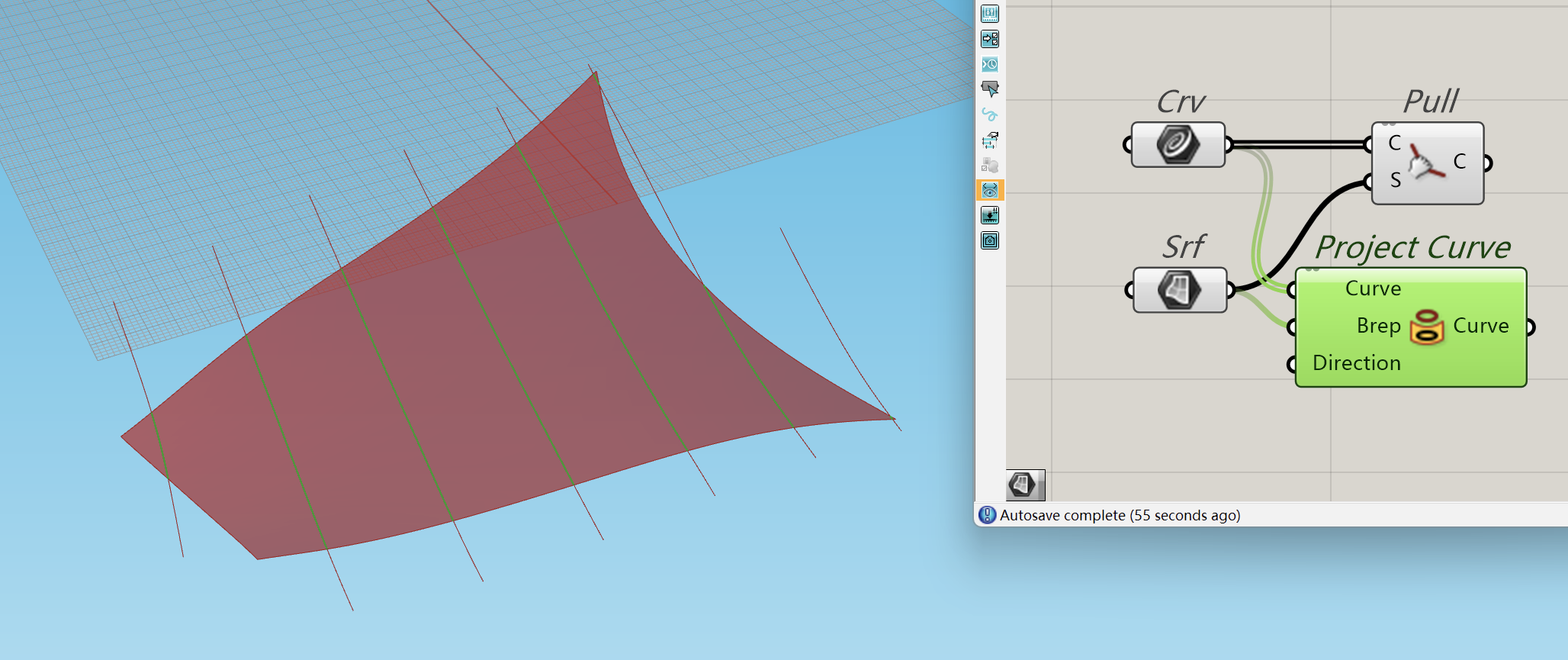
…because it will only ever produce one output curve for each input curve, while the equivalent Rhino command creates all the relevant results :
250829_IMG_Pull fails.gh (68.8 KB)
…because it will only ever produce one output curve for each input curve, while the equivalent Rhino command creates all the relevant results :
250829_IMG_Pull fails.gh (68.8 KB)
250829_IMG_Pulls_jvs01.gh (77.7 KB)
import Rhino.Geometry as rg
pulled = iCurve.PullToBrepFace(iBrep.Faces[0], 0.001)
How did you define the orientation of the strips?
Or in other words, how did you decide where to place the split curves?
How are you going to unroll the fabric?
Dear User454, Pull and Project don’t do the same thing.
I NEED to use Pull.
How is this relevant to my question ?
Sorry for asking something completely off topic. I was just curious.
as meanwhile solution, the Rhinocommon method is working fine:
Py_PullToSrf.gh (79.9 KB)
I guess when the bug is solved you could just replace the Python script with the reworked component (which also offers a parallel computing option)
I have just pushed a fix which should become available in the next Rhino 8 SRC. In order to implement this fix, I needed to change the output type to return a List instead of an Item. This change causes the output data structure to be different than the previous version of the component… which means this is a breaking change to existing definitions.
Thus, I’ve made the existing component OBSOLETE which means that definitions that use the Pull Curve component will still work the same as it always has… but the component will display an “OLD” overlay on top of the icon to indicate to the user that this component has been updated. The user can choose to simply replace the existing component with a new one from the component menu and it will now work as expected. Alternatively, the user can go to Solution → Upgrade Components and they can upgrade all of the existing OLD components with a new one in a single step.
Fantastic ! Thanks Andy.
RH-89114 is fixed in Rhino 8 Service Release 24 Release Candidate
RH-89114 is fixed in Rhino 8 Service Release 24
SRC …. Service Release Candidate
My Updates frequency is set to SRC.
Do you really have to poke your nose in ALL my posts ?
OK. I publicly ask you to get out of my face.
Hi Olivier -
That appears to be the case on your system.
You can use the Check Now... link to manually download 8.24 and install that.
-wim
I did, and it worked.