Hello forum, I have placed an image on a layout page using ‘Picture’, it’s a quick raytraced image from my model using ‘viewcapturetofile’. It looks really dark, it doesn’t look like this when I view it in a viewer outside of Rhino. When I zoom right in on it the picture seems to adjust to the correct brightness, any thoughts ?
edit- when I place the ‘picture’ in model space, then create a layout detail view it displays correctly 

I am having the exact same issue! I have 3 reference photos that I need to insert into my layout and they are coming out almost black.
Hi, @stevebaer
Same issue here both in V6 and V7 beta. Are you printing to raster? I found if I print to vector though
the image displays dark the image prints to pdf fine but not in raster where it’s either dark or with lines through it.
I sent in a file and am yet waiting to hear about it. Steve any news on this I reported it in the thread bloated pdfs. This looks like a gamma issue with imported images in layout where redraw is failing.
RM
Can you send me a basic sample 3dm that exhibits this behavior? Thanks
Recently I got a similar issue in Rhino 7.8.21196.5001
When I add detail view in layout page. and set the detail rendered.
the scene is getting darker than previous Rhino version.
I think somehow Gamma setting of Rendering option is disabled in page layout.
1 Like
Hello - does the rendered mode show differently in model space? Can you post a simple example file?
-Pascal

Hi, I uploaded the image.on the left, image is general perspective view mode.
on the right, image is page layout which added detail perspective view.
default gamma setting 2.2 in Rendering option might be automatically disabled in page layout.
Hello - try setting the ground plane to use a material.
-Pascal
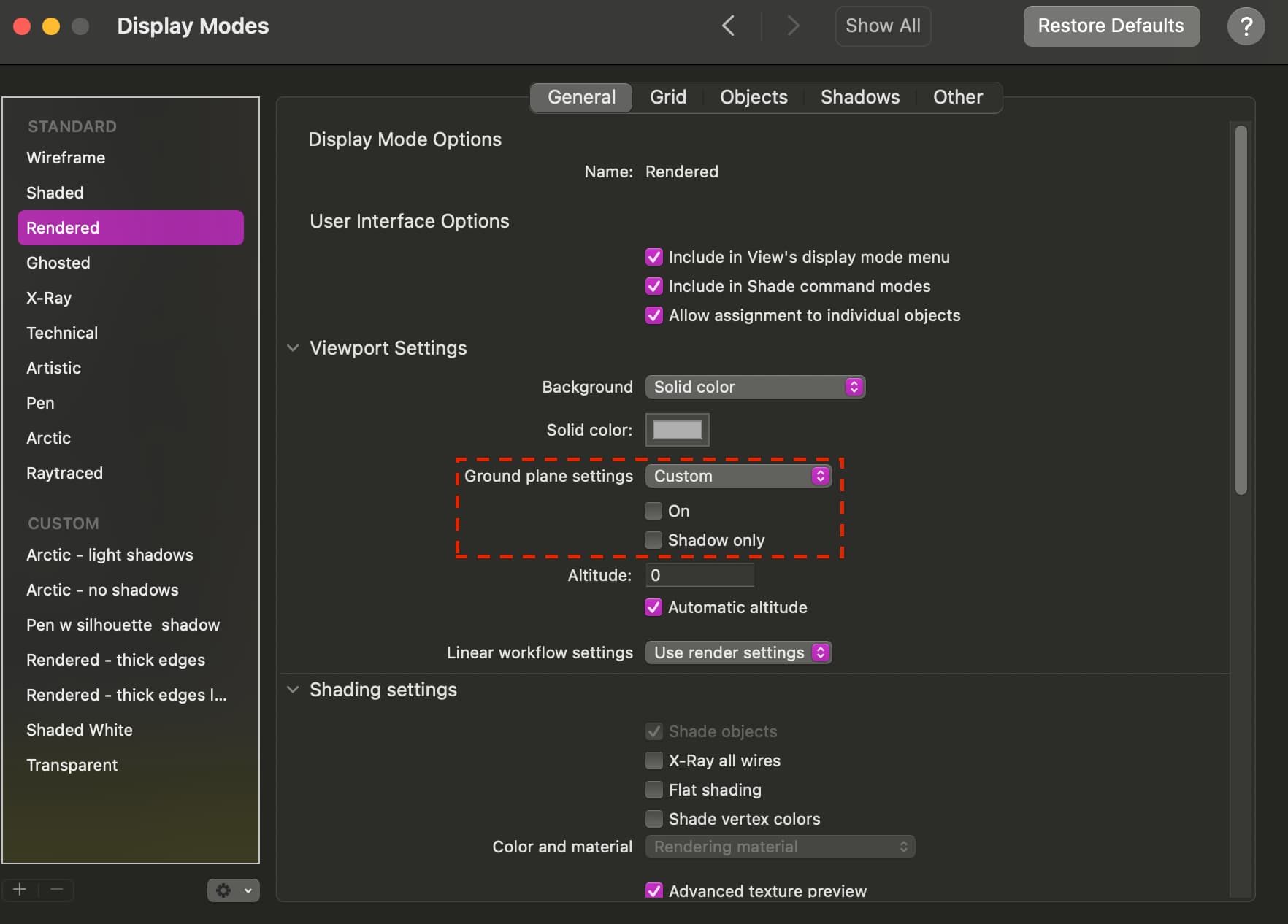
Hi, I’m having the same issue and cannot find a way to set the ground plane to use a material in the display mode settings. Also, I don’t see how this will help? I definitely think it’s to do with the Gamma settings in Layout Mode.
Bumping for visibility. Having the same issue in Rhino 8. Wondering if it’s a graphics card issue.
Please run SystemInfo in you Rhino command line and post the result.
Screenshot of difference in brightness: Top is a detail view of the same image pasted in model space. Bottom is directly in layout space.
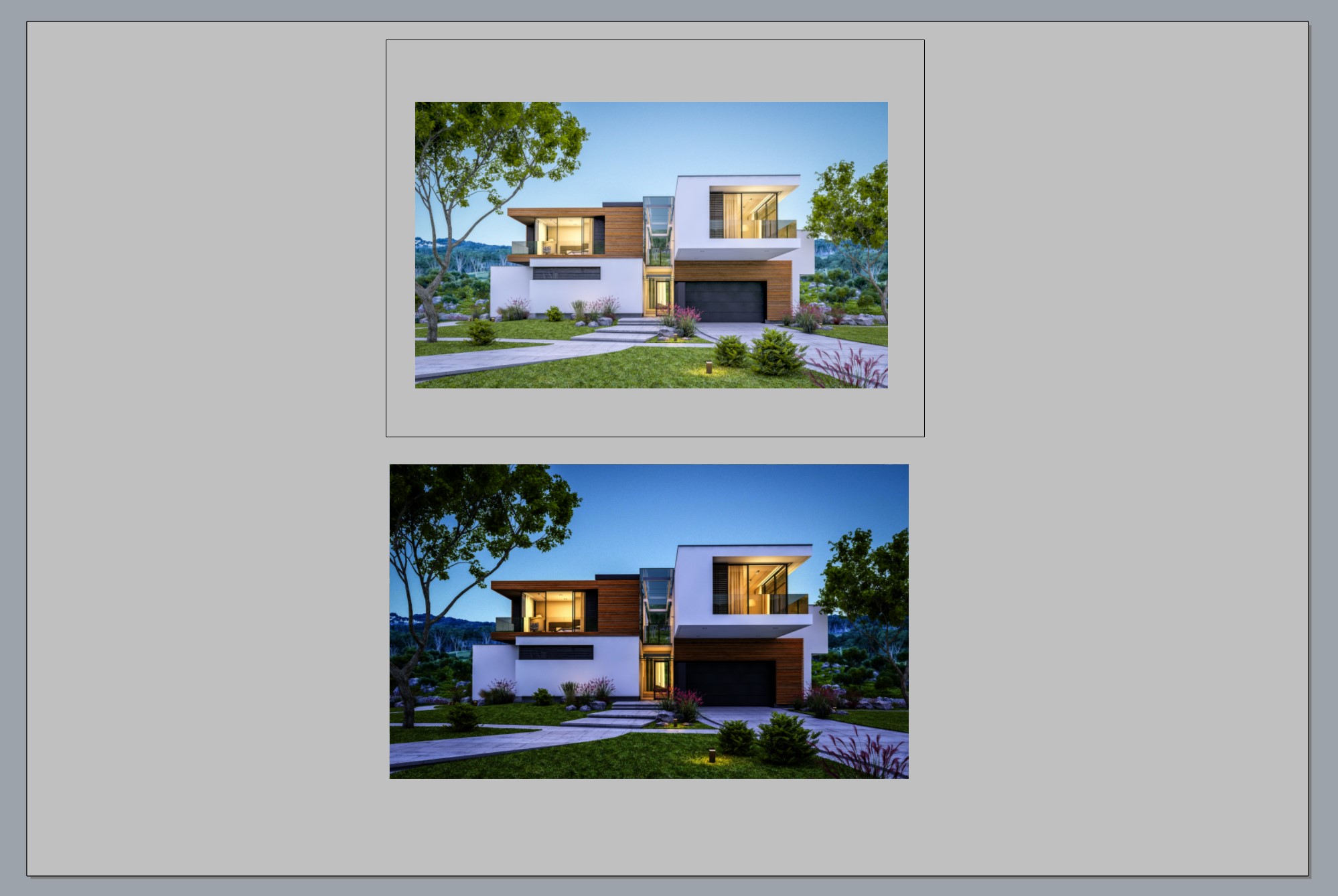
System info here:
Rhino 8 SR7 2024-5-17 (Rhino 8, 8.7.24138.15431, Git hash:master @ 03702f889bdef32626af4bca510b5e8a85666d38)
License type: Commercial, build 2024-05-17
License details: Cloud Zoo
Windows 11 (10.0.22631 SR0.0) or greater (Physical RAM: 64GB)
.NET 7.0.0
Computer platform: LAPTOP - Plugged in [96% battery remaining]
Non-hybrid graphics configuration.
Primary display and OpenGL: NVIDIA RTX A4500 Laptop GPU (NVidia) Memory: 16GB, Driver date: 6-10-2024 (M-D-Y). OpenGL Ver: 4.6.0 NVIDIA 538.78
> Integrated accelerated graphics device with 4 adapter port(s)
- Windows Main Display is laptop’s integrated screen or built-in port
Primary OpenGL: NVIDIA RTX A4500 Laptop GPU (NVidia) Memory: 16GB, Driver date: 6-10-2024 (M-D-Y). OpenGL Ver: 4.6.0 NVIDIA 538.78
> Integrated accelerated graphics device with 4 adapter port(s)
- Windows Main Display is laptop’s integrated screen or built-in port
Secondary graphics devices.
Intel(R) UHD Graphics (Intel) Memory: 2GB, Driver date: 8-19-2024 (M-D-Y).
> Integrated graphics device with 4 adapter port(s)
- Secondary monitor is laptop’s integrated screen or built-in port
OpenGL Settings
Safe mode: Off
Use accelerated hardware modes: On
Redraw scene when viewports are exposed: On
Graphics level being used: OpenGL 4.6 (primary GPU’s maximum)
Anti-alias mode: 4x
Mip Map Filtering: Linear
Anisotropic Filtering Mode: High
Vendor Name: NVIDIA Corporation
Render version: 4.6
Shading Language: 4.60 NVIDIA
Driver Date: 6-10-2024
Driver Version: 31.0.15.3878
Maximum Texture size: 32768 x 32768
Z-Buffer depth: 24 bits
Maximum Viewport size: 32768 x 32768
Total Video Memory: 16 GB
Rhino plugins that do not ship with Rhino
C:\Users\tifpn\AppData\Local\Programs\Enscape\Enscape.Rhino.Plugin-net48\Enscape.Rhino8.Plugin.dll “Enscape.Rhino8.Plugin” 0.0.24138.1238
Rhino plugins that ship with Rhino
C:\Program Files\Rhino 8\Plug-ins\Commands.rhp “Commands” 8.7.24138.15431
C:\Program Files\Rhino 8\Plug-ins\WebBrowser.rhp “WebBrowser”
C:\Program Files\Rhino 8\Plug-ins\rdk.rhp “Renderer Development Kit”
C:\Program Files\Rhino 8\Plug-ins\RhinoRenderCycles.rhp “Rhino Render” 8.7.24138.15431
C:\Program Files\Rhino 8\Plug-ins\RhinoRender.rhp “Legacy Rhino Render”
C:\Program Files\Rhino 8\Plug-ins\rdk_etoui.rhp “RDK_EtoUI” 8.7.24138.15431
C:\Program Files\Rhino 8\Plug-ins\NamedSnapshots.rhp “Snapshots”
C:\Program Files\Rhino 8\Plug-ins\MeshCommands.rhp “MeshCommands” 8.7.24138.15431
C:\Program Files\Rhino 8\Plug-ins\IronPython\RhinoDLR_Python.rhp “IronPython” 8.7.24138.15431
C:\Program Files\Rhino 8\Plug-ins\RhinoCycles.rhp “RhinoCycles” 8.7.24138.15431
C:\Program Files\Rhino 8\Plug-ins\Toolbars\Toolbars.rhp “Toolbars” 8.7.24138.15431
C:\Program Files\Rhino 8\Plug-ins\3dxrhino.rhp “3Dconnexion 3D Mouse”
C:\Program Files\Rhino 8\Plug-ins\BlockEdit.rhp “BlockEdit” 8.7.24138.15431
C:\Program Files\Rhino 8\Plug-ins\Displacement.rhp “Displacement”
C:\Program Files\Rhino 8\Plug-ins\Calc.rhp “Calc”
C:\Program Files\Rhino 8\Plug-ins\SectionTools.rhp “SectionTools”
C:\Program Files\Rhino 8\Plug-ins\NamedPositions.rhp “Named Position”
lets start by getting you up to date. The current release is 8.15
https://www.rhino3d.com/download/rhino-for-windows/8/latest/
@Japhy you probably meant to say 8.15, since the user is already on 8.
1 Like
Thanks! read that too fast… again. I modified the link
1 Like
Updated. No Dice:

Rhino 8 SR15 2025-1-19 (Rhino 8, 8.15.25019.13001, Git hash:master @ 74164bdf5469c2f269746857c54b8c44b74c7b24)
License type: Commercial, build 2025-01-19
License details: Cloud Zoo
Windows 11 (10.0.22631 SR0.0) or greater (Physical RAM: 64GB)
.NET 7.0.0
Computer platform: LAPTOP - Plugged in [98% battery remaining]
Non-hybrid graphics configuration.
Primary display and OpenGL: NVIDIA RTX A4500 Laptop GPU (NVidia) Memory: 16GB, Driver date: 6-10-2024 (M-D-Y). OpenGL Ver: 4.6.0 NVIDIA 538.78
> Integrated accelerated graphics device with 4 adapter port(s)
- Windows Main Display is laptop’s integrated screen or built-in port
Primary OpenGL: NVIDIA RTX A4500 Laptop GPU (NVidia) Memory: 16GB, Driver date: 6-10-2024 (M-D-Y). OpenGL Ver: 4.6.0 NVIDIA 538.78
> Integrated accelerated graphics device with 4 adapter port(s)
- Windows Main Display is laptop’s integrated screen or built-in port
Secondary graphics devices.
Intel(R) UHD Graphics (Intel) Memory: 2GB, Driver date: 8-19-2024 (M-D-Y).
> Integrated graphics device with 4 adapter port(s)
- Secondary monitor is laptop’s integrated screen or built-in port
OpenGL Settings
Safe mode: Off
Use accelerated hardware modes: On
GPU Tessellation is: On
Redraw scene when viewports are exposed: On
Graphics level being used: OpenGL 4.6 (primary GPU’s maximum)
Anti-alias mode: 4x
Mip Map Filtering: Linear
Anisotropic Filtering Mode: High
Vendor Name: NVIDIA Corporation
Render version: 4.6
Shading Language: 4.60 NVIDIA
Driver Date: 6-10-2024
Driver Version: 31.0.15.3878
Maximum Texture size: 32768 x 32768
Z-Buffer depth: 24 bits
Maximum Viewport size: 32768 x 32768
Total Video Memory: 16 GB
Rhino plugins that do not ship with Rhino
C:\Users\tifpn\AppData\Local\Programs\Enscape\Enscape.Rhino.Plugin-net48\Enscape.Rhino8.Plugin.dll “Enscape.Rhino8.Plugin” 0.0.24138.1238
Rhino plugins that ship with Rhino
C:\Program Files\Rhino 8\Plug-ins\Commands.rhp “Commands” 8.15.25019.13001
C:\Program Files\Rhino 8\Plug-ins\WebBrowser.rhp “WebBrowser”
C:\Program Files\Rhino 8\Plug-ins\rdk.rhp “Renderer Development Kit”
C:\Program Files\Rhino 8\Plug-ins\RhinoRenderCycles.rhp “Rhino Render” 8.15.25019.13001
C:\Program Files\Rhino 8\Plug-ins\RhinoRender.rhp “Legacy Rhino Render”
C:\Program Files\Rhino 8\Plug-ins\rdk_etoui.rhp “RDK_EtoUI” 8.15.25019.13001
C:\Program Files\Rhino 8\Plug-ins\NamedSnapshots.rhp “Snapshots”
C:\Program Files\Rhino 8\Plug-ins\MeshCommands.rhp “MeshCommands” 8.15.25019.13001
C:\Program Files\Rhino 8\Plug-ins\IronPython\RhinoDLR_Python.rhp “IronPython” 8.15.25019.13001
C:\Program Files\Rhino 8\Plug-ins\RhinoCycles.rhp “RhinoCycles” 8.15.25019.13001
C:\Program Files\Rhino 8\Plug-ins\Toolbars\Toolbars.rhp “Toolbars” 8.15.25019.13001
C:\Program Files\Rhino 8\Plug-ins\3dxrhino.rhp “3Dconnexion 3D Mouse”
C:\Program Files\Rhino 8\Plug-ins\BlockEdit.rhp “BlockEdit” 8.15.25019.13001
C:\Program Files\Rhino 8\Plug-ins\Displacement.rhp “Displacement”
C:\Program Files\Rhino 8\Plug-ins\Calc.rhp “Calc”
C:\Program Files\Rhino 8\Plug-ins\SectionTools.rhp “SectionTools”
C:\Program Files\Rhino 8\Plug-ins\NamedPositions.rhp “Named Position”
Give this file a go, i’m not able to reproduce with a simple test. If this is fine I please post an example of your own that we can look at. Thanks
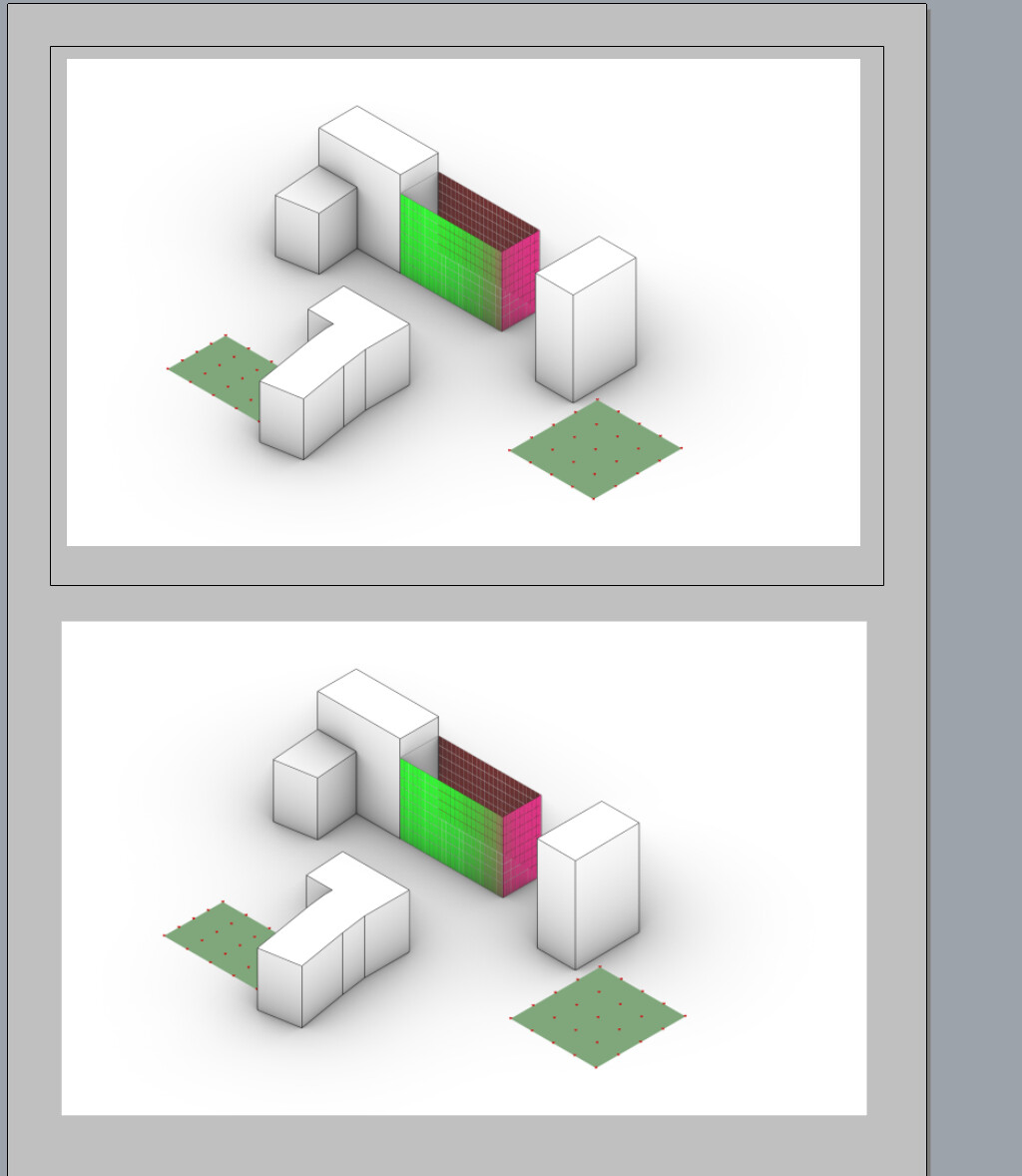
R8-imagetest.3dm (2.4 MB)
Your file works fine. I even tried pasting a new image into both model space and layout space and it was fine.
My file is larger than 20 MB (Already tried purging, reducing, and zipping to get it smaller). Is there any way for me to upload it? It is, annoyingly, 21.8MB

Use our uploader. Be sure to copy the link to this discussion into the comment section.
Uploaded, thanks.