Hi Keith,
Issues in your file Leader test 2.DWG were logged as 2 issues from :
RH-71782 - AutoCAD MultiLeaders with No Text Do not Import to Rhino
RH-71783 - Leader with User Arrow Needs Arrow Block Assigned

Some of the issues in your file Leader test 3 DWG were related to :
RH-71782 - AutoCAD MultiLeaders without Text Do not Import to Rhino.

There are leaders in AutoCAD with the leader deleted and a frame around the text.
As a workaround, you can Explode the Leader into text and the curve around it.
Then it will import to Rhino properly.
Other leaders were having an issue with the AutoCAD Annotation scale setting, And I need to adjust a couple styles to prompt for mtext because of RH-71782.
These leaders were set to use the AutoCAD Annotation scale. Rhino does not currently support this. So as a workaround, you need to turn this off.

You can turn it off in the Leader style.
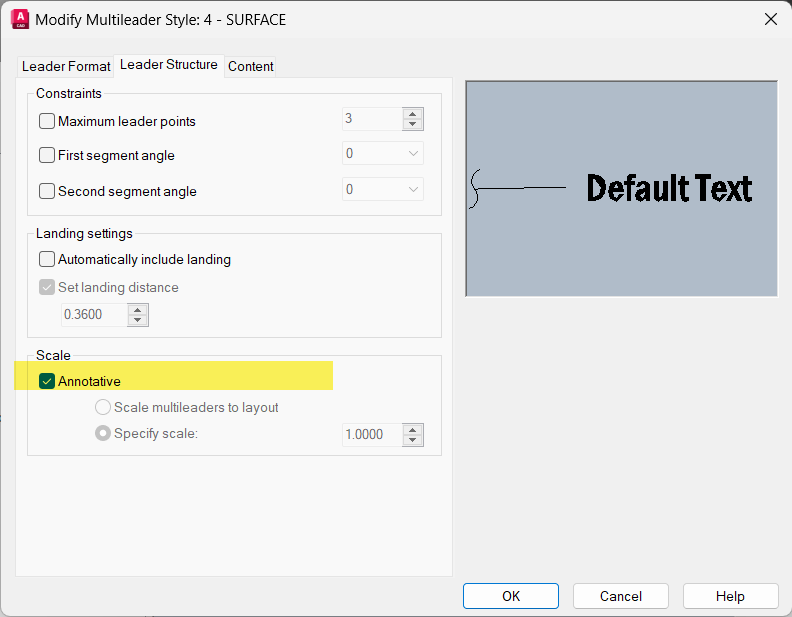
Or just change the properties to turn off this setting after being create.

The leader import and look like they did in AutoCAD with this setting off:

I found I had already been logged as a bug 6 years ago. 
But sadly no love here for this bug.
RH-36210 Rhino Not Opening DWG/DXFs with Annotation Scale On Correctly
So I rewrote the but as RH-71799 Annotation-Scale-not-Imported-to-Rhino and included some a clearer example files. Also since Rhino does not support Annotations scale exactly like AutoCAD, at import these will be reset to Model scale, which is a setting that both AutoCAD and Rhino support. They will also import back to AutoCAD as Model scale.
In the mean time, you will need to embrace the workaround suggested or fix the scales once they are in Rhino. Of course, I know that you need the RH-71782 (AutoCAD MultiLeaders with No Text Do not Import to Rhino) to be fixed. You will be notified here when there is a fix in the WIP for you to test.
Hope this helps.
Sincerely,
Mary Ann Fugier
leader 3 no anno scale.dwg (46.5 KB)