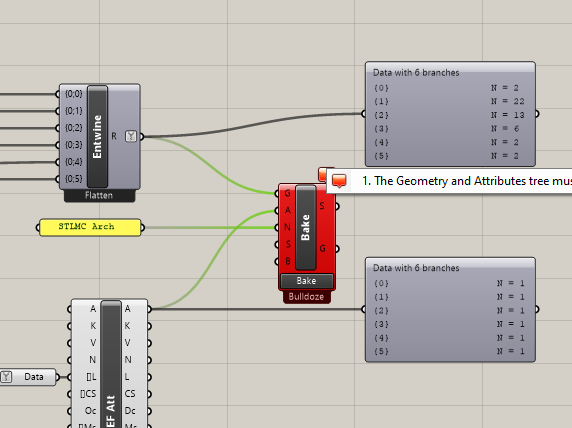
Even though the tree structure might be the same, did you try also making the tree lists the same length ? If you want to do that, the simplest way is to use the Longest List component. Then double check list contents are what you want, and try feeding those 2 trees into the Elefront component.
Let me know if that works, that’s just a wild guess
Been playing around with elefront for a few days now and have a basic understanding of how everything works except for this same error. I can only get a single object to bake in a specified layer but if I have more than one object I can’t seem to get it to work. I created a simple example gh file with 2 gh curves for example I want in the same layer with a color. I can bake one curve at a time and it works and updates when i update parent object but if I plug in both curves it doesn’t work. error.gh (12.5 KB)
Hi - as stated elsewhere in the thread, the error message does give some clue as to how to fix it. You need to make the trees of the Geometry and the Attributes match exactly - so you should need to duplicate the Attributes so that they match the tree structure of the Geometry. I would probably use LongestList, but there are plenty of ways to do it.
Side note - It looks like your display is a bit off. Usually you’ll have dashed lines to reveal multiple branches (trees). Perhaps you did this by intention but can confuse “the internet”