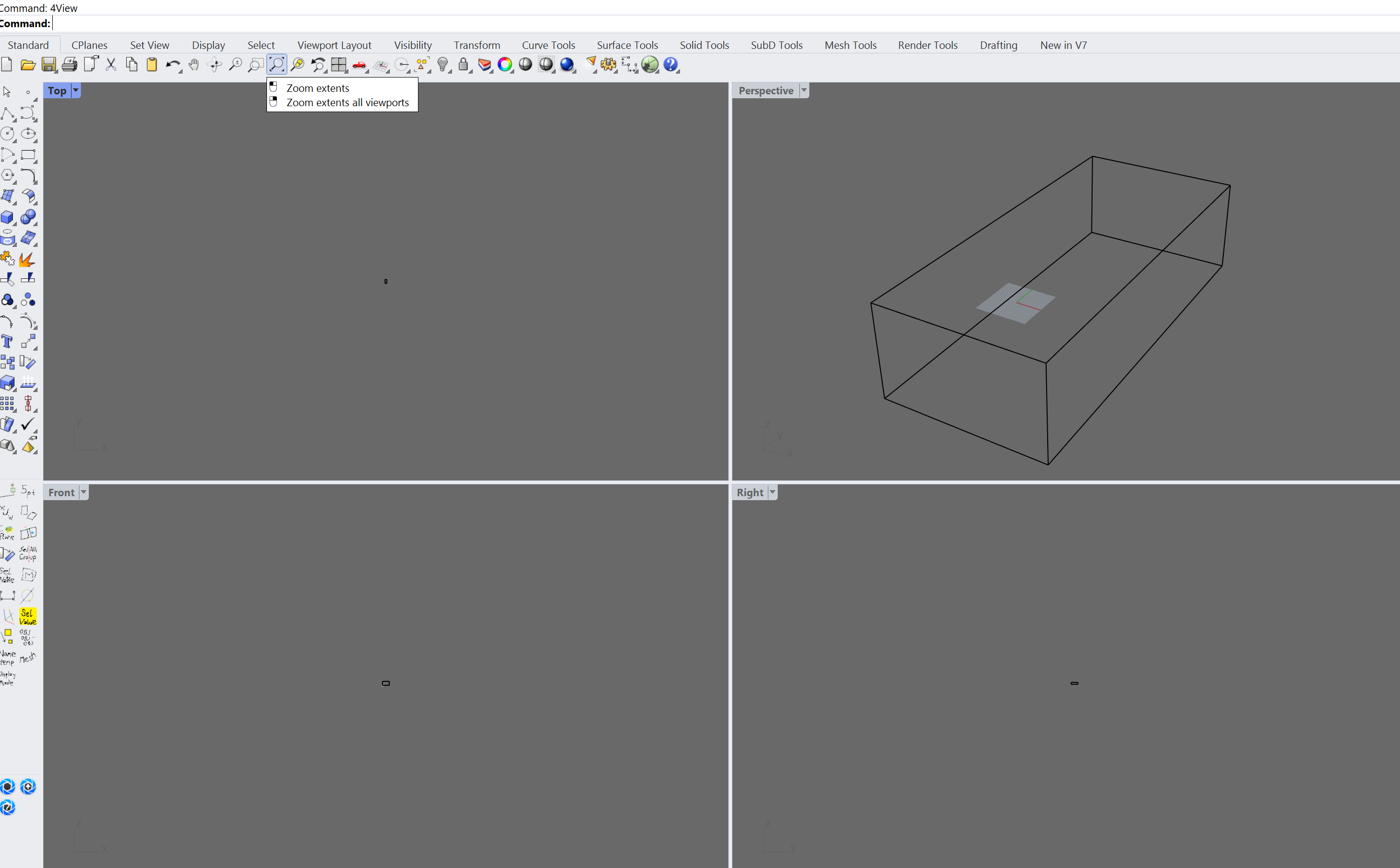
I’ve been having this problem recently where _Zoom _Extents and other zoom commands only work in the Perspective viewport. In Top, Front and Right View _Zoom _Extents zooms out way too far and I need to zoom in manually to see my objects.
Rhino 7, latest Service Release Candidate
Rhino 7 SR21 2022-7-27 (Rhino 7, 7.21.22208.13001, Git hash:master @ c31aea87137a5d0de449338a7ef6856f49dd4797)
License type: Kommerziell, build 2022-07-27
License details: Cloud Zoo
Windows 10 (10.0.19044 SR0.0) or greater (Physical RAM: 1.3e+02Gb)
Computer platform: DESKTOP
Standard graphics configuration.
Primary display and OpenGL: NVIDIA RTX A5000 (NVidia) Memory: 22GB, Driver date: 7-21-2022 (M-D-Y). OpenGL Ver: 4.6.0 NVIDIA 516.94
> Accelerated graphics device with 4 adapter port(s)
- Secondary monitor attached to adapter port #0
- Windows Main Display attached to adapter port #1
Secondary graphics devices.
NVIDIA Quadro K2200 (NVidia) Memory: 4GB, Driver date: 7-21-2022 (M-D-Y).
> Accelerated graphics device with 4 adapter port(s)
- Secondary monitor attached to adapter port #0
OpenGL Settings
Safe mode: Off
Use accelerated hardware modes: On
Redraw scene when viewports are exposed: On
Graphics level being used: OpenGL 4.6 (primary GPU’s maximum)
Anti-alias mode: 8x
Mip Map Filtering: Linear
Anisotropic Filtering Mode: High
Vendor Name: NVIDIA Corporation
Render version: 4.6
Shading Language: 4.60 NVIDIA
Driver Date: 7-21-2022
Driver Version: 31.0.15.1694
Maximum Texture size: 32768 x 32768
Z-Buffer depth: 24 bits
Maximum Viewport size: 32768 x 32768
Total Video Memory: 23028 MB
Rhino plugins that do not ship with Rhino
C:\Users\martinsiegrist\AppData\Roaming\McNeel\Rhinoceros\7.0\Plug-ins\KeyShot9RhinoPlugin (ecfe8d1f-876a-460f-aa5e-3dd816936811)\1.4.0.0\KeyShot9RhinoPlugin\Rhino 7\KeyShot9RhinoPlugin.rhp “KeyShot9RhinoPlugin” 1.4.0.0
C:\Users\martinsiegrist\AppData\Roaming\McNeel\Rhinoceros\packages\7.0\EleFront\4.2.2\ElefrontProperties.rhp “ElefrontProperties” 1.0.0.0
Rhino plugins that ship with Rhino
C:\Program Files\Rhino 7\Plug-ins\Commands.rhp “Commands” 7.21.22208.13001
C:\Program Files\Rhino 7\Plug-ins\rdk.rhp “Renderer Development Kit”
C:\Program Files\Rhino 7\Plug-ins\RhinoRenderCycles.rhp “Rhino Render” 7.21.22208.13001
C:\Program Files\Rhino 7\Plug-ins\rdk_etoui.rhp “RDK_EtoUI” 7.21.22208.13001
C:\Program Files\Rhino 7\Plug-ins\rdk_ui.rhp “Renderer Development Kit UI”
C:\Program Files\Rhino 7\Plug-ins\NamedSnapshots.rhp “Snapshots”
C:\Program Files\Rhino 7\Plug-ins\RhinoCycles.rhp “RhinoCycles” 7.21.22208.13001
C:\Program Files\Rhino 7\Plug-ins\Grasshopper\GrasshopperPlugin.rhp “Grasshopper” 7.21.22208.13001
C:\Program Files\Rhino 7\Plug-ins\Toolbars\Toolbars.rhp “Toolbars” 7.21.22208.13001
C:\Program Files\Rhino 7\Plug-ins\3dxrhino.rhp “3Dconnexion 3D Mouse”
C:\Program Files\Rhino 7\Plug-ins\Displacement.rhp “Displacement”
Tried in Rhino WIP and it works as expected.
Compared settings in Rhino 7 and WIP but I couldn’t find what’s causing my problem yet?
Was hoping someone can help me…
zoom_problem.3dm (47.8 KB)