Hi, I have searched the previous forum and realise none of the suggestions work for me. I am trying to capture a shaded view but it is very blurry.
i have tried to increase the DPI to 600 but it doesn’t improve the image quality. Also, when I tried to increase the size of the picture beyond the default setting, my picture cannot be saved.
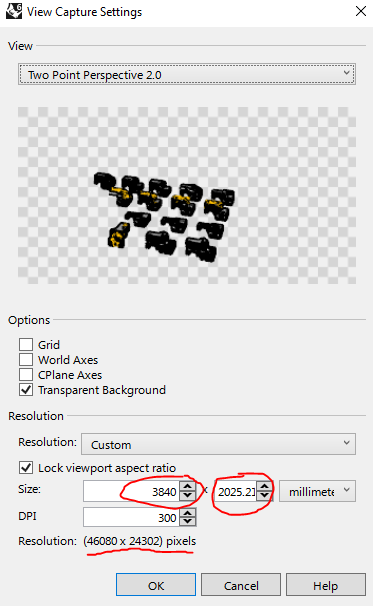
Thanks for the reply! I have tried to increase the file resolution by increasing the size of the image, but I realised my image are failed to be saved. Attached herewith the image of my setting. I remember doing the same thing using another computer before with Rhino 5, and the images were successfully saved and it they were very clear.
Could this be some settings in either Rhino 6 or my computer that I need to adjust?
Hello - the image file size you show, ~46,000 by 24,000 pixels would create an image of
46,000 X 24,000 * 3 bytes = 3312 MB - simply too large. To experiment, please set your numbers by the number of pixels you would like in the image - not by image dimensions, which in your picture is almost 4 meters by 2 meters. Try, for example, 2048 by 1024 pixels and see how that looks. If itis not clean enough, try doubling it.