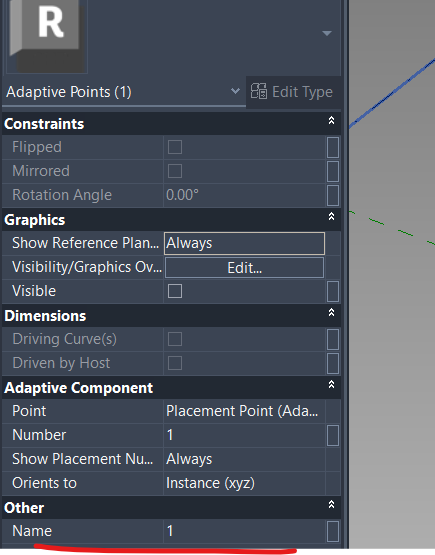
I have a list of Revit Reference Point : elements, in Project environment.
I am trying to sort this list based on the placement point “Number”, that it’s a built-in parameter in the Adaptive Family environment, but I am not able to access it from the Project. It looks that from the project is visible just from the RevitUI.
Is there any method to access those “Number” values in grasshopper?
If not do you have any other suggestion on how I can sort those adaptive points in grasshopper?
Unfortunately I have noticed that there is not a relation between the Element ID of the point and it’s placement index.
Yes, it is totally possible to get and sort adaptive points by their placement order using the Revit API. The method returns the list of adaptive placement points in the exact order they were placed, which corresponds to the Number shown in the Revit UI. While this Number is not available as a direct parameter on the points in the project environment, the order of points returned by this method reliably reflects this numbering.
import clr
clr.AddReference('RevitAPI')
clr.AddReference('RhinoInside.Revit')

from Autodesk.Revit.DB import *
from RhinoInside.Revit import Revit

doc = Revit.ActiveDBDocument


point_ids = AdaptiveComponentInstanceUtils.GetInstancePlacementPointElementRefIds(adaptive_Element)

adaptive_points = [doc.GetElement(pt_id) for pt_id in point_ids]

point_numbers = list(range(1, len(adaptive_points) + 1))
Yes, element location is fine for getting the xyz coordinates, but I still miss the reference number. As shown in the first message element id is not related to the placement number
From project environment you can’t directly access their Placement Number. The component returns the list of adaptive placement points in the exact order they were placed, which corresponds to the Number shown in the Revit UI. so you can apply additional logic to get their Numbers.
Initially I had the same idea but unfortunately it looks there is not correspondence between them. Has shown in the first message the element ids does not correspond to the order were they have been placed