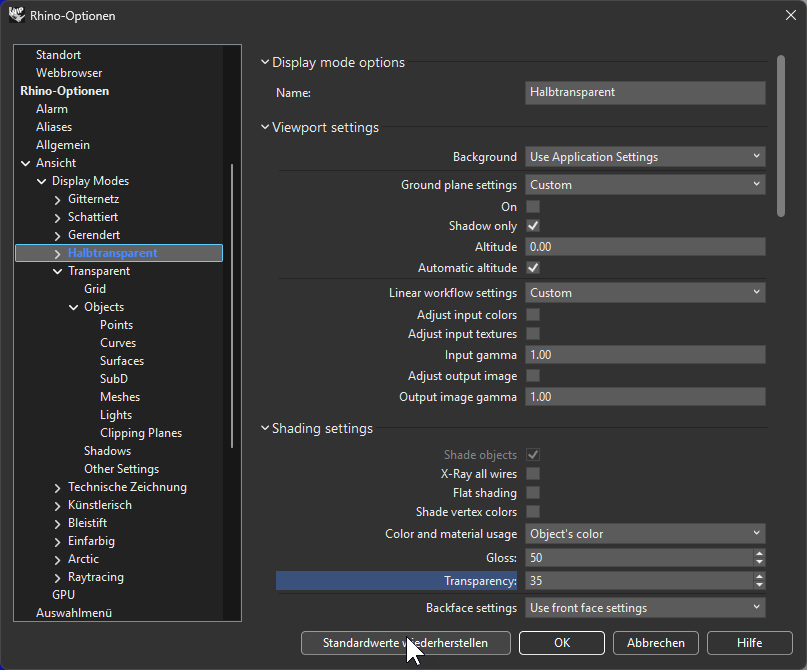
I can’t reset Ghosted display mode to default.
For other display modes it works.
(9.0.25184.18305, 2025-07-03)
Thanks for you reporting, I found it works fine in RhinoWIP (9.0.25187.12305, 2025-07-06). I have sent a download link to you via DM
Tried it, but no luck.
I tried with German and English UI.
Perhaps it’s a regional issue?
Windows is in German.
Hi Charles -
What happens when you delete the display mode, restart Rhino, and make a modification?
-wim
Aha, that worked.
When Rhino was restarted, I had the altered (blue) Ghosted back again.
Then I modified Transparency.
And clicked Restore Defaults.
The Defaults were restored, blue is gone.
Then I quit Rhino and restart it.
Ghosted is blue again and can’t be reset to default.
Couldn’t make a YT make sense before this gets lost?
I still see the issue.
Hi Charles -
Please post your current SystemInfo data.
-wim
Rhino 9 SR0 2025-7-24 (Rhino WIP, 9.0.25205.18305, Git hash:master @ cb53d236b68cd0e9329d3bee3f4b7f1a32a433cd)
License type: Commercial, build 2025-07-24
License details: Cloud Zoo
Expires on: 2025-09-07
Windows 11 (10.0.26100 SR0.0) or greater (Physical RAM: 32GB)
.NET Framework 4.8.9310.0
Computer platform: DESKTOP
Standard graphics configuration using DirectX
Primary display: NVIDIA GeForce RTX 2070 (NVidia) Memory: 8GB, Driver date: 1-26-2025 (M-D-Y). DirectX(11)
> Accelerated graphics device with 4 adapter port(s)
- Windows Main Display attached to adapter port #0
Secondary graphics devices.
None found.
DirectX Settings
Safe mode: Off
OpenBLAS: OpenBLAS 0.3.29 DYNAMIC_ARCH NO_AFFINITY Zen MAX_THREADS=64.
Rhino plugins that do not ship with Rhino
C:\Program Files\SimLab\Plugins\SimLab 3D PDF From Rhino 6\plugins\SimLabPDFExporter.rhp “SimLab PDF Exporter”
Rhino plugins that ship with Rhino
C:\Program Files\Rhino 9 WIP\Plug-ins\Commands.rhp “Commands” 9.0.25205.18305
C:\Program Files\Rhino 9 WIP\Plug-ins\rdk.rhp “Renderer Development Kit”
C:\Program Files\Rhino 9 WIP\Plug-ins\UpdatesAndStatistics\UpdatesAndStatistics.rhp “UpdatesAndStatistics” 9.0.25205.18305
C:\Program Files\Rhino 9 WIP\Plug-ins\RhinoRenderCycles.rhp “Rhino Render” 9.0.25205.18305
C:\Program Files\Rhino 9 WIP\Plug-ins\rdk_etoui.rhp “RDK_EtoUI” 9.0.25205.18305
C:\Program Files\Rhino 9 WIP\Plug-ins\NamedSnapshots.rhp “Snapshots”
C:\Program Files\Rhino 9 WIP\Plug-ins\MeshCommands.rhp “MeshCommands” 9.0.25205.18305
C:\Program Files\Rhino 9 WIP\Plug-ins\RhinoCycles.rhp “RhinoCycles” 9.0.25205.18305
C:\Program Files\Rhino 9 WIP\Plug-ins\Toolbars\Toolbars.rhp “Toolbars” 9.0.25205.18305
C:\Program Files\Rhino 9 WIP\Plug-ins\3dxrhino.rhp “3Dconnexion 3D Mouse”
C:\Program Files\Rhino 9 WIP\Plug-ins\Displacement.rhp “Displacement”
C:\Program Files\Rhino 9 WIP\Plug-ins\SectionTools.rhp “SectionTools”