Walls - Multilayer Walls - Multilayer Slabs - Slabs

Hello,

  1. I understand that Style layers sharing the same section properties join. The following image has two wall styles each with solid hatch section but different color.

They get joined, the edge disappears. I was expecting an edge since they may have same solid hatch but they do not share the same color.

  1. [quote=“Francesc Salla, post:8, topic:141933, username:fsalla”]
    In VisualARQ 3 slabs and walls calculate their intersection automatically.
    [/quote]

In the following image multilayered walls do not automatically intersect with multilayered slabs.

Normal and core settings are not being applied to the model, even with vaupdate. Red notation 1 is the expected result according to the core/normal settings of the multilayer wall and multilayer slab, it does not happen automatically but only after running add interference between the slab and the wall.

So it seems there is not an automatic interaction between multilayer walls and multilayer slabs. Btw applied add interference gets lost randomly between elements and you need to rerun it, if you by chance notice the issue while plotting or working in the viewport.

Red notation 2 is an automatic result, the core layer of the wall does not cut the normal layers of the slab. The top normal layer of the slab goes right through the core layer of the wall. But right above it, the bottom normal layer of the slab does not.

Same happens with walls and columns randomly. Most of the times columns cut as core items through walls, but many times they dont.

  1. Regarding the suggestion to prefer working with multilayered walls, because stacked single layer walls do not work, i believe (besides adding support and correct functionality of stacked wall styles) you need to reconsider the insertion base point that defines the alignment of the wall styles. For multilayered walls left right and center might not be suitable for anything.

Lets consider the following multilayer wall case.

The wall needs to “sit” on the slab at the blue AP alignment point. As you can see in this wall the center is totally irrelevant and the left and right could work with the alignment offset option.

The alignment option is found only in the item properties, which makes is too tedious and prone to errors, to set the alignment offset for every new multilayer wall you insert. So i believe multilayer walls need to either have an option where you choose which wall layer gets the alignment/insertion point (where left right or center is applied) or have the option of alignment offset in the multilayer wall style options (which you can override if you want, like the wall height).

  1. This has been discussed and expressed as a wish elsewhere by other users too, please consider adding a top and bottom wrap or cap option to multilayer walls.

  1. Regarding the multilayer slabs and their alignment offset, its the same discussion as the multilayer walls. Please add the option to choose which layer gets the level height top bottom or center alignment point, or have the offset alignment option in the slab style.

  2. Similar to walls top bottom wrap or cap options, slabs in general, but especially multilayer slabs need to have a wrap/cap or layer option for their sides. This has already been discussed as a wish and i have seen this workaround, but zero width layers are a problem down the road to schedules etc.

Please see attached file for further wall to slab interaction details.
wall test.3dm (6.6 MB)

best,
alex.

edit 01 i work with version 3.4.3.20093 20025-07-15
edit 02 having an alignment point set to a user given layer, i believe would also enable to add layers or change their thickness to a wall, and then negate the need to reposition the wall. At the moment any change and you need to reset the alignment offset value.

Did anyone get a chance to review points 1 and 2?

Hi @ng5_Alex

Thank you for your detailed message and for sharing your observations.
Regarding the first point:

Currently, when section styles have the same hatch pattern and scale, the joint line between them disappears. We understand this might not be ideal in all cases—especially when the materials or colors are different. We’ll consider taking the material into account to improve this behavior in future versions.
Point two:

You’re right — there is an issue in the areas you marked as 1 and 2 in your image. We’ve identified it and will report it to our internal bug tracker. In the meantime, you can continue using the Add Interferences command or try switching the layer type between Core and Normal to improve the result.
Point Three:

Thank you for the suggestion — we’ll consider this point for a future version.
Point Four:

This feature has already been requested and has received many votes. We’re considering it for future versions.
Point five:

Thanks for mentioning this. We’ll consider this point for a future version.
Point six:

This is something we are taking into account. Thank you for highlighting it.

This report has been very valuable in helping us improve and understand user needs better. I will keep you updated on future improvements.

Best,
Melissa

Hello, thank you for your answer.

Please clarify, future versions means Visualarq 4 or 3 updates?

I thought Section attributes have nothing to do with materials and rightfully so. Its the same section attributes that define which items are “joined”. Color seems to be one of them, exposed as a property in the section style window.

Thank you for looking into this.

Visualarq 3 promises multilayered walls and slab that automatically interact and intersect according to core/normal property of each layer. A feature so far not delivered in any reasonable manner. These multilayered items work as long as they do not intersect with anything (well, maybe except walls hosting windows).

If Add Interference worked, you suggestion would be a workaround. But like i already mentioned, two items with add interference relationship added, after a while this relationship is lost, vaupdate does nothing, and you need to rerun add interference. I am pretty sure other users face this issue too.

I am sorry to say this, but suggesting me to keep trying to switch core normal options to improve result, seems like an aimless futile exercise. Change it to what? If a layer needs to cut another, the setting is core and normal respectively.

Hi @ng5_Alex

Just to clarify: by “future versions,” we meant the very first release of VisualARQ 4 — that’s the earliest version where these changes are planned to be implemented.

About the first issue (solid hatches with different colors not showing intersection lines): this is the current default behavior. As you showed in your image, no line is drawn between hatches of different colors. We’re considering updating this behavior in future versions, so that a line is shown in this case — if users find it clearer that way.

For the second issue, this is a bug because the interferences between multilayer elements should happen automatically. It also seems to be an error that, although you can use Add Interferences as a workaround, the relationships are lost after running it and updating the 3D view with vaupdate. These problems are currently reported in our bug tracker, and I’ll keep you updated on when we can fix them.

About switching Core and Normal layers: because of these bugs that stop us from getting the right result, the best I can suggest for now is to double-check which layers (Core or Normal) your walls and slabs use, and change them if needed to get as close as possible to the correct result while we work on fixing the reported issues.

Thanks again for taking the time to report this.

Best,
Melissa

I see, thank you for your answer.

At the very least alignment offset needs to be found in every wall, slab etc style options and not only on a per item basis. This needs to be done in version 3.

Hopefully the bugs will be fixed…

best,
alex.

Hi @ng5_Alex ,

Thanks for your message.

  • In the current version (VisualARQ 3.4.3):
    • You can set the alignment offset in wall styles. Just create or edit a wall style and set the offset you need.

  • You can also change the alignment offset for a specific wall in the properties panel.

But if you do that, and later change the wall style’s offset, it will update all walls using that style — except the ones you changed manually. Those will keep their custom offset.

  • For slabs:
    Right now, alignment offset is not available for slabs.
    It’s more complicated, because slabs have multiple faces (top, bottom, sides), so we would need to control each face separately. However, this is something we can bring up with our development team for discussion.

If you have any ideas on how you’d like slab offsets to work (for example, per face), feel free to share them. Your feedback is really helpful!

Best,
Melissa

@MCosta thank you for taking the time to follow up. I am in the current version.

I am asking for the alignment offset, not the very useful elevation offsets, which the test wall style already uses.

Please see the following image.

This needs to be in the style options, global setting to the wall style.

best,
alex.

Thank you @ng5_Alex for clarifying your request — we’ll include it in our development planning.

Regarding the slabs alignment and alignment offset, my suggestions are the same as the walls. It would be great if the alignment point for all VA elements would be like a blocks insertion point. But I read here and here that’s not the case unfortunately. I also mistakenly thought that VA elements are like blocks where you can easily define their insertion point in any layer you want.

I think this is not possible since each VisualARQ object type requires different input geometry to be created (path curves for walls, railings, beams…, boundary curves and surfaces for slabs, roofs, spaces… points for Windows, Furniture, Elements…).

Furniture and Element objects can be created from blocks. So their insert point is the same as the original block base point. Also you can put them in any Layer you want.

I dont know how the creation of the VA objects affects their alignment point. I am referring to blocks not because i am expecting block functionality from VA elements, but to describe what i find reasonable to have in multilayered walls and slabs.

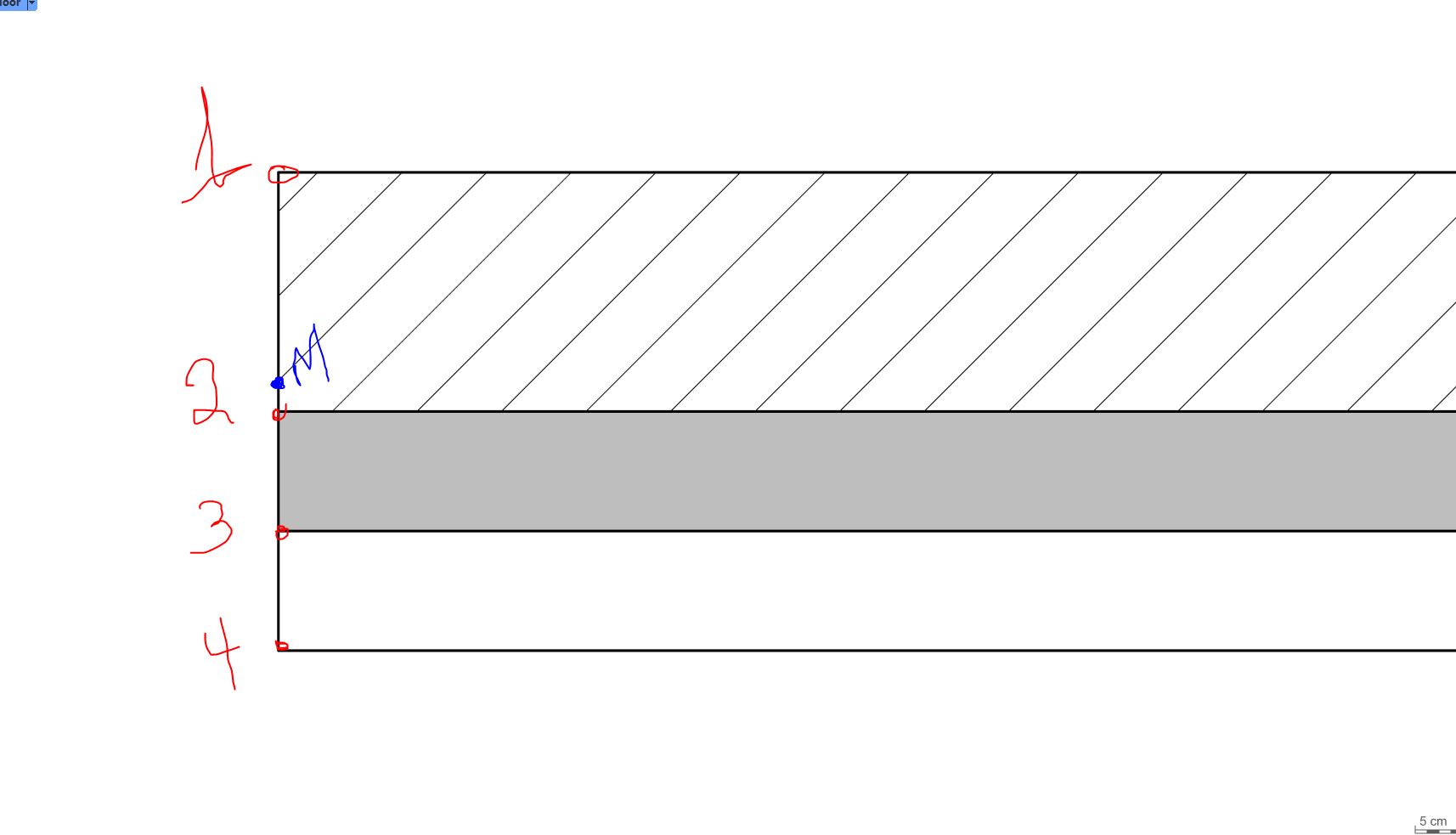
This is my last attempt to describe it.

This is a three layered wall or slab.

There must be an option to choose where the alignment happens. One should be able to choose point 1, 2, 3 or 4.

At the moment inside [meaning 1] outside [meaning 4] and middle [meaning blue M which is totally irrelevant] offer very basic, if any, meaningful support to draw a multilayered item in plan or any view.

Especially since alignment offset is not available in the style properties and we need to constantly set per item alignment value (see above posts).

Hi @ng5_Alex your request is clear. Thanks!

+1. Thanks @ng5_Alex