EDIT: Found a solution. Original still below to help other noobs like me in the future.
To get this working, I manually modified the .csproj file of my example to include the below “ItemGroup”
  <ItemGroup>
    <PackageReference Include="Rhino.Inside">
      <Version>7.0.0</Version>
    </PackageReference>
  </ItemGroup>
I don’t know if manually editing the .csproj file is the correct way to go about this, but my console application is working now. If anyone wants to elaborate more as to contribute to this reference, please do so.
Also a good reference can be found here in docs - https://docs.microsoft.com/en-us/aspnet/web-forms/overview/deployment/web-deployment-in-the-enterprise/understanding-the-project-file
Thank you.
-------- Original below line --------
Hey all,
I’m trying to get a console app with RhinoInside integration working. I’m referencing the samples for RhinoInside. Specifically - RhinoInside Github Sample
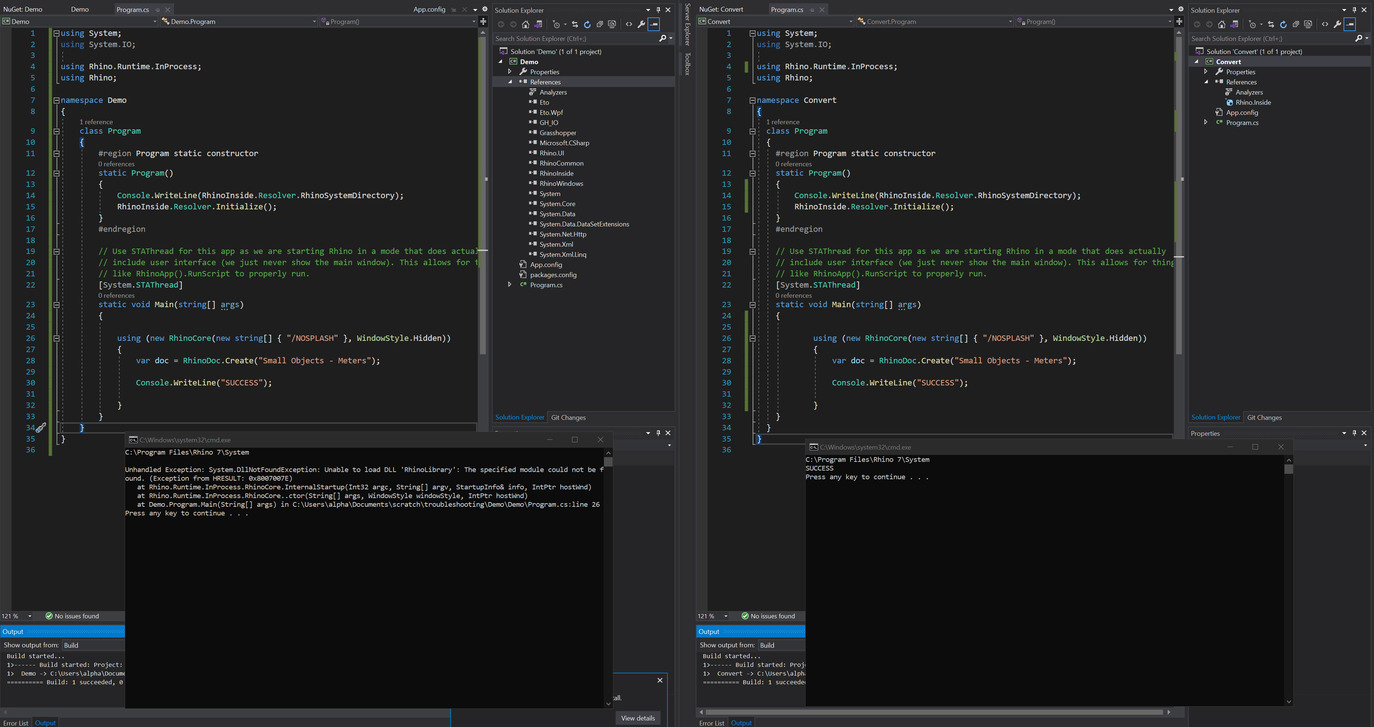
The above linked sample is working fine when I run it. My own solution which appears to mirror it is however failing. I’m getting this System.DllNotFoundException -
Unhandled Exception: System.DllNotFoundException: Unable to load DLL 'RhinoLibrary': The specified module could not be found. (Exception from HRESULT: 0x8007007E)
   at Rhino.Runtime.InProcess.RhinoCore.InternalStartup(Int32 argc, String[] argv, StartupInfo& info, IntPtr hostWnd)
   at Rhino.Runtime.InProcess.RhinoCore..ctor(String[] args, WindowStyle windowStyle, IntPtr hostWnd)
   at Demo.Program.Main(String[] args) in C:\Users\alpha\Documents\scratch\troubleshooting\Demo\Demo\Program.cs:line 26
Both my “Demo” solution (not working) and the sample “Convert” solution (working) look to be identical builds! Below images show left being my failed solution compared against the working convert solution.
-
Why do my references for RhinoInside from the same Nuget package look different in my Demo vs the sample?
-
What is causing the failed DLL load in my application?
I’m completely at a loss here. Any guidance would be amazing. Thank you.