[ NOTE: due to an almost complete misunderstanding of how RUI files, toolbars and macro libraries work, my initial ideas would NOT be helpful…but I think my final idea might be]
Whenever I want to create a new macro library, I instinctively go to Window > Macros... to open the Macro Library dialog only to discover that the Macro Library Dialog doesn’t allow me to create new macro libraries, which is confusing. I think right now the only way to create a new macro library is through an indirect process (ie, create a new toolbar and add at least one “new” command to it).
If it wouldn’t be too difficult to do, I would like to see a New Library button of some sort in the Macro Library dialog, which would create a new empty library. This could be a little + beside the library drop-down or a New Library button.
Now, if it would be a huge time-consuming task and/or something that could potentially break a bunch of toolbar stuff, then please don’t worry about it. It’s not a huge deal.
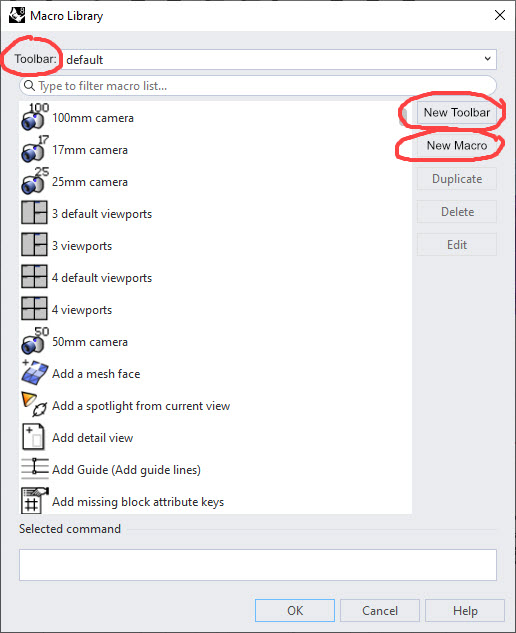
[Below are two ideas for how to adjust the Macro Library dialog]
Perhaps you’re not understanding what a macro ‘library’ is in Rhino. A library is the set of all the macros in a given collection of tools. Any collection can only have one library. As the default tools collection is now integrated into Rhino - i.e. there is no separate .rui - the only way to have an additional library is to first create a new collection - i.e. a new .rui. This is managed under the Toolbars section currently, that could be an interesting point for discussion, for the nomenclature isn’t all that clear. One has File > New which creates a new .rui and one has Edit > New Toolbar which creates a new toolbar in the current collection.
Yes, I did misunderstand. I was viewing toolbars and macro libraries as completely separate objects. If I’m understanding you correctly, it looks more like two different ways to view and interact with the same RUI file. I’ve changed the title to reflect the info you gave.
I guess instead of a New Library button, we could have a New Toolbar button (and rename the dropdown from Library to Toolbar (since it apparently is actually a drop down of toolbars)?
Again, if it’s too complicated or too likely to break things in the toolbar ecosystem, then I’d rather not have the change, but I’m hoping it’s just renaming one button and adding a new button that calls whatever command(s) that File > New in the Toolbars option dialog calls and then refreshes the drop down so the new toolbar appears there.
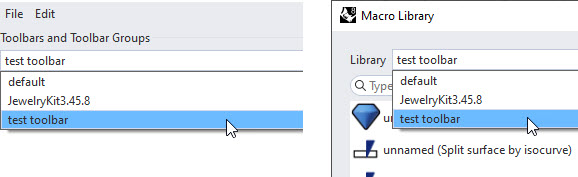
[Below are my two revised mock-ups of the Macro Library dialog]
No, I think you’re still not completely understanding… Granted, it’s complicated.
No that’s not entirely accurate.
The macro library does not contain toolbar info. A macro is a collection of information that creates a command or action, it includes a reference name, a command script, a button text, a help text, a menu text, a tooltip text and optionally one or two images (light/dark mode). The macro library is the collection of all macros availble for the current toolset (default or external .rui).
The default or external .rui contains just toolbar button and toolbar information. A toolbar button can reference one or two macros from the library, a toolbar can have one or more buttons. Macro information is not stored in the default or .rui toolbar files, they are stored in the macro library and the buttons just reference them when pressed.
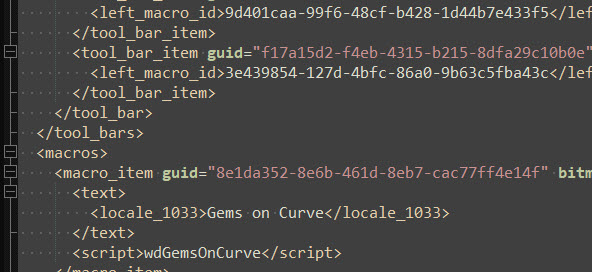
Well, I’ve pulled up an rui file of mine, and it has both toolbar items and macro items. I think I did misunderstand it at first, but I think I get it now…at least a little better than I did. It looks like an rui file defines toolbar groups, toolbars, toolbar items and has a macro library <macros> that contains <macro_items> along with some other stuff (like bitmap data). So it seems an rui file is both a toolbar and a macro library at the same time. I think the Macro Library window is giving users a way to interact with the macros section of the rui, while the toolbars window is giving them a way to interact with the toolbar sections (and to some extent the macros sections, too, since new macros can be added via the toolbar window). That’s what it looks like to me, at least.
And, from what I can see, the ‘Library’ dropdown in the Macro Library dialog contains the same list of toolbar names that we find labeled as Toolbar Groups and Toolbars in the Toolbars section of the Document Properties / Rhino Options window. So, I think the drop down should be called Toolbar in the Macro Library dialog, too.
What do you think of my two mock-ups? Do you think these simple changes to the Macro Library window might make macro / toolbar creation a little less confusing?
Well, first let me say that it is highly unlikely that any changes will be made in V8, they’re intent on keeping the existing toolbar house of cards stabilized in a release version, so nothing of significance will be added or changed. As to whether the existing system will be revamped to work better in V9 (a lot of work), or whether they will start over again from scratch (even more work) has not yet been decided yet as far as I know.
Now as to “Library”, etc…
IMO, where the data is actually stored doesn’t matter in this case - nobody except for developers are really going to open the .xml/.rui files and start scrolling through looking for stuff. What’s important is how it’s presented to the user in terms of UI - and of course how it actually works in practice.
Currently “library” is used to describe a macro/tool collection - changing it to something else will also cause confusion. Changing “Library” to “Toolbar” in the macro editor window (as you show in the last two mockups) is in any case incorrect because that window/interface is showing a tool collection and not a single toolbar or even multiple toolbars. Toolbars are groups of tools and they have their own interface/window.
Note also that one can have tools (macros) in the macro library that are not present anywhere in the toolbars - there is no obligation that they be actually referenced by anything, you can create them as you wish. The inverse is however not true, you cannot create a toolbar button without creating or referencing a macro on a library somewhere. In fact, if you do not specifically reference an existing macro when creating a toolbar button a new macro will automatically be created in the library that the toolbar resides in (default or external rui).
Furthermore, crosstalk between toolbar collections is possible. If you copy a button from default into your custom .rui, the copied toolbar button will still reference the original macro in default - a new copy of the macro is not created in the .rui’s macro library. (You can test this relatively simply yourself).
Going the other way is even funnier. You can create a macro/button in an external .rui, move that to default and then close the .rui. The button will still be there even though the reference to the macro has been cut - because you closed the .rui. And the macro behind the button has not been copied to default when you moved the button. So you now have an ‘orphan’ button in default that has no entry in the default macro library - but still works.
Yep, the system is complex - it’s taken me quite awhile to understand how it works in practice, and I think there are only a couple of people actively testing stuff right now.
So, I did try this. I created an .rui called test toolbar.rui and then dragged the split command over onto it. I also dragged one of my custom tools over onto it. I then saved the toolbar. When I opened the test .rui in an xml editor, the macros were there in the xml, but they didn’t show up visually in the new toolbar’s macro library. That confused me at first, but then I thought what if I close and re-open the test .rui. And, sure enough, now the macros I dragged into it appear in that .rui’s macro library. So, the macros are copied into the external rui’s macro library, but this is not apparent until the rui is closed and reopened.
So, now I think I understand it even a little better (key word there is think).
When we click File > New in the toolbar window, we are not creating a new toolbar, but rather we are creating a new RUI file. Once we have the RUI file, we can toolbars and toolbar groups to the RUI file (eg, Edit > New Toolbar) and we can also open up the Macro Library and add macros to the RUI file (which may or may not be used in any of the various toolbars of the RUI file).
That means these two drop downs (the one in the toolbars window and the other in the macro library window) are actually RUI dropdowns. But one window refers to the RUIs as “toolbars and toolbar groups” and the other window refers to the RUIs as “libraries”.
So, with all that in mind, what would be less confusing to me is to call them RUIs in all cases. So below, I show my two ideas for the macro library window but this time I call the drop down RUI File. Then either the drop down can can have a little plus sign by it to create new RUIs or there can be a New RUI button. And, in either case, the current New button gets renamed to New Macro.
But then this time I also show some changes to the toolbar panel in the Rhino Options window. The dropdown would get renamed to RUI File and the Toolbars and Toolbar Groups becomes a heading below that. And the File > New becomes File > New RUI File.
Now personally, after diving this deep into it, I will probably never be confused like I was before whenever creating a new toolbar, but had it been set up like this initially, I think I would not have been confused to begin with or at least not as badly.
In the past, whenever I opened up the Macro Library window, I felt like I needed to create a new macro library to add macros to, but I couldn’t figure out how. Eventually I would realize, oh I need to create a new toolbar first (but actually I needed to create a new RUI file…I see now the toolbar itself is not needed to start creating macros only the RUI is needed).
So, while I think this would cut down on confusion for future users of the toolbar stuff, I myself no longer need any changes.