In the Rhino WIP we’ve made PushPull work across multiple faces of a polysurface.
What is PushPull Multiface?
The PushPull command allows you to detect regions on a solid or polysurface and extrude them inward or outward. In Rhino WIP, PushPull can detect regions accross multiple faces as opposed to one single face, like in Rhino 8.
Why is this useful?
PushPull multiple faces at once solves intersections between faces automagically. It also accelerates the workflow.
That’s something I’ve been trying to do. PushPull generates the offsets with the OffsetSrf/Shell functions which I also work on. I’ve rooted out some bugs in that already.
Great new ability of the tool! Can’t wait to try it once Rhino 9 is released on the market.
By the way, is there an option to make offsetting with customizable loose settings to avoind generating of shell polysurfaces with overly-crowded surfaces?
@Joshua_Kennedy I’m joining the party a bit late, I hope not too late.
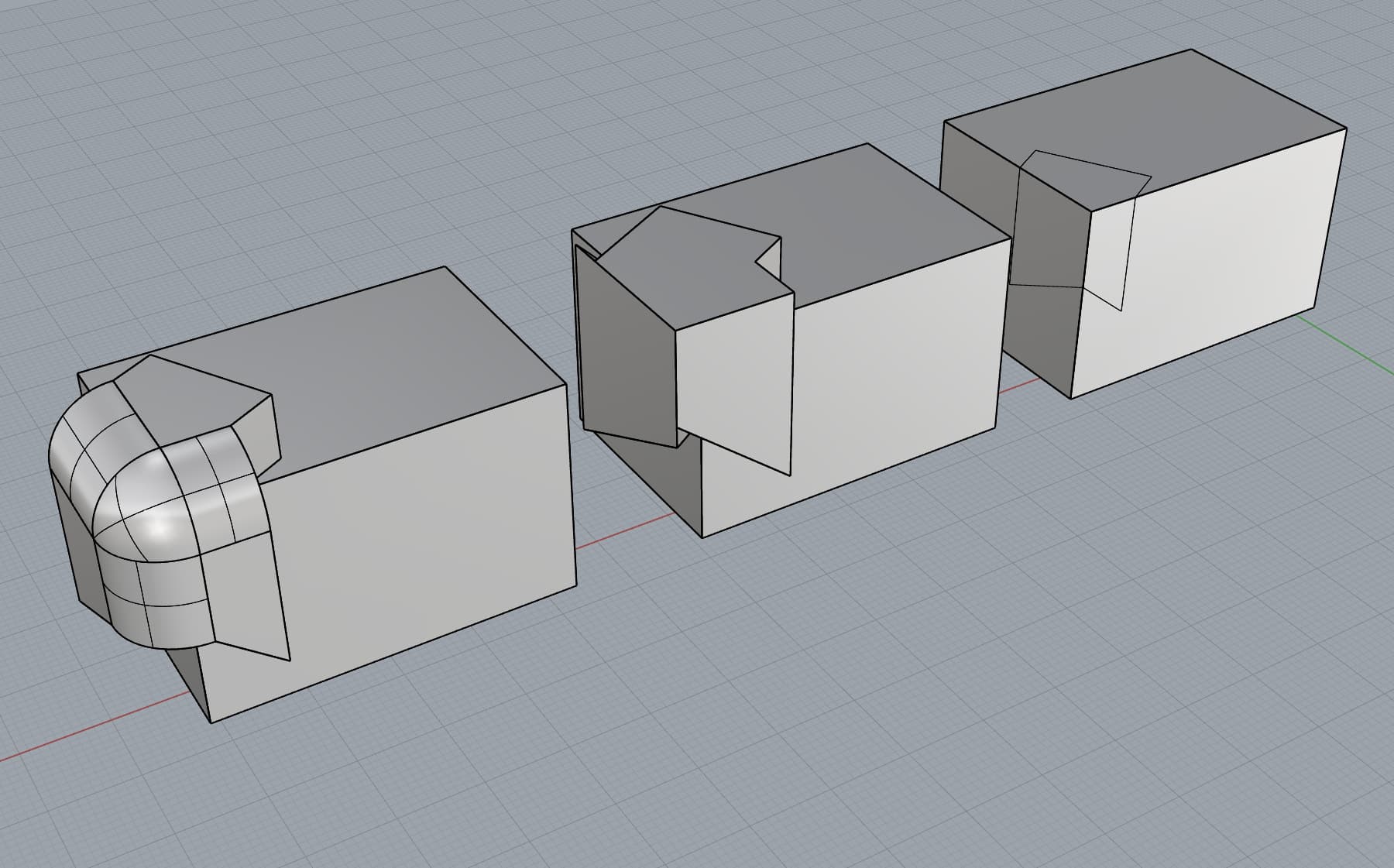
I gave a try to this option today and this are my 2 consideration:
when you use this on weird corner isn’t giving the full intersection. It solve the solid, that’s really good, but not the full extent. I think is related to Holo’s request (see picture the middle shape)
may be usefull to add another option to control how big the radius would be created. I thing the radius is using the filletxxx command internally so it wouldn’t be too hard to add an option to specify a custom value for the radius. In my option is right to have the radius equal the distance as standard behaviour but, in product deisgn, may be good to have different value. (see picture the left shape)
Hi @Holo ! Yes, I think PushPull would benefit from supporting the Extend option when selecting multiple faces. Let’s hope @Joshua_Kennedy can get to it (RH-89112)!
Hi @Rhino_Bulgaria - Are you talking about the RH-XXX links to the bug reports? I’m adding them here for reference, however the items contain user files. Those are automatically only visible internally.
Hi @Robert26 - This should be the process you see:
At the Select surface to PushPull prompt > pick the region
It becomes yellow.
At the Select Regions prompt > press Enter
The display becomes red outlines if you extrude inward (carve into the solid)
The display becomes grey if you extrude outward (add a volume to the solid)
Press Enter to end the command.
The difference in display color is to indicate a different result as you drag.
If you pick and you don’t see a display change (as in your #3), there’s something wrong that we need to look into.


 Can’t wait to try it once Rhino 9 is released on the market.




 Thanks.
 .
.