Rhino taking up all my memory on Macbook

Hello,

I have used Rhino for a while now and I have had a recurring problem over the past months, I cannot remember if it was always the case.

If I have a Rhino file open on my computer on the background, it will end up taking a huge amount of memory on my computer over time, even if it is a file as simple as a line drawing file that has almost nothing in it.

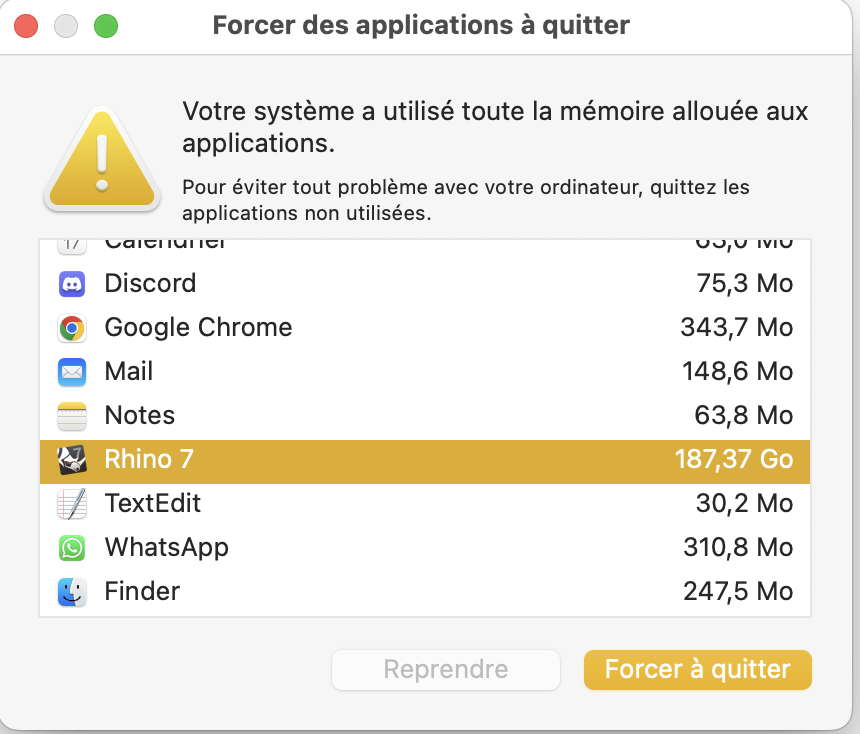
I receive this kind of message from the Finder:


Translation in english: “your system used all the memory allocated to the applications.”, Rhino being at 187,37Go. (My computer has 32Go memory if I make no mistake)

I do not understand what causes this or what could fix it. If I quit and restart then it works fine again until I have to close and open again. Is there something about the fonctionning of the software that I am unaware of?

In this case this was the file that was open:

This is a small file that I made to see how precise I could get with line weight in PDF export. But does not seem to be linked to the size of the file I use.

Has this issue ever been reported ? I tried to look on forum but did not find.

Thank you very much and have a good day,

Louis

Hi Louis -
Please run the Rhino SystemInfo command and copy-paste the result here.
-wim

Hello, thank you for swift answer.

Here is the info:

Rhino 7 SR36 2023-12-12 (Rhino 7, 7.36.23346.16352, Git hash:master @ 11a364321297eb8cdb34405a3308d8911f58706d)
License type: Educational, build 2023-12-12
License details: Stand-Alone

Apple macOS Version 14.3.1 (Build 23D60) (Physical RAM: 32Gb)
Rhino is running in Rosetta2 on Apple Silicon
Mac Model Identifier: MacBookPro18,2
Language: en

Apple M1 Max (OpenGL ver:4.1 Metal - 88)

OpenGL Settings
Safe mode: Off
Use accelerated hardware modes: On
Redraw scene when viewports are exposed: On

Anti-alias mode: None
Mip Map Filtering: Linear
Anisotropic Filtering Mode: High

Vendor Name: Apple
Render version: 4.1
Shading Language: 4.10
Maximum Texture size: 16384 x 16384
Z-Buffer depth: n/a
Maximum Viewport size: 16384 x 16384
Total Video Memory: 21845 MB
Graphics: Apple M1 Max
Displays: Unknown (255dpi 2x)

Graphics processors
Apple M1 Max
Color LCD (1728 x 1117 @ 120.00Hz)

USB devices
None

Bluetooth devices
None

Third party kernel extensions
None

Third party plugins
/usr/lib/swift/libswiftCore.dylib
/usr/lib/swift/libswiftCoreFoundation.dylib
/usr/lib/swift/libswiftCoreGraphics.dylib
/usr/lib/swift/libswiftCoreImage.dylib
/usr/lib/swift/libswiftDarwin.dylib
/usr/lib/swift/libswiftDispatch.dylib
/usr/lib/swift/libswiftIOKit.dylib
/usr/lib/swift/libswiftMetal.dylib
/usr/lib/swift/libswiftOSLog.dylib
/usr/lib/swift/libswiftObjectiveC.dylib
/usr/lib/swift/libswiftQuartzCore.dylib
/usr/lib/swift/libswiftUniformTypeIdentifiers.dylib
/usr/lib/swift/libswiftXPC.dylib
/usr/lib/swift/libswift_Concurrency.dylib
/usr/lib/swift/libswiftos.dylib
/usr/lib/swift/libswiftsimd.dylib
/usr/lib/swift/libswift_StringProcessing.dylib
/usr/lib/swift/libswift_RegexParser.dylib
/usr/lib/swift/libswiftCryptoTokenKit.dylib
/usr/lib/swift/libswiftAVFoundation.dylib
/usr/lib/swift/libswiftCoreAudio.dylib
/usr/lib/swift/libswiftCoreLocation.dylib
/usr/lib/swift/libswiftCoreMIDI.dylib
/usr/lib/swift/libswiftCoreMedia.dylib
/usr/lib/swift/libswiftCompression.dylib
/usr/lib/swift/libswiftCoreML.dylib
/usr/lib/swift/libswiftFileProvider.dylib
/usr/lib/swift/libswiftIntents.dylib
/usr/lib/swift/libswiftAccelerate.dylib
/usr/lib/usd/libusd_ms.dylib
/usr/lib/swift/libswiftGLKit.dylib
/usr/lib/swift/libswiftGameplayKit.dylib
/usr/lib/swift/libswiftMetalKit.dylib
/usr/lib/swift/libswiftModelIO.dylib
/usr/lib/swift/libswiftSceneKit.dylib
/usr/lib/swift/libswiftSpriteKit.dylib
/usr/lib/swift/libswiftVision.dylib
/usr/lib/swift/libswiftRegexBuilder.dylib
/usr/lib/swift/libswiftDemangle.dylib
/usr/lib/swift/libswiftVideoToolbox.dylib
/usr/lib/swift/libswiftObservation.dylib
/usr/lib/swift/libswiftWebKit.dylib
/usr/lib/swift/libswiftNaturalLanguage.dylib
/usr/lib/swift/libswiftSystem.dylib
/usr/lib/swift/libswiftMapKit.dylib
/Users/louisconforti/Library/Application Support/McNeel/Rhinoceros/MacPlugIns/DatasmithRhino7.rhp/DatasmithFacadeCSharp.dylib
/Users/louisconforti/Library/Application Support/McNeel/Rhinoceros/MacPlugIns/DatasmithRhino7.rhp/libtbb.dylib
/Users/louisconforti/Library/Application Support/McNeel/Rhinoceros/MacPlugIns/DatasmithRhino7.rhp/libtbbmalloc.dylib
/usr/lib/log/liblog_network.dylib

Rhino plugins that do not ship with Rhino
/Users/louisconforti/Library/Application Support/McNeel/Rhinoceros/MacPlugIns/DatasmithRhino7.rhp “Datasmith Exporter” 5.3.2.0

Rhino plugins that ship with Rhino
/Applications/Rhino 7.app/Contents/Frameworks/RhCore.framework/Resources/ManagedPlugIns/RhinoCycles.rhp “RhinoCycles” 7.36.23346.16352
/Applications/Rhino 7.app/Contents/PlugIns/NamedSnapshots.rhp “Snapshots” 7.36.23346.1002
/Applications/Rhino 7.app/Contents/Frameworks/RhCore.framework/Resources/ManagedPlugIns/GrasshopperPlugin.rhp “Grasshopper” 7.36.23346.16352
/Applications/Rhino 7.app/Contents/PlugIns/PanelingTools.rhp “PanelingTools” 7.36.23346.1002
/Applications/Rhino 7.app/Contents/PlugIns/AnimationTools.rhp “AnimationTools” 7.36.23346.1002
/Applications/Rhino 7.app/Contents/Frameworks/RhCore.framework/Resources/ManagedPlugIns/Commands.rhp “Commands” 7.36.23346.16352
/Applications/Rhino 7.app/Contents/Frameworks/RhMaterialEditor.framework “Renderer Development Kit” 7.36.23346.1002
/Applications/Rhino 7.app/Contents/Frameworks/RhCore.framework/Resources/ManagedPlugIns/RDK_EtoUI.rhp “RDK_EtoUI” 7.36.23346.16352
/Applications/Rhino 7.app/Contents/PlugIns/Displacement.rhp “Displacement” 7.36.23346.1002
/Applications/Rhino 7.app/Contents/Frameworks/RhCore.framework/Resources/ManagedPlugIns/RhinoRenderCycles.rhp “Rhino Render” 7.36.23346.16352
/Applications/Rhino 7.app/Contents/Frameworks/RhCore.framework/Resources/ManagedPlugIns/RhinoDLR_Python.rhp “IronPython” 7.36.23346.16352
/Applications/Rhino 7.app/Contents/PlugIns/RhinoRender.rhp “Legacy Rhino Render” 7.36.23346.1002

Hello I am having the same issue with my MacBook Pro Here is the systemInfo:

I am running into the issue of it ramping up to 97 GB of Memory! I have no idea what to do. I reset all the files and settings on my computer and while that did help for general memory, it didn’t work for the application memory. Please help!

Thanks
Rhino 8 SR34 2026-8-11 (Rhino 8, 8.34.26223.11002, Git hash:master @ f416e902495235e4e4a45cfc29ff1320cc8c70d8)
License type: Educational Lab License, build 2026-08-11
License details: LAN Zoo Network Node

Apple macOS Version 26.5.2 (Build 25F84) (Physical RAM: 24GB)
Mac Model Identifier: Mac16,7
Language: en-US (MacOS default)
.NET 8.0.14

Metal GPU Family Apple 7
Metal GPU Family Common 3
Metal GPU Family Mac 2
Graphics processors
Apple M4 Pro
Color LCD (1728 x 1117 @ 120.00Hz)
GPU Vendor: Apple

USB devices
PixArt: USBC Wired OpticalMouse

Bluetooth devices
None

Third party kernel extensions
None

Third party plugins
/usr/lib/swift/libswiftCore.dylib
/usr/lib/swift/libswiftObjectiveC.dylib
/usr/lib/swift/libswiftCoreFoundation.dylib
/usr/lib/swift/libswiftDarwin.dylib
/usr/lib/swift/libswiftDispatch.dylib
/usr/lib/swift/libswiftIOKit.dylib
/usr/lib/swift/libswiftSystem.dylib
/usr/lib/swift/libswiftXPC.dylib
/usr/lib/swift/libswift_Builtin_float.dylib
/usr/lib/swift/libswift_Concurrency.dylib
/usr/lib/swift/libswift_DarwinFoundation1.dylib
/usr/lib/swift/libswift_StringProcessing.dylib
/usr/lib/swift/libswiftos.dylib
/usr/lib/swift/libswiftDistributed.dylib
/usr/lib/swift/libswiftObservation.dylib
/usr/lib/swift/libswiftSynchronization.dylib
/usr/lib/swift/libswiftAccelerate.dylib
/usr/lib/swift/libswiftCoreAudio.dylib
/usr/lib/swift/libswiftCoreMedia.dylib
/usr/lib/swift/libswiftMetal.dylib
/usr/lib/swift/libswiftOSLog.dylib
/usr/lib/swift/libswiftQuartzCore.dylib
/usr/lib/swift/libswiftUniformTypeIdentifiers.dylib
/usr/lib/swift/libswiftVideoToolbox.dylib
/usr/lib/swift/libswiftsimd.dylib
/usr/lib/swift/libswift_DarwinFoundation2.dylib
/usr/lib/swift/libswift_DarwinFoundation3.dylib
/usr/lib/swift/libswift_RegexParser.dylib
/usr/lib/swift/libswiftCoreMIDI.dylib
/usr/lib/swift/libswiftCoreImage.dylib
/usr/lib/swift/libswiftCompression.dylib
/usr/lib/swift/libswiftCoreLocation.dylib
/usr/lib/swift/libswiftAVFoundation.dylib
/usr/lib/swift/libswiftRegexBuilder.dylib
/usr/lib/swift/libswiftNaturalLanguage.dylib
/usr/lib/swift/libswiftMLCompute.dylib
/usr/lib/swift/libswiftSpatial.dylib
/usr/lib/swift/libswiftCoreGraphics.dylib
/usr/lib/swift/libswiftFoundation.dylib
/usr/lib/swift/libswiftSwiftOnoneSupport.dylib
/usr/lib/swift/libswiftsys_time.dylib
/usr/lib/usd/libusd_ms.dylib
/usr/lib/swift/libswift_errno.dylib
/usr/lib/swift/libswiftIntents.dylib
/usr/lib/swift/libswiftCoreMediaIO.dylib
/usr/lib/swift/libswiftCallKit.dylib
/usr/lib/swift/libswiftPassKit.dylib
/usr/lib/swift/libswiftAppleArchive.dylib
/usr/lib/updaters/libAppleTconUARPUpdater.dylib
/usr/lib/updaters/libT200Updater.dylib
/usr/lib/swift/libswiftDemangle.dylib
/usr/lib/swift/libswiftGLKit.dylib
/usr/lib/swift/libswiftMetalKit.dylib
/usr/lib/swift/libswiftModelIO.dylib
/usr/lib/swift/libswiftSceneKit.dylib
/usr/lib/swift/libswiftExtensionFoundation.dylib
/usr/lib/swift/libswiftGameplayKit.dylib
/usr/lib/swift/libswiftSpriteKit.dylib
/usr/lib/swift/libswiftMapKit.dylib

Rhino plugins that do not ship with Rhino

Rhino plugins that ship with Rhino
/Applications/Rhino 8.app/Contents/Frameworks/RhMaterialEditor.framework “Renderer Development Kit” 8.34.26223.1002
/Applications/Rhino 8.app/Contents/Frameworks/RhCore.framework/Resources/ManagedPlugIns/Commands.rhp “Commands” 8.34.26223.11002
/Applications/Rhino 8.app/Contents/PlugIns/NamedSnapshots.rhp “Snapshots” 8.34.26223.1002
/Applications/Rhino 8.app/Contents/Frameworks/RhCore.framework/Resources/ManagedPlugIns/RDK_EtoUI.rhp “RDK_EtoUI” 8.34.26223.11002
/Applications/Rhino 8.app/Contents/Frameworks/RhCore.framework/Resources/ManagedPlugIns/MeshCommands.rhp “MeshCommands” 8.34.26223.11002
/Applications/Rhino 8.app/Contents/Frameworks/RhCore.framework/Resources/ManagedPlugIns/RhinoRenderCycles.rhp “Rhino Render” 8.34.26223.11002
/Applications/Rhino 8.app/Contents/Frameworks/RhCore.framework/Resources/ManagedPlugIns/RhinoCycles.rhp “RhinoCycles” 8.34.26223.11002
/Applications/Rhino 8.app/Contents/PlugIns/AnimationTools.rhp “AnimationTools” 8.34.26223.1002
/Applications/Rhino 8.app/Contents/PlugIns/SectionTools.rhp “SectionTools” 8.34.26223.1002
/Applications/Rhino 8.app/Contents/PlugIns/RhinoRender.rhp “Legacy Rhino Render” 8.34.26223.1002
/Applications/Rhino 8.app/Contents/PlugIns/Displacement.rhp “Displacement” 8.34.26223.1002
/Applications/Rhino 8.app/Contents/PlugIns/PanelingTools.rhp “PanelingTools” 8.34.26223.1002
/Applications/Rhino 8.app/Contents/Frameworks/RhCore.framework/Resources/ManagedPlugIns/RhinoDLR_Python.rhp “IronPython” 8.34.26223.11002
/Applications/Rhino 8.app/Contents/Frameworks/RhCore.framework/Resources/ManagedPlugIns/GrasshopperPlugin.rhp “Grasshopper” 8.34.26223.11002
/Applications/Rhino 8.app/Contents/Frameworks/RhCore.framework/Resources/ManagedPlugIns/RhinoCodePlugin.rhp “RhinoCodePlugin” 8.34.26223.11002

Hi Yuki -

Is this behavior something that recently started happening?

Louis mentioned that this also happened in a small file with just a few lines. Is that also the case on your system? If so, how long does it take from launching Rhino to where large amounts of memory are taken?

Do you have a file open in Rhino and then let that sit in the background while working in a different application, and when you then get back this occurs or does that happen while you are actively working in the document?

Do you open and close specific panels a lot or do you tend to stick to a window layout which allows you to do most of what you need during a modeling session?

The more details you can provide, the greater become the chances for us to be able to find out what’s happening here.
-wim

Hi Wim,

This is recent with a file that does have a lot in it, about 500 MB. It tends to use a lot of memory when I try to render which makes sense but also happens when modeling. I’ve been trying to use only this file when modeling but typically will also have other applications like InDesign or Chrome open. It happens when I am actively using the file. I go between window layouts/views, often working in perspective view and sometimes a four window view.

When I am not doing anything and just having the file open it sits at about 32GB memory use.
Thanks for your help,

Yuki