Hi, I wanted to re-create my toolbar in Rhino 8. So I used under _options - Toolbars the “File - New” menu and created a new toolbar. Afterwards I saved it as .rui file. But when I drag it into Rhino it does not show the Icons, only texts:
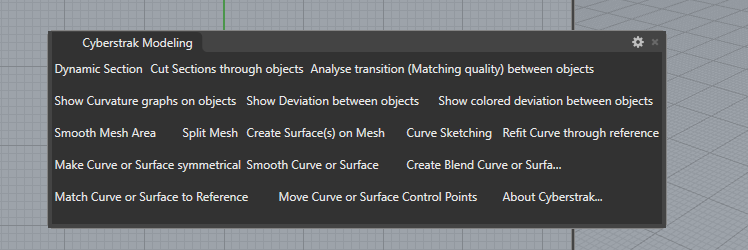
I also noticed, that the .rui file is much smaller than in Rhino 7. So I exported the created toolbar to a .rhc container file. This is bigger, so it contains also the icons. I can also drag it to Rhino and the toolbar is now shown correctly:

But how can I deploy it with my Plugin installation? In the past the recommendation was something like described here: Rhino - Creating and Deploying Plugin Toolbars
But if I have to load the .rhc - how can I do it programmatically?
Up to Rhino 7 I used in C++ SDK the CRhinoUiFile functions somehow like this:
cToolbar = cAppDataPath + L"Cyberstrak.rui";
UFileID = CRhinoUiFile::FileOpen(cToolbar);
if (UFileID != ON_nil_uuid)
{
iCount = CRhinoUiFile::ToolBarCount(UFileID);
UUID TB_ID = CRhinoUiFile::ToolBarID(UFileID, 0);
ON_wString cName = CRhinoUiFile::ToolBarName(UFileID, TB_ID);
But it looks as if they do not work for .rhc files. What can I do to deploy my toolbar with my Plugin installation that it pops up?
So far I used Rhino 7 toolbars in Rhino 8. But I wanted to take advantage of some R8 features like using different images for dar/light mode.