Hi Team,
Wondering if you can help me with this issue.
In Rhino 8 (Rhino 8 SR19 2025-5-12 )
I create 1 physically based material - all good.
When I create a second physically based material it will copy the properties of the first one. Thus I can only use 1 pbr at a time.
Image 1 - importing the first pbr material
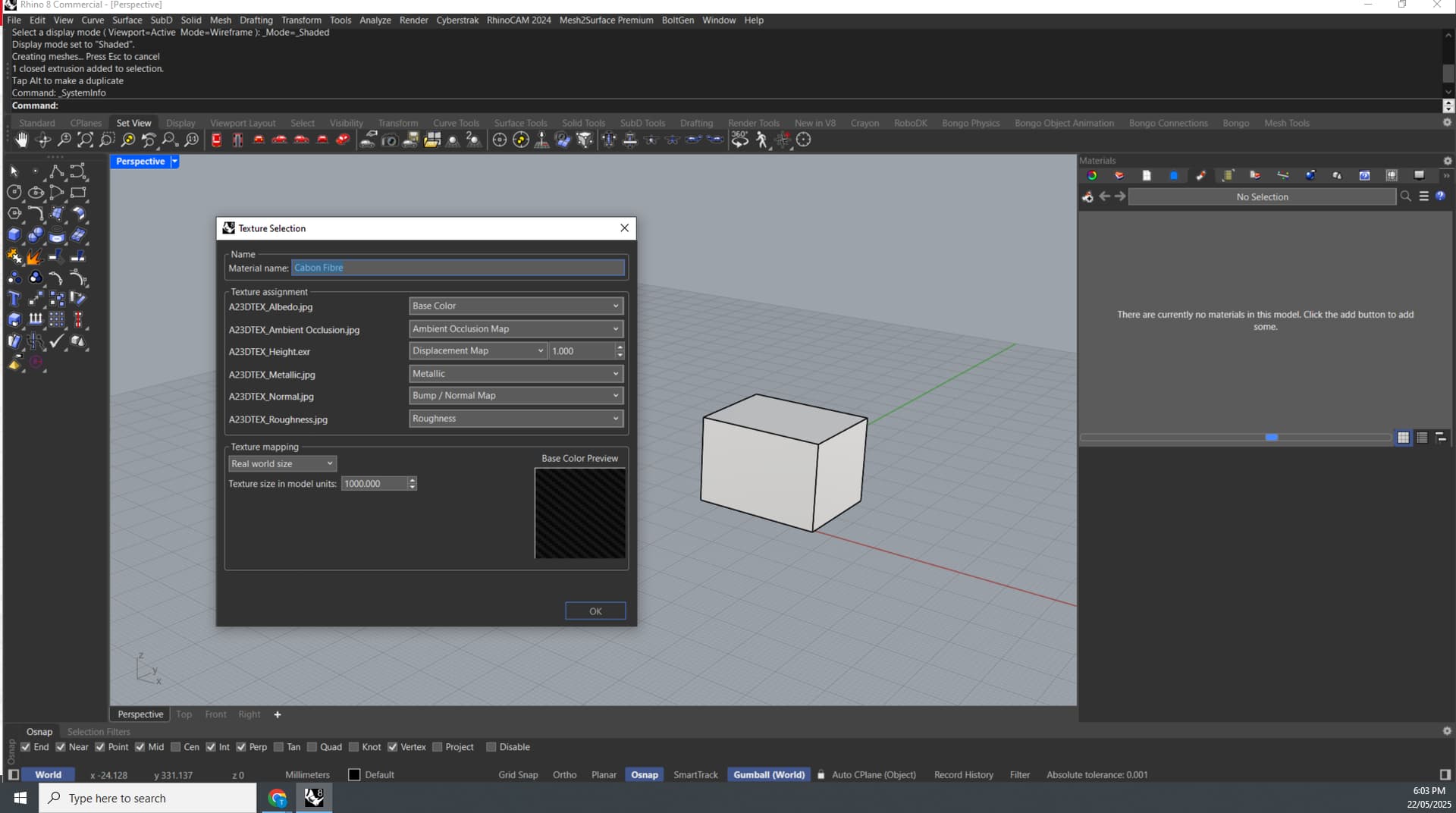
Image 2 - importing the second pbr material
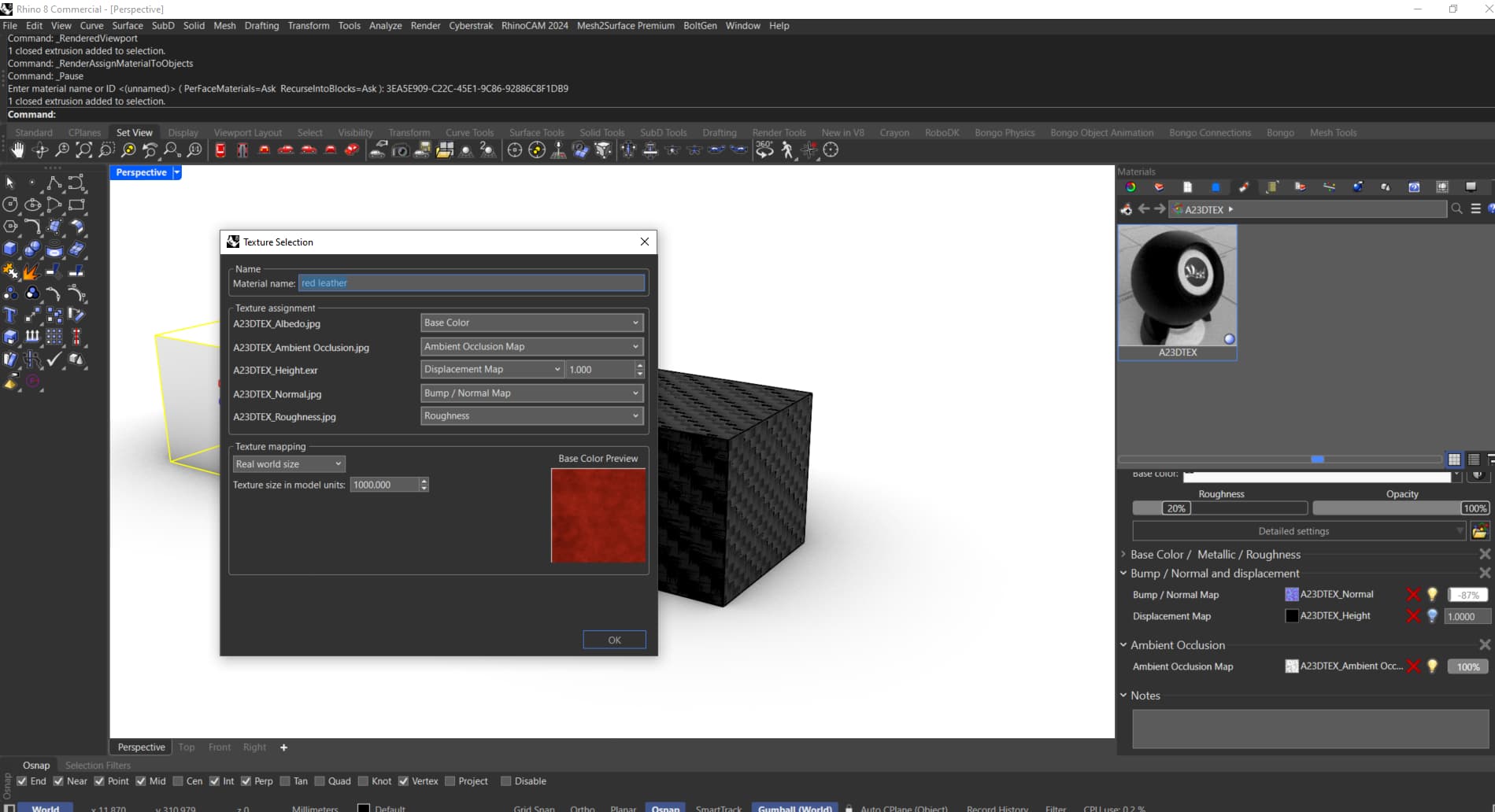
Image 3 - how the second material appears in the materials tab

This seems to happen in Rhino WIP too but not in rhino 7
Any Fixes or ideas welcome.
Cheers Tyler
here is my full system info:
Rhino 8 SR19 2025-5-12 (Rhino 8, 8.19.25132.01001, Git hash:master @ 57e3eb280b0f32cbe59f53a554be5e8ffa66fc36)
License type: Commercial, build 2025-05-12
License details: Cloud Zoo
Windows 10 (10.0.19045 SR0.0) or greater (Physical RAM: 64GB)
.NET Framework 4.8.9310.0
Computer platform: LAPTOP - Plugged in [96% battery remaining]
Hybrid graphics configuration.
Primary display: Intel(R) UHD Graphics (Intel) Memory: 2GB, Driver date: 11-26-2024 (M-D-Y).
> Integrated graphics device with 4 adapter port(s)
- Windows Main Display is laptop’s integrated screen or built-in port
- Secondary monitor attached to adapter port 1
- Secondary monitor attached to adapter port #2
Primary OpenGL: NVIDIA T1200 Laptop GPU (NVidia) Memory: 4GB, Driver date: 3-14-2025 (M-D-Y). OpenGL Ver: 4.6.0 NVIDIA 572.83
> Integrated accelerated graphics device (shares primary device ports)
- Video pass-through to primary display device
OpenGL Settings
Safe mode: Off
Use accelerated hardware modes: On
GPU Tessellation is: On
Redraw scene when viewports are exposed: On
Graphics level being used: OpenGL 4.6 (primary GPU’s maximum)
Anti-alias mode: 4x
Mip Map Filtering: Linear
Anisotropic Filtering Mode: High
Vendor Name: NVIDIA Corporation
Render version: 4.6
Shading Language: 4.60 NVIDIA
Driver Date: 3-14-2025
Driver Version: 32.0.15.7283
Maximum Texture size: 32768 x 32768
Z-Buffer depth: 24 bits
Maximum Viewport size: 32768 x 32768
Total Video Memory: 4 GB
Rhino plugins that do not ship with Rhino
C:\Program Files\Cyberstrak\R8\CS_ModelingPlugIn.rhp “Cyberstrak Modeling PlugIn”
C:\Program Files\Rhino 8\Plug-ins\RhinoCAM 2024 for R8\RhinoArt1FileExporter For Rhino8.0.rhp “RhinoArt1FileExporter”
C:\Users\tyler\AppData\Roaming\McNeel\Rhinoceros\8.0\Plug-ins\XNurbs (80be33b0-13b2-4ac4-9c77-03829214f9e9)\7.0.1.1\XNurbsRhino8.rhp “XNurbs”
C:\Users\tyler\AppData\Roaming\McNeel\Rhinoceros\packages\8.0\keyshot_studio\1.8.1\KeyShotStudioRhino8Plugin.rhp “KeyShotStudioRhinoPlugin” 1.0.0.0
C:\Program Files\Common Files\McNeel\Rhinoceros\8.0\Plug-ins\Crayon (39629248-4fa6-47b8-83c7-745a7efea259)\1.2.0.0\Crayon\Crayon.rhp “Crayon” 1.0.0.0
C:\Program Files\Rhino 8\Plug-ins\RhinoCAM 2024 for R8\RhinoCAM 2024 For Rhino8.0.rhp “RhinoCAM 2024 - The cutting edge CAM plug-in for Rhino 8.0 from MecSoft Corporation”
C:\Program Files\Scan&Solve Pro for Rhino 6 & 7\SnSPro_Rhino_6+7.rhp “Scan&Solve Pro for Rhino” 1.0.0.0
C:\Program Files\ADA 3D\Mesh2Surface for Rhino 6\m2s_for_Rhino.rhp “MESH2SURFACE”
Rhino plugins that ship with Rhino
C:\Program Files\Rhino 8\Plug-ins\Commands.rhp “Commands” 8.19.25132.1001
C:\Program Files\Rhino 8\Plug-ins\WebBrowser.rhp “WebBrowser”
C:\Program Files\Rhino 8\Plug-ins\rdk.rhp “Renderer Development Kit”
C:\Program Files\Rhino 8\Plug-ins\RhinoRenderCycles.rhp “Rhino Render” 8.19.25132.1001
C:\Program Files\Rhino 8\Plug-ins\rdk_etoui.rhp “RDK_EtoUI” 8.19.25132.1001
C:\Program Files\Rhino 8\Plug-ins\NamedSnapshots.rhp “Snapshots”
C:\Program Files\Rhino 8\Plug-ins\MeshCommands.rhp “MeshCommands” 8.19.25132.1001
C:\Program Files\Rhino 8\Plug-ins\RhinoCycles.rhp “RhinoCycles” 8.19.25132.1001
C:\Program Files\Rhino 8\Plug-ins\Toolbars\Toolbars.rhp “Toolbars” 8.19.25132.1001
C:\Program Files\Rhino 8\Plug-ins\3dxrhino.rhp “3Dconnexion 3D Mouse”
C:\Program Files\Rhino 8\Plug-ins\Displacement.rhp “Displacement”
C:\Program Files\Rhino 8\Plug-ins\Calc.rhp “Calc”
C:\Program Files\Rhino 8\Plug-ins\SectionTools.rhp “SectionTools”