I am new to Visual ARQ and I have a question related to the object GUID.
I used VisualARQ to add parameters to an object. When I need to modify the parameters, I have to bake the object again. So, Rhino will create new object with new GUID. This causes trouble for the estimation software to recalculate since it recognizes the object as a new one.
Is there any way to update the parameters of an object while can keep its original GUID?
If it can be done with GHpython it would be great.
@archdang you are welcome! There is already an API available for VisualARQ (although no documentation yet). In this thread you can find some details: VisualARQ API - #2 by enric
Thanks Francesc,
It is great to hear that the API is there I think it will be very helpful when the document is in place.
Also, I found a couple things related to the IFC export process that we need help please .
In Rhino, it is great that we can keep update attributes while keep GUID of object.
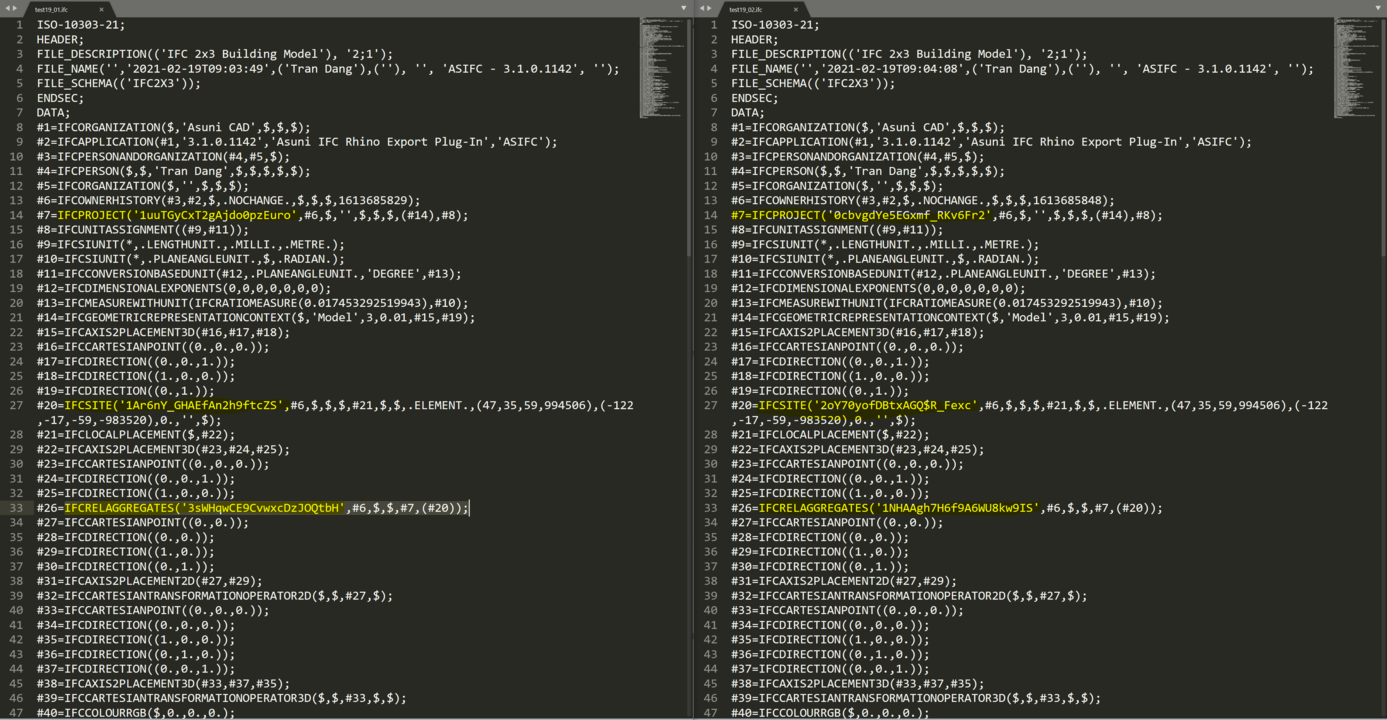
However, when I export to IFC files, the 3 values: IFCPROJECT, IFCSITE, IFCRELCONTAINEDINSPATIALSTRUCTURE: are keep changing. Only IFCPROXY is remained.
Please find attached images for the comparison.
My question are:
1.Could we control the values of IFCPROJECT, IFCSITE, IFCRELCONTAINEDINSPATIALSTRUCTURE?
2. What is the relationship between Rhino GUID and the IFC Guid of geometry when exported? is there any way to control them is your exporting process?
These values has affected our estimating process using a third party software since it based on GUID for checking revision.
Thank you in advance and your help is much appreciated.
Hi @archdang,
The information about ifcProject and ifcSite can be assigned to the document through the Document User Text dialog, or through the command line (SetDocumentUserText command). These are the user text keys available:
IfcProject_Name
IfcProject_Description
IfcProject_LongName
IfcProject_Phase
IfcSite_Name
IfcSite_Description
IfcSite_LongName
As regards objects GUID, VisualARQ always keeps the objects’ GUID when it exports them to IFC. But when the same model it’s imported, a new GUID is assigned to each object, and this new one will be exported to IFC the next time you export the model.
However, in other entities GUID (such as IfcSite, IfcProject, or relations…) a random GUID is generated each time the file is exported to IFC). We could make the GUID in these entities was preserved (when exporting the model to IFC), if you wish.
Dear Francesc,
Thank you for your response.
In our case, we need to preserve as much as possible all the GUIDs of those entities for revision purposes.
Could you please help us with that.
Thank you in advance
Best regards
Tran
Dear Francesc,
It should be great, we appreciate your supports. We are looking forward to trying the new version. A little hint about the release time frame should be great for us if you do not mind.
Thank you in advance,
Best regards
Tran Dang
Hi @archdang, it’s still soon to do a fair estimation when version 3 will be released. The earliest might be in 2022. Hopefully, we will release a WIP version in a few weeks that will be available for VisualARQ users.
Is it possible to get the guid of an object through the table property? I’m exporting data via a csv not the ifc export. I didn’t see any parameter that was a guid.
Hi @Benjamin_Paolo_Fortu there is no property in the table styles to list the objects ID. However, you can use a Custom parameter for that. You can use Grasshopper to create that parameter and assign the ID’s to objects with the Update Property component:
Thanks, that is what we are trying to do. We are generating our own guid using C# and putting it in the object as a parameter. If one is there the script runs if not it does not. Since the script will run every time any parameter changes we need to make sure the guid is persistent.