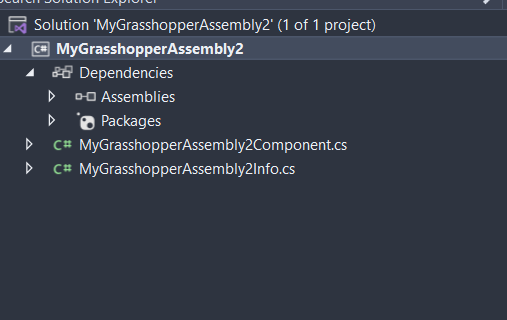
When I create a new GH project using the templated from the VS extension, I got the following structure:
There is no "AssemblyInfo.cs` file, whereas my old project had it.
Everything compiles with this structure. However, if I want to release it and use the official YAK method, an error occurs as there’s no AssemblyInfo file to look for information, even I provided everything in the MyprojectInfo.cs.
Question:
How to resolve this? Is there anything changed in the VS extension?
There’re many questions in the forum asking the difference between AssemblyInfo.cs and MyprojectInfo.cs, version number provided in both files etc. I hope the developer team could simplify or make clear the role of these files… IMHO, one of them is not actually needed – In my case here, the AssemblyInfo.cs has no use unless for the YAK to work…
Hi, you need to do two things in a modern .core application. But I think this might the problem anyway, are you targeting the framework 4.8 and not .Net Core?
inside the .csproj file disable autocreation of the AssemblyInfo by adding to the PropertyGroup node:
Then just manually add the AssemblyInfo.cs. (There is a template in Visual Studio for it).
In my non-Rhino project’s this is added to the old ‘Properties’ folder. So this folder needs to be created
then as well, although I’m not sure if you can just place it on top level.
To update, it seems I mis-used the YAK command.
As long as a .gha is provided, it seems even without assemblyinfo.cs, I can still spec the info from .gha.