Windows 10.0.19044 SR0.0 or greater (Physical RAM: 16Gb)
Computer platform: DESKTOP
Standard graphics configuration.
Primary display and OpenGL: NVIDIA GeForce RTX 2070 (NVidia) Memory: 8GB, Driver date: 3-17-2022 (M-D-Y). OpenGL Ver: 4.6.0 NVIDIA 512.15
> Accelerated graphics device with 4 adapter port(s)
- Secondary monitor attached to adapter port #0
- Windows Main Display attached to adapter port #1
OpenGL Settings
Safe mode: Off
Use accelerated hardware modes: On
Redraw scene when viewports are exposed: On
Graphics level being used: OpenGL 4.6 (primary GPU’s maximum)
Anti-alias mode: 4x
Mip Map Filtering: Linear
Anisotropic Filtering Mode: High
Vendor Name: NVIDIA Corporation
Render version: 4.6
Shading Language: 4.60 NVIDIA
Driver Date: 3-17-2022
Driver Version: 30.0.15.1215
Maximum Texture size: 32768 x 32768
Z-Buffer depth: 24 bits
Maximum Viewport size: 32768 x 32768
Total Video Memory: 8 GB
Rhino plugins that do not ship with Rhino
C:\Program Files\Rhino 7\Plug-ins\Tibidabo\Tibidabo.rhp “Tibidabo”
C:\Program Files\Doliwa Workshop\Rhino Nature\Rhino Nature.rhp “Rhino Nature” 1.0.2.42286
C:\Program Files\Rhino 7\Plug-ins\Tibidabo\VisualARQ.rhp “VisualARQ”
C:\Users\e.sares\AppData\Local\Programs\Enscape\Bin64\Enscape.Rhino7.Plugin.dll “Enscape.Rhino7.Plugin” 0.0.22102.1509
X:\11_RHINO\PLUGINS\SafeLayout\SafeLayout.rhp “SafeLayout” 1.1.0.0
C:\Users\e.sares\AppData\Roaming\McNeel\Rhinoceros\packages\7.0\EleFront\4.2.2\ElefrontProperties.rhp “ElefrontProperties” 1.0.0.0
C:\Users\e.sares\AppData\Roaming\McNeel\Rhinoceros\packages\7.0\SubstanceImporter\2.0.0\Substance.Win.rhp “SubstanceImporter” 2.0.0.0
I’m not sure if you meant to use the newly saved file as a template for a new file. I just reopened that newly created file but that showed the layout in the panel.
-wim
Hello! Thanks for the reply!
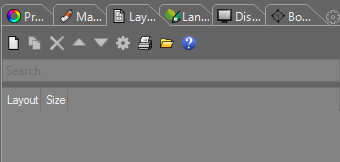
What I mean is this: when you open any file that contains layouts, and go to the Layout panel, it will not show anything. To trigger a refresh of the panel, you need to e.g. pan/zoom in any layout. Suddenly, the whole Layout list will reappear.
I’m still unable to reproduce that behavior here.
What happens when you disable all the non-default plug-ins, create a new file with layouts, and then reopen that file?
-wim