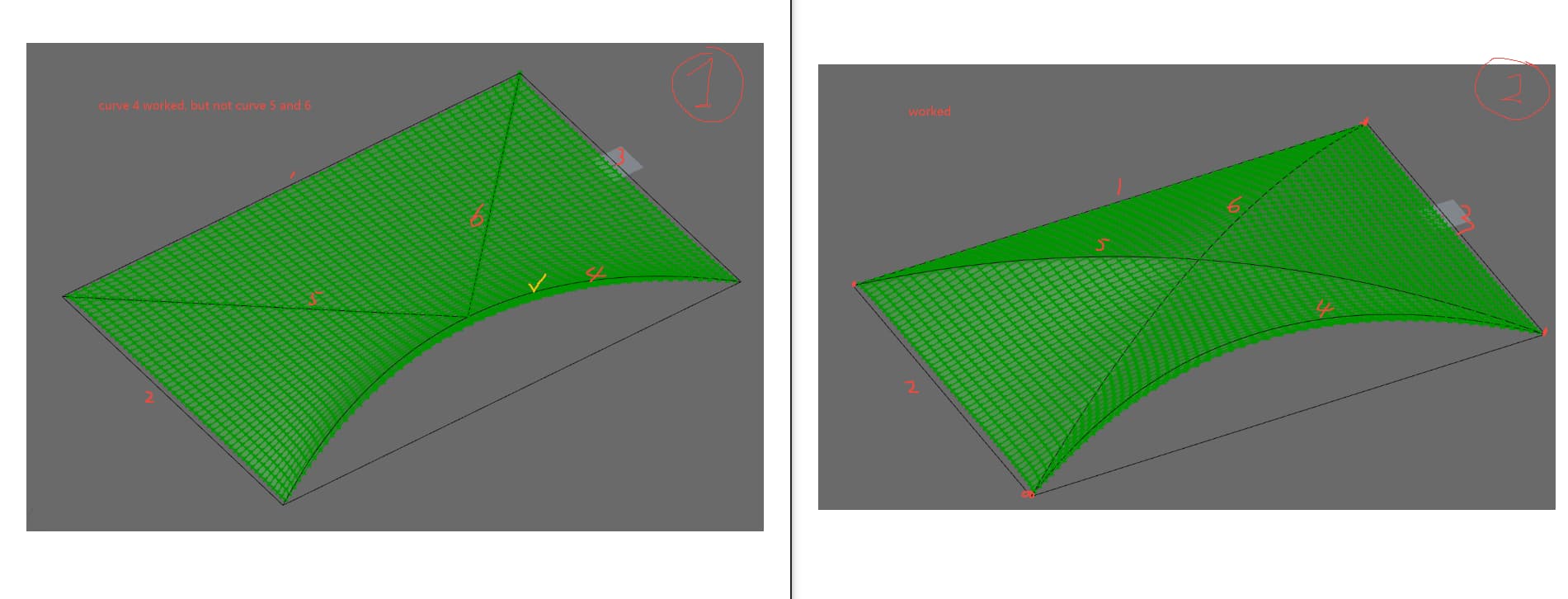
I am trying to simulate a soft film that is anchored by a several lines, but having problems with curve 5 and 6. It works fine when curve 5 and 6 are connect at the vertexes, but it does not work when curve 5 and 6 land in the middle of curve 4. Does anybody know why? Is it because of that the end points of curve 5 and 6 must land on vertices of the big rectangle boundary?
Let me be more explicit. These red - marked points are not mesh points, while the others are.
How does K2 determine which points are mesh points? It does so by measuring the distance. Specifically, the non - red points are extremely close to the points on the mesh. Therefore, K2 includes them in the simulation. In contrast, the red - marked points are too distant from the mesh vertices.
Thanks for your reply! It makes sense, however, looking at the images below, does that mean that points on curve 5& 6 in image 2 are closer to the mesh, and points on curve 5&6 in image 1 are away from the mesh, determined by K2? Is there a way to adjust the threshold of distance that K2 is calculating? Is there a way to make image 1 work? Should I cull the points on the mesh that are close to curve 5 and 6, and have those points pulled toward curve 5 and 6? (Image at the bottom wit the yellow zone)
Should I cull the points on the mesh that are close to curve 5 and 6, and have those points pulled toward curve 5 and 6? (Image at the bottom wit the yellow zone)