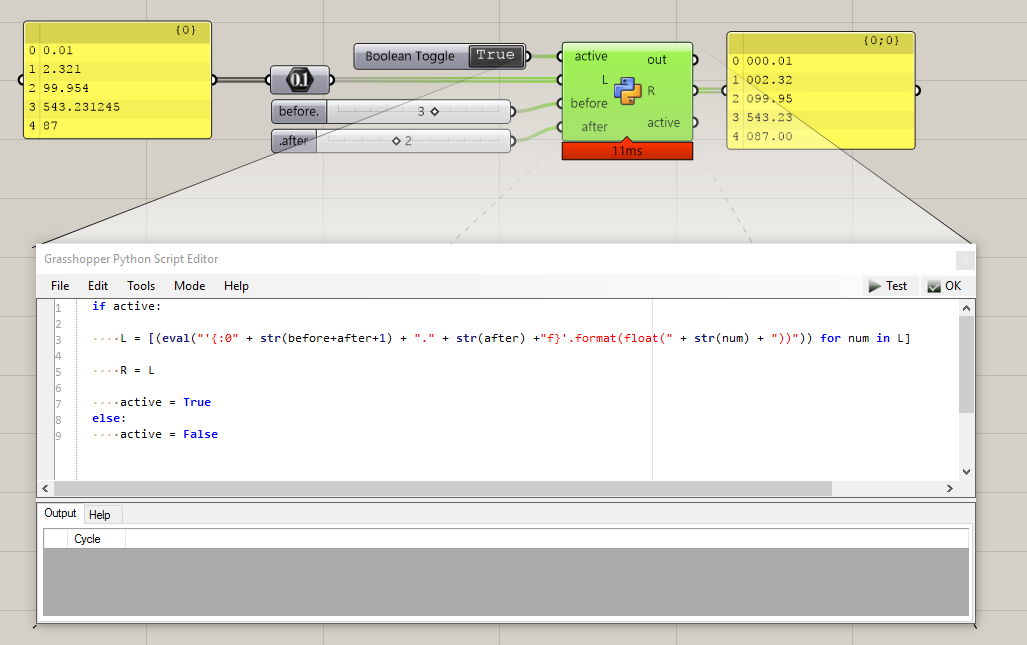
I am using Elefront to generate text objects from a spreadsheet. I need these numbers to be displayed at 2 decimal places. They currently go from 0 to MANY decimal places. I can’t find a way to format numeric output to just 2 decimals. Feeling dumb - it could be Excel - or Grasshopper - or something in Notepad…
Perhaps someone may find this useful so I thought I’d share. I wrote this Python script to make number formatting a bit more intuitive for my own uses. Note: the script only adds/ removes padding, it doesn’t do anything for exponents.
And FYI, below is s a link to David Rutten’s post on the subject on the old grasshopper site.
Regards,
Ole
the Round component in Rhino 6 + Grasshopper 1.0.0007 does not look like that. Where did that one come from? Also, I can’t seem to get the desired results from the expression…
OK - I don’t have Pufferfish installed. I solved the Expression failure. SubSet was putting out a string. Adding a Number component between SubSet and Expression fixed it.