As part of creating trees, I have hundreds or maybe even thousands of polylines that I want to pipe. The radius varies along the polyline. I tried:
Pipe Variable (VPipe): It doesn’t create continuous pipes when used with polylines. A solution is to rebuild the polylines as splines, but it’s not quite what I want. I want the kinks.
MultiPipe (MP): This does a good job. However, it is way too slow to be usable.
The output can be a low resolution mesh. Below is an example that I built manually. In this example, the radius stays the same for about half the distance, then gets much thinner towards the end.
How fast is fast for piping polylines? I thought MP was pretty fast, but I’m guessing you’re doing this for many polylines?
Several ways, simplest (my guess) is to loft/sweep + scale a polygon section along the polyline and the likes, but you might have to align + rotate planes and what not—why do that when Mesh Pipe (see here or attached .gha) has existed for ages and it’s faster than anything. You can pipe your polyline(s) rapidly and then grab some plane data from edge loops (rely on handy Warp Weft for that), scale them, and pull the vertices. That could be one opportunistic way: MeshPipe_vary_cross-section.gh (35.1 KB)
Some tools are slow because they generate a mesh for each polyline. It is far more efficient to generate ONE mesh for a list of polylines.
Here is the result I have with 69902 polylines, 30 s with Mesh Pipe, vs 2.2 s with a single mesh as output.
It is not the scripted way that is fast but that it is more efficient to output a big mesh (that is a join of many meshes) than many meshes. It could be good to have a version of Mesh Pipe that reads a list of curves rather than one curve at a time.
Not horrible. But it’s a polyline with only 5 vertices…and I’d still have to take care of varying radii…
Could you share a basic example? How are ~70k 3D polylines piped with varying radii and meshed as a single mesh? Topologized first? Not sure how I’d achieve that natively along with the varying radii!
Also I guess we don’t know how many polylines we’re dealing with, whether they’re all copies or different.
I tried something myself, obviously shooting in the dark brute force/limited know-how, where at most I transform (cheat) the per-face vertices of ONE guide mesh pipe to all 90k instances. It only takes a couple of seconds, but it’s making multiple meshes as opposed to a single mesh, and I still need to combine/weld it: unnamed.gh (22.7 KB)
My summary of your algorithm: Pipe with meshpipe, then rescale the cross section curves with a factor based on their position along the input curve.
Find below an example where your algorithm is applied to a little sample tree. I restructured your definition in order to understand it better. And I did some changes to the algorithm. Most notably, I changed the way cross section curves are detected based on them being closed curves. I have no closed curves in my input curves. I also made it work for a list of input curves instead of just one.
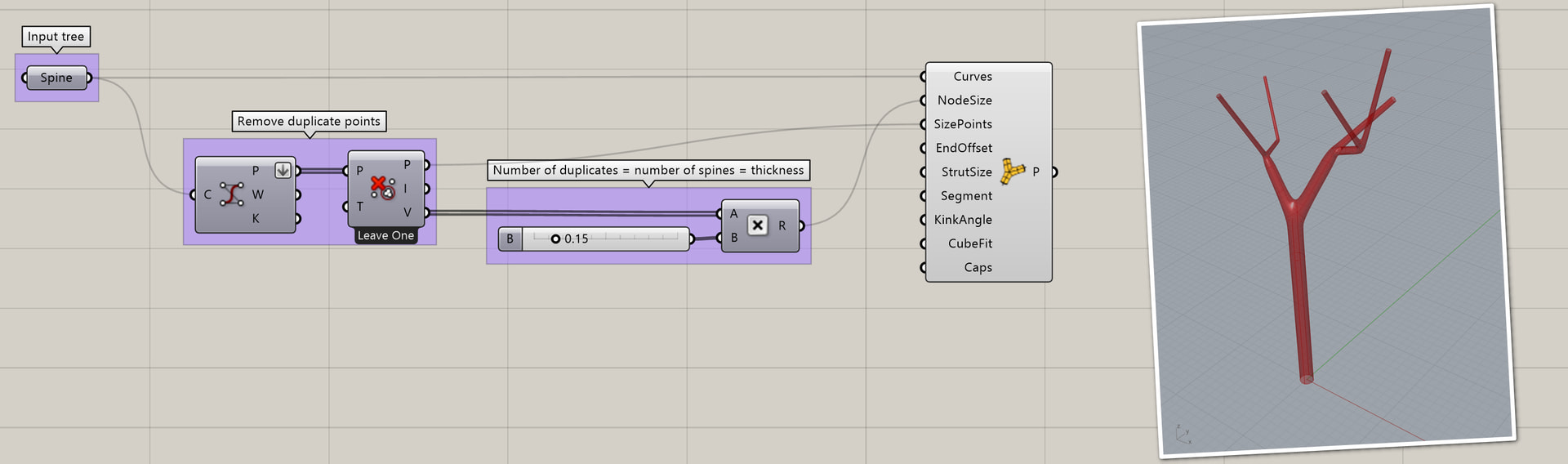
This is interesting and made me come up with an alternative algorithm. Instead of tapering pipes, it varies the amount of pipes. Each pipe has the same diameter. Thus the piping operation can be done in one go. The look might work for my use case, which is modeling banyan trees.
Thank you for the offer! I might want to test drive it later. For now, I would like to try if – with the wonderful help in this forum – I can find a simple way to create trees with not much more than the internal Grasshopper tools.
My goal is to have a decent solution with as few parameters as possible.
This morning in the shower, I realized it should be possible to have the thickness at each vertex be defined by the number of spines that go through it. Each spine is a poly line that connects a tip, or leaf, with the root of the tree.
I’m a bit surprised you’re finding MultiPipe too slow.
Here’s an example with over a thousand lines, and it’s still quite interactive when adjusting sliders: treepipe.gh (13.0 KB)
Are you maybe trying to apply this to many separate trees? If this is the case then the path structure matters, so it builds each graph separately.
This example also makes use of the node sizing interpolation in MultiPipe - if you input sizes at only some of the points (here just the tips of the outer branches and the root point), it automatically blends the sizing at the intermediate nodes.
edit- just saw you’re talking about hundreds of thousands of curves. In this case the SubD rendering probably adds a fair bit of overhead. You can connect a mesh parameter to the output of MultiPipe and hide the preview for the component itself to avoid generating the mesh of the SubD as preview. Still I can see it might be useful to have an option for the component to skip the SubD step altogether and only output the mesh.
I’ve helped design art pieces with thousands of mesh pipes. In our situation blending was not needed and we exported *.stl files with thousands of individual round capped mesh pipes.
If this isn’t a learning project or something you’re doing for the challenge, there is a pretty cool tree making utility called Arbaro. It creates the trees outside of Rhino, saving them as obj files.
I just updated my earlier example to use the same size distribution as above. This example is based on the meshing algorithm by @René_Corella. There are no artifacts:
Thanks for the suggestion! I have used SpeedTree in the past, which is very sophisticated. However, in the end I need to model many trees that are partially fused, with roots and branches all over the place. SpeedTree is great for modeling standard trees, which can be realistic or cartoon like. Once you want to do shapes that involve several trees or a banyan tree with lots of prop roots, that is a major pain. The software is not made for that.
What I need this for is visualization of houses grown from trees, such as my Hyperboloid Banyan. I want to see how far I can get with just Grasshopper. In the past, for visualization, I’ve mixed roots generated with Grasshopper and chopped up mesh models of trees from 3D libraries. I never really liked that workflow. Other practitioners in the field simply use lots of Photoshop. I also looked into machine learning based image generators, but the output is totally random.
I think that you should take a pencil, eraser and a pad of paper and head to the park and sketch a few trees. Sketch the tree from the side and from the top (you can’t fly, but you can note from which side of the trunk of the tree a branch branches out as you move up the tree trunk). You’ll notice a few things. Like that branches never spilt by more than two at a time. That to a branching there is a major continuous and minor offshoot direction. And that there is a maximal angle between branchings.
I understand that you are going for a simplistic rendition, but maybe you’ll think of something easy to implement that will make these tree look a little more convincing than they currently are. I don’t know how important these many tiny branches are. More important is a convincing stem and floating foliage to convince the viewer of the general shape of the canopy (less spherical, more ellipsoidal.)
This is a snap that I took two days ago while in the middle of a call out in the field. The almost mini tree growing out of the branch caught my eye. Here in Guangxi, China, some trees have shed their leaves for winter.
Anyhow, this thread is really about the piping, although I’m also interested in making the general tree shape more convincing. I created another thread about the branches: Fusing branches to make generated tree more realistic
For that thread, I went from 3D to 2D to further reduce complexity for purpose of discussion. In 2D, it should be fairly straight forward to draw a graph with realistic branching and then get it pulled into position with Kangaroo. However, in 3D that looks harder, and I might want to ditch Kangaroo because of performance and complexity.
Regarding canopy shape: That’s something for later. And, also, I’m looking for a kind of balance between realism, practicality and simplicity. My goal is to model dozens of trees, fused together and with a shared canopy. I would love to have a flexible solution for prototyping. But if one is not careful, then complexity gets in the way. It’s easy to introduce too many parameters.
In the end, the highest level of realism is achieved by actually planting the trees.
Thank you for your insights! As you might have seen when reading the previous messages, I mentioned five days ago that the example here is not supposed to be a very realistic tree. This thread is about piping polylines.
Back on topic:@DanielPiker I tried to create a minimal example to replicate the spike artifact. But I realized that once I remove curves, the spike gets shorter and shorter. That seems to be independent of which curves I remove.
Below is the same example as before, just with the geometry baked and a simpler Grasshopper definition.