Debugging Rhino on production server

I have been able to setup Compute server in production via these docs.

Everything was working last time I tested, but when I was testing again today I started getting 500s and I can’t tell why. I even tried the basic twisty example:

  pt1 = rhino3dm.Point3d(0, 0, 0)
  circle = rhino3dm.Circle(pt1, 5)
  angle = 20

  # convert circle to curve and stringify
  curve = json.dumps(circle.ToNurbsCurve().Encode())

  # create list of input trees
  curve_tree = gh.DataTree("RH_IN:curve")
  curve_tree.Append([0], [curve])
  rotate_tree = gh.DataTree("RH_IN:rotate")
  rotate_tree.Append([0], [angle])
  trees = [curve_tree, rotate_tree]
  gh.EvaluateDefinition("gh/twisty.gh", trees)

Response

    response = Util.ComputeFetch(url, args)
               ^^^^^^^^^^^^^^^^^^^^^^^^^^^^
.../site-packages/compute_rhino3d/Util.py", line 35, in ComputeFetch
    return r.json()
           ^^^^^^^^
    raise RequestsJSONDecodeError(e.msg, e.doc, e.pos)
requests.exceptions.JSONDecodeError: Expecting value: line 2 column 1 (char 2)

The response is a JsonDecodeError but that’s not very helpful.
Under that error it’s a standard 500 “Internal Server Error” html page with no json payload,
so it can’t be serialized .

Compute Liveness

❯ curl -H "RhinoComputeKey: $KEY" $COMPUTE_URL/activechildren
5⏎

Logs

In the production server, I can see logs and the 500 errors as expected:

# C:\inetpub\logs\LogFiles\W3SVC2
...
2025-07-25 20:42:28 10.138.0.5 POST /grasshopper - 80 - 34.125.14.33 compute.rhino3d.py/0.12.2 - 500 0 0 32
2025-07-25 20:43:30 10.138.0.5 POST /grasshopper - 80 - 34.125.14.33 compute.rhino3d.py/0.12.2 - 500 0 0 30

and here:

# C:\inetpub\wwwroot\aspnet_client\system_web\4_0_30319\rhino.compute\logs
RC   [20:41:52 INF] Max concurrent requests = 0
RC   [20:42:28 ERR] HTTP POST /grasshopper responded 500 in 4.3887 ms
RC   [20:42:52 INF] Max concurrent requests = 1
RC   [20:43:30 ERR] HTTP POST /grasshopper responded 500 in 2.7354 ms
RC   [20:43:52 INF] Max concurrent requests = 1

These confirm the 500 error but do not provide any of the internal error details.

Is there any other log files I can look at to know more about the root cause?
Is there a way to enable verbose logging for compute or compute.geometry?
(didn’t see anything here - Rhino - Deployment to Production Servers)

I also tried calling via the hops component but was not able due to the issue reported here

PS: @AndyPayne

You can enable verbose logging by following the steps here: Rhino - Frequently Asked Questions

I think having more verbose logging will be helpful here.

Looks like possibly startup issue @AndyPayne ?

CG  [22:16:00 DBG] Hosting starting
CG  [22:16:01 FTL] Application startup exception
System.Runtime.InteropServices.COMException (0x80004005): Error HRESULT E_FAIL has been returned from a call to a COM component.
   at Rhino.Runtime.InProcess.RhinoCore.InternalStartup(Int32 argc, String[] argv, StartupInfo& info, IntPtr hostWnd)
   at Rhino.Runtime.InProcess.RhinoCore..ctor(String[] args, WindowStyle windowStyle, IntPtr hostWnd)
   at Rhino.Runtime.InProcess.RhinoCore..ctor(String[] args, WindowStyle windowStyle)
   at compute.geometry.Startup.RhinoCoreStartup() in /home/runner/work/compute.rhino3d/compute.rhino3d/src/compute.geometry/Startup.cs:line 46
   at compute.geometry.Startup.Configure(IApplicationBuilder app) in /home/runner/work/compute.rhino3d/compute.rhino3d/src/compute.geometry/Startup.cs:line 33
   at System.RuntimeMethodHandle.InvokeMethod(Object target, Void** arguments, Signature sig, Boolean isConstructor)
   at System.Reflection.MethodBaseInvoker.InvokeDirectByRefWithFewArgs(Object obj, Span`1 copyOfArgs, BindingFlags invokeAttr)
   at System.Reflection.MethodBaseInvoker.InvokeWithOneArg(Object obj, BindingFlags invokeAttr, Binder binder, Object[] parameters, CultureInfo culture)
   at Microsoft.AspNetCore.Hosting.ConfigureBuilder.Invoke(Object instance, IApplicationBuilder builder)
   at Microsoft.AspNetCore.Hosting.GenericWebHostService.StartAsync(CancellationToken cancellationToken)

This comment indicates possible license issue?

… The errors seen below are typically indicative that there is a problem with Rhino getting a valid license.
System.Runtime.InteropServices.COMException (0x80004005): Error HRESULT E_FAIL has been returned from a call to a COM component.
Trouble following Compute Deployment tutorial - #5 by AndyPayne

Possibly related, I have not been able to launch Rhino UI on this machine.

I followed this recommendation and delete all contents of license folders, restarted server but no luck.

I did verify the RHINO_TOKEN matches my license auth token.

I can also see there has been no usage on core-hour-billing license.


One random thought, I did make a few changes related to license management (change team owner, renamed team etc). I am wondering if this could have broken something related to the core-billing license?

I recall during setup script prompts for user email email.
Does the server persist and use it for anything related to license (I am guessing no, since docs mention it uses email to download rhino). I also don’t see anything related to team or user email in ENV vars, only the RHINO_TOKEN which appears to match our auth token

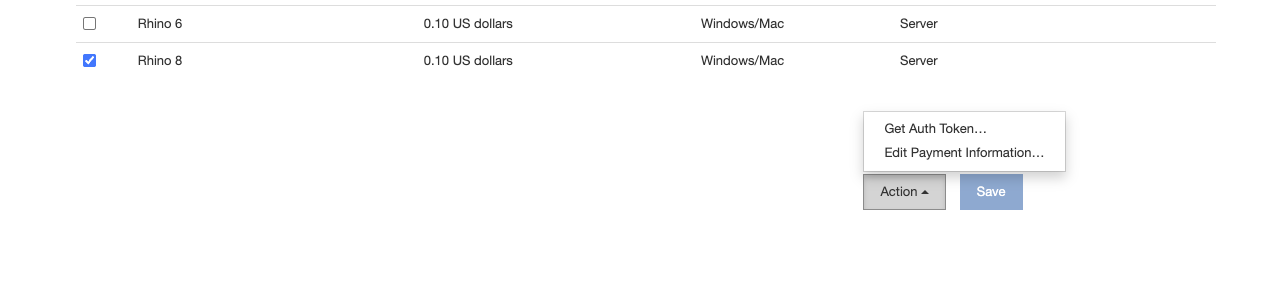
You may need to check the license portal. I have noticed occasionally I’ll have to click a check box next to the product I want to use and then “save” the user preferences. Do you see anything like that? And you said you’ve confirmed that the auth token stored in your env variable matches what you see in the license portal?

Do you see anything like that? And you said you’ve confirmed that the auth token stored in your > env variable matches what you see in the license portal?

Looks ok on license portal. Also triple checked the token, although it has also not changed since it was last working.


If you uncheck and then recheck the Rhino 8 product, do you see a little sentence show up asking if you agree to the terms? What happens if you check the Rhino 9 checkbox? I don’t exactly know why this happens (I’m not as involved in the licensing part) but I’ve occasionally had to re-agree to that statement and then hit save and then the licensing started working again. Perhaps @brian could help here.

1 Like

I did try unchecking and re-checking + save

After unchecking then checking and save was there a statement that showed up? Did you retry hitting your server?

1 Like

@AndyPayne sorry for the delay, disconnected over the weekend.

was there a statement that showed up

Just the standard billing ack.

I did try hitting the server and still getting the same startup error.

CG  [20:42:03 FTL] Application startup exception
System.Runtime.InteropServices.COMException (0x80004005): Error HRESULT E_FAIL has been returned from a call to a COM component.
   at Rhino.Runtime.InProcess.RhinoCore.InternalStartup(Int32 argc, String[] argv, StartupInfo& info, IntPtr hostWnd)
   at Rhino.Runtime.InProcess.RhinoCore..ctor(String[] args, WindowStyle windowStyle, IntPtr hostWnd)
   at Rhino.Runtime.InProcess.RhinoCore..ctor(String[] args, WindowStyle windowStyle)
   at compute.geometry.Startup.RhinoCoreStartup() in /home/runner/work/compute.rhino3d/compute.rhino3d/src/compute.geometry/Startup.cs:line 46
   at compute.geometry.Startup.Configure(IApplicationBuilder app) in /home/runner/work/compute.rhino3d/compute.rhino3d/src/compute.geometry/Startup.cs:line 33
   at System.RuntimeMethodHandle.InvokeMethod(Object target, Void** arguments, Signature sig, Boolean isConstructor)
   at System.Reflection.MethodBaseInvoker.InvokeDirectByRefWithFewArgs(Object obj, Span`1 copyOfArgs, BindingFlags invokeAttr)
   at System.Reflection.MethodBaseInvoker.InvokeWithOneArg(Object obj, BindingFlags invokeAttr, Binder binder, Object[] parameters, CultureInfo culture)
   at Microsoft.AspNetCore.Hosting.ConfigureBuilder.Invoke(Object instance, IApplicationBuilder builder)
   at Microsoft.AspNetCore.Hosting.GenericWebHostService.StartAsync(CancellationToken cancellationToken)

There was a (supposed non-breaking) change to Rhino Account tokens over the past week. Can you please generate a new one and see if that changes anything? It’s unfortunate that we have so little visibility into the actual issue.

1 Like

@brian I did try unchecking rhino and re-checking but auth token did not change.
I also do not see any buttons to revoke/regen.

@Gui_Talarico Can you download and run the rh8_debug_logging.reg file? Just unzip the file and then double click on the .reg file. This file will enable debug logging in Rhino which might tell us something new about licensing during startup. Rhino will write the debug logs to RhinoDebugMessages.txt in the Documents folder.

After running the reg file and restarting your VM, try manually running Rhino. This will look for the same core-hour billing license that rhino.compute uses and hopefully we’ll be able to find out some more information.

rh8_debug_logging.zip (420 Bytes)

1 Like

I also do not see any buttons to revoke/regen

I suppose I can do this by creating a new team but seems like it should be possible to revoke token… :thinking:

@AndyPayne will try this and report back

@AndyPayne full log below. Confirming license issue.
@brian let me know if you all have a way to rotate the auth token from your end (or if I missing something and there is a way for me to do it). If not I will create new team to get a new core-hour-billing token. FYI I tried and it requires me to re-enter all payment + billing info which is going to be a bit of a process to get again.

RhinoDebugMessages.txt (11.7 KB)

...
20:40:42	  Detected Windows Server	[D:\BuildAgent\work\dujour\src4\rhino4\rhino3.cpp line 9606]	Command: [none]
20:40:42	  RHINO_TOKEN detected	[D:\BuildAgent\work\dujour\src4\rhino4\rhino3.cpp line 9617]	Command: [none]
20:40:43	LoadAllLicensesByFileDate starting	[ line 0]	Command: [none]
20:40:43	LoadAllLicensesByFileDate searchPath: C:\Users\<user>\AppData\Roaming\McNeel\Rhinoceros\6.0\License Manager\Licenses	[ line 0]	Command: [none]
20:40:43	LoadAllLicensesByFileDate searching: *.chk	[ line 0]	Command: [none]
20:40:43	LoadAllLicensesByFileDate searchPath: C:\Users\<user>\AppData\Roaming\McNeel\Rhinoceros\6.0\License Manager\Licenses	[ line 0]	Command: [none]
20:40:43	LoadAllLicensesByFileDate searching: *.lic	[ line 0]	Command: [none]
20:40:43	LoadAllLicensesByFileDate searchPath: C:\ProgramData\McNeel\Rhinoceros\6.0\License Manager\Licenses	[ line 0]	Command: [none]
20:40:43	LoadAllLicensesByFileDate searching: *.lic	[ line 0]	Command: [none]
20:40:43	Initialize license manager	[D:\BuildAgent\work\dujour\src4\rhino4\rhino3.cpp line 4911]	Command: [none]
20:40:43	Enable license checking	[D:\BuildAgent\work\dujour\src4\rhino4\RhinoLicense.cpp line 956]	Command: [none]
20:40:43	Connection established with license manager	[D:\BuildAgent\work\dujour\src4\rhino4\RhinoLicense.cpp line 1005]	Command: [none]
20:40:43	Get license from license manager	[D:\BuildAgent\work\dujour\src4\rhino4\RhinoLicense.cpp line 1006]	Command: [none]
20:40:44	Killing splash screen	[D:\BuildAgent\work\dujour\src4\rhino4\RhinoLicense.cpp line 890]	Command: [none]
20:40:47	The license is not valid	[D:\BuildAgent\work\dujour\src4\rhino4\RhinoLicense.cpp line 1040]	Command: [none]

Looks like your account got removed from the team, and therefore the core-hour billing token isn’t valid. Please have x-light-* email account add you back to the team, or use that account to generate your core-hour billing token.

I am currently logged in as the account that controls the team (just dm’d you screenshot).

(edit)
I used to also have my personal account (gmail) belong to this team.

Was the token somehow made invalid because a user that used to be on the team is no longer in it? Should UI indicate the auth token is not valid?

Update:
I re-added my personal account (gmail) to the team and rhino UI is now booting up.
Is this because my personal account was previously the team owner?

It’s because your personal account was the creator of the token. When your personal account was removed, it got stripped out of the team and therefore didn’t have core-hour permissions. So in order for this to work, you need to log in as the team owner and generate a new core-hour billing token from that account.

1 Like

Thanks @brian - I am finally able to complete requests :clap:

In retrospect, I would be helpful if UI or logs pointed to auth token issue for easier debugging.
Also, the web UI for license manager seems to indicate core-hour tokens exists at the team level, so it never occur to me deleting a team user from the team would have this side effect.

Also thanks @AndyPayne for the relentless support

1 Like

Hi @Gui_Talarico, I’m glad you’re back up running, and I apologize on behalf of McNeel for the trouble.

I built much of the server-side infrastructure of for Cloud Zoo, which includes Core-Hour Billing.

Truth be told, the way compute handles licensing on the client-side is simply by bending and twisting our existing licensing code to function in “headless” mode. When we give you an “auth token” from https://www.rhino3d.com/licenses, we are simply embedding an OAuth2 token in it that Rhino would normally fetch itself when it’s running normally to authenticate with Cloud Zoo. By definition, the OAuth2 token has to have an owner, so the user who requests the OAuth2 token from the UI over at https://www.rhino3d.com/licenses becomes the owner of that token. If that user is removed from the team that has core hour billing enabled, Rhino won’t be able to renew a license lease from Cloud Zoo.

Had you been removed from the team with regular Rhino, you would have received an appropriate error message of what happened rather than the cryptic HRESULT E_FAIL

AJ

1 Like