Hi all, I found that it is a tedious job to copy elements from one model to another model manually, more over, it is a lot of constraint – you need to specify the ref level(base, top constraint, offset etc.)…I wonder if it is possible to use RIR to copy multiple elements to another model on the same place?
Is it possible that we can let RIR read all the elements’ parameters and copy the elements to another model?

Hi Jack,
I changed your forum category to Rhino.Inside - Revit.
You can use the Duplicate Elements component to go from one file to another (Zoom in to add the Document input)

In general Rhino.Inside - Revit components are a single Revit API functions, ensuring levels, parameters and other variables that are required will need to be accounted for separately per your particular workflow.


I see… when I duplicate the lighting fixtures, I need to duplicate their host – the floor as well.
My bad, it works now, many thanks Japhy!!
I think using RIR to duplicate elements is easier – you don’t need to specify the aligned level.
Seems like RIR is more clever that it knows which level the element should go to.
Like i mentioned above, RiR components are simple Revit API functions. In this case its ElementTransformUtils.CopyElements
I believe you would get the same result (maintaining the level if its in the other document) with one of the paste special commands in the Revit UI

CopyFromSourceToTarget.gh (6.6 KB)
Here is a scripted version that was used before the RiR Duplicate Component came along, which is the same function.
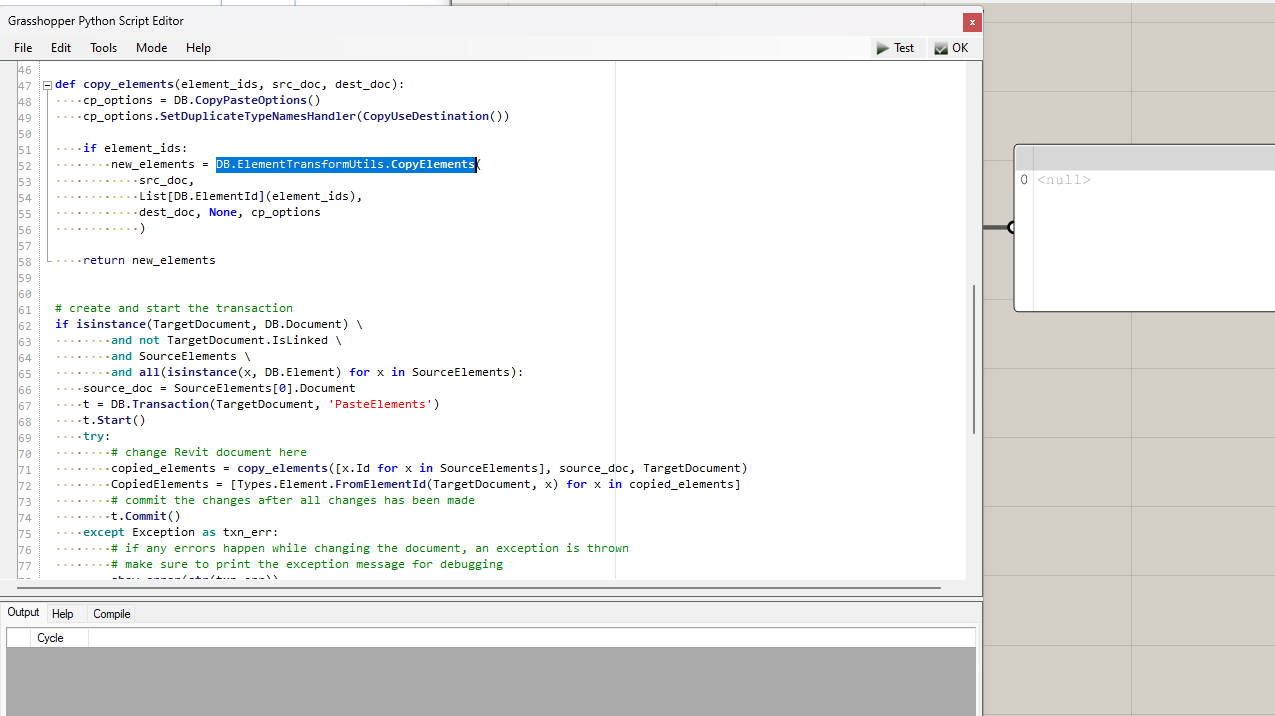
Nice, thanks Japhy
Hi Japhy, is it also possible to duplicate elements from one Design Option to another Design Option? Thanks
Changing the Design Option is not exposed in the Revit API, its a long standing open feature request in the Revit API.
I see, thanks Japhy