Is a compiler warning about .NET core 7.0 expected for a newly created RhinoCommon plugin using the McNeel template? TestOf70.zip (255.6 KB)
Visual Studio 2022 with the Rhino template extension v8.0.0.0 installed.
rhino_en-us_8.0.23264.09003 (sept 21 build)
Create a new RhinoCommon project. Pick V8 as the target.
Upon the solution getting created, there’s a warning on the 7.0 dependency warning for the RhinoCommon package.
This warning is repeated when compiling:
1>C:\devrepro\TestOf70\TestOf70\TestOf70.csproj : warning NU1701: Package ‘RhinoCommon 8.0.23164.14305-wip’ was restored using ‘.NETFramework,Version=v4.6.1, .NETFramework,Version=v4.6.2, .NETFramework,Version=v4.7, .NETFramework,Version=v4.7.1, .NETFramework,Version=v4.7.2, .NETFramework,Version=v4.8, .NETFramework,Version=v4.8.1’ instead of the project target framework ‘net7.0’. This package may not be fully compatible with your project.
Is this a Rhino issue, do I have a broken install, or is it a result of Rhino supporting 4.8 and 7.0 which isn’t actually an issue to deploy (Win+Mac)?
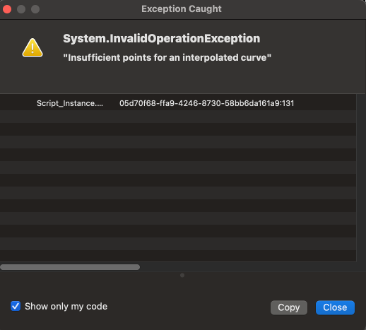
I’m having the same problem with my recent install of Rhino 8. I’m also having serious problems with my de-bugger. I don’t know if the two are related but I’ll show the problem anyways.
This makes reference to a Rhino.Geometry.Curve.CreateInterpolatedCurve call. I have only one inside my code which is now imbedded inside an IF statement limiting the execution of the call to a situation of points.Count >= 25. An IF statement that never jumps to the ELSE.
The call to CreateInterpolatedCurve is also error trapped which doesn’t seem to be catching anything. I tried playing with some of the de-bugging properties in VS Studio, to no avail. (I’m not really sure what goes where on that one.)
This is just one example. There are others. If I’m trying out some code in a C# component on the Grasshopper palette and it hits an error, sometimes Rhino hangs completely and I lose all my work.
It never fails. I’ve been struggling with this problem for about a week before I gave in and asked for help. Sure enough, as soon as I send out the post I figure it out. Or at least some of it. The source seems not to be in my code inside VisualStudio with all my error trapping but, rather, in one of my C# components on the Grasshopper palette. Ones that I used to develop the code that eventually went into VisualStudio. I’ve deleted a whole bunch of these and the problem seems to have disappeared.
Still, I’m sure it will come back again, so any suggestions would be appreciated.