Hi, the add-on is showing, but I cannot enable it.
I’m getting the following error - can you help:
import_3dm: This platform (macos-x64) isn’t one of (windows-x64, macos-arm64, macos-x86_64, linux-x86_64)
Thanks.
Hi, the add-on is showing, but I cannot enable it.
I’m getting the following error - can you help:
import_3dm: This platform (macos-x64) isn’t one of (windows-x64, macos-arm64, macos-x86_64, linux-x86_64)
Thanks.
I must admit I haven’t tested on Intel Mac as I don’t have one, but sounds like the fix would be relatively simple if it is just a simple naming issue (as it appears to be). I’ll see if I can have a file for you tomorrow to test with.
That will be amazing if you are able to.
Either way, thanks for your quick response - much appreciated.
Hi @nathanletwory just a quick follow up to see if you had a chance to look at this?
TIA
Not yet, a bit busy, but it is on my list!
@Rob_Cohen if you could try this file please:
import_3dm-0.0.16_extension.zip (15.4 MB)
Hey @nathanletwory
Thanks so much for sending this.
I am able to install the add-on, and import .3dm files.
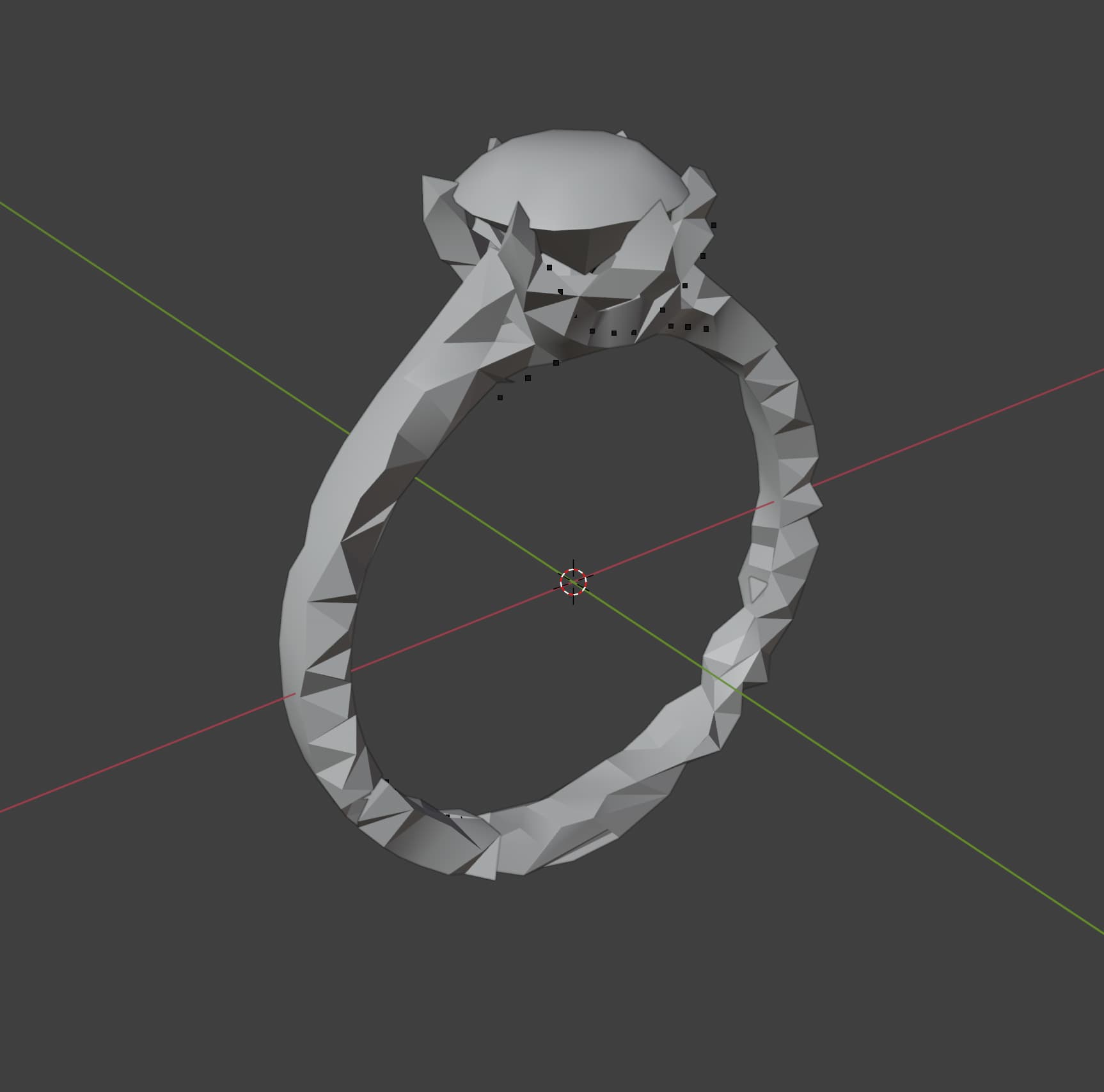
However there seems to be some corruption of the meshes in the export process.
This is what I’m seeing:
In this folder are the original .3dm files, and a glb version that I’ve been using to compare.
What do you think?
TIA
Hi @Rob_Cohen
I didn’t try your file but I recently had a problem bringing in a Rhino file into Blender using the plugin. It had to do with mismatched units.
The file in Rhino was in mm and when I brought it into blender it didn’t work and many surfaces were missing my units in blender were set to meters. In Rhino I resaved the file in feet and then brought it into Blender and it worked.
Maybe something is going on with unit scale/transfer?
Edit.
I just tried your file and I can see it suffers from the same setting mm problem I had. I tried setting my units to mm in blender and that didn’t work.
I am able to get your file into blender and have it work by…
In rhino change your unit setting to feet but use the “no option” in the dialog box when you convert units.
My guess is it’s too small in some way for the converter or tolerance in Blender. Could just be proper settings but this works at least to get your model into blender.
RM
Thanks for the idea @3dsynergy
I’ve tried the plugin on multiple .3dm files, with different units settings, and still getting the same import issue.
Appreciate your input though.
import_3dm merges vertices with a fixed distance on import:
Remove doubles sometimes too aggressive · Issue #137 · jesterKing/import_3dm
Best way to get around this at the moment is using a bigger scale, e.g. scale up in Rhino, import to blender, then scale down if needed.
Thank you @Bernd_Möller - will try this.
Hi @Rob_Cohen
When scale you should answer “no” to scaling, otherwise your object will not get bigger when you change units. Alternatively you can do it by hand as Bernd suggested but then it might be harder to get back to your original size if you need to be consistent or send other objects with the same size as your ring into blender.
RM
Thanks very much for this input!