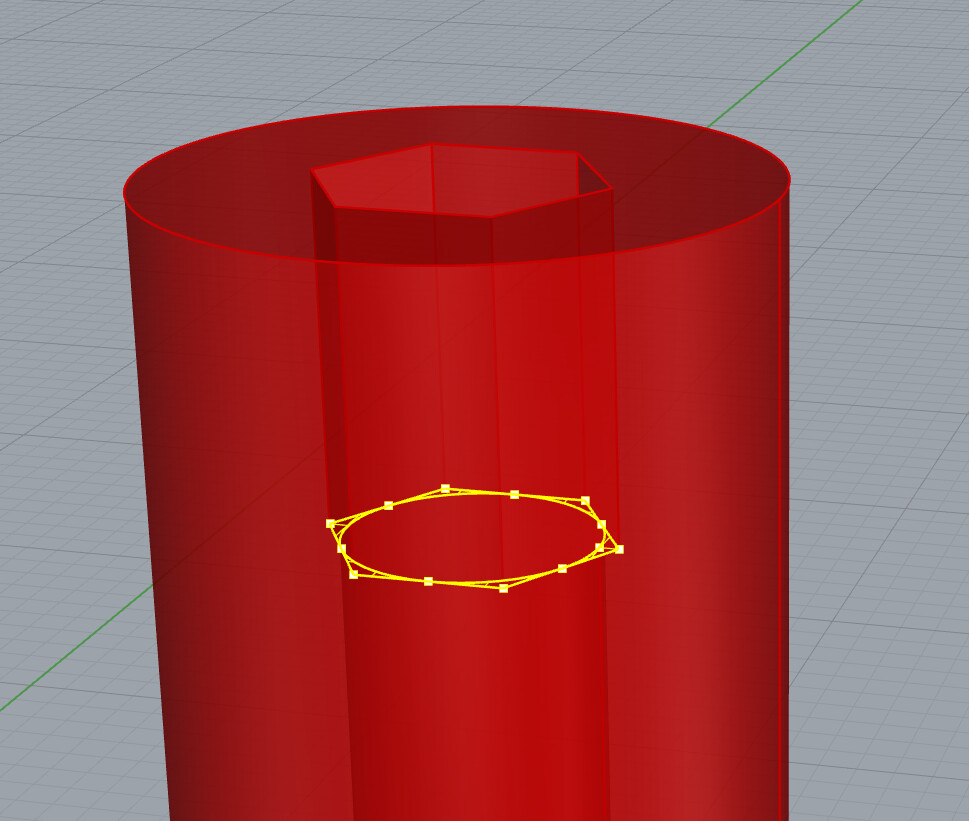
My current project contains two sizes of threaded inserts known as Rampa insert. I modeled the outer thread so I can subtract it from 3D printed parts. The inside metric thread is simplified with a throughhole. The type I’m using has a hex drive.
Initially I modeled the hole and hexagon with the same diameter. The polysurface was closed so to me everything seemed fine. At the very end of my process I tried to calculate the weight of all my hardware and the volume calculation failed. I came to the conclusion that the hexagonal hole edges being coincident with the round hole are the start of the problem. Running _ShrinkTrimmedSrf results in a faulty polysurface.
The file below contains two cylinders. The volume can be calculated on the green object but not on the red one…


unable-to-calculate-volume.3dm (254.0 KB)
This is all I can share publicly.
I recently reported a problem where a block import failed. The file which repeatedly didn’t want to load in the first attempt contained a block with such a faulty threaded insert, actually 4 instances… Maybe related.
As mentioned in the linked topic, I was unable to reproduce the import problem with a simplified file. This is my definition:

System Info
Rhino 9 SR0 2025-5-20 (Rhino WIP, 9.0.25140.12305, Git hash:master @ d890ecce73c6f3a95029dec83812cb2b7774c990)
License type: Commercial, build 2025-05-20
License details: Cloud Zoo
Expires on: 2025-07-04
Windows 11 (10.0.26100 SR0.0) or greater (Physical RAM: 128GB)
.NET 9.0.5
Computer platform: DESKTOP
Standard graphics configuration on OpenGL
Primary display: NVIDIA RTX A5000 (NVidia) Memory: 24GB, Driver date: 5-12-2025 (M-D-Y). OpenGL(4.6.0 NVIDIA 573.24)
> Accelerated graphics device with 4 adapter port(s)
- Windows Main Display attached to adapter port 0
- Secondary monitor attached to adapter port 1
Secondary graphics devices.
NVIDIA Quadro K2200 (NVidia) Memory: 4GB, Driver date: 5-12-2025 (M-D-Y).
> Accelerated graphics device with 4 adapter port(s)
- There are no monitors attached to this device!
OpenGL Settings
Safe mode: Off
Use accelerated hardware modes: On
GPU Tessellation is: On
Redraw scene when viewports are exposed: On
Graphics level being used: OpenGL 4.6 (primary GPU’s maximum)
Anti-alias mode: 4x
Mip Map Filtering: Linear
Anisotropic Filtering Mode: High
Vendor Name: NVIDIA Corporation
Render version: 4.6
Shading Language: 4.60 NVIDIA
Driver Date: 5-12-2025
Driver Version: 32.0.15.7324
Maximum Texture size: 32768 x 32768
Z-Buffer depth: 24 bits
Maximum Viewport size: 32768 x 32768
Total Video Memory: 24564 MB
Rhino plugins that do not ship with Rhino
C:\Program Files\Rhino 9 WIP\Plug-ins\ConstraintsUI.rhp “Constraints UI” 9.0.25140.12305
Rhino plugins that ship with Rhino
C:\Program Files\Rhino 9 WIP\Plug-ins\SolidTools.rhp “SolidTools”
C:\Program Files\Rhino 9 WIP\Plug-ins\Commands.rhp “Commands” 9.0.25140.12305
C:\Program Files\Rhino 9 WIP\Plug-ins\rdk.rhp “Renderer Development Kit”
C:\Program Files\Rhino 9 WIP\Plug-ins\RhinoRenderCycles.rhp “Rhino Render” 9.0.25140.12305
C:\Program Files\Rhino 9 WIP\Plug-ins\rdk_etoui.rhp “RDK_EtoUI” 9.0.25140.12305
C:\Program Files\Rhino 9 WIP\Plug-ins\NamedSnapshots.rhp “Snapshots”
C:\Program Files\Rhino 9 WIP\Plug-ins\MeshCommands.rhp “MeshCommands” 9.0.25140.12305
C:\Program Files\Rhino 9 WIP\Plug-ins\IronPython\RhinoDLR_Python.rhp “IronPython” 9.0.25140.12305
C:\Program Files\Rhino 9 WIP\Plug-ins\RhinoCycles.rhp “RhinoCycles” 9.0.25140.12305
C:\Program Files\Rhino 9 WIP\Plug-ins\Toolbars\Toolbars.rhp “Toolbars” 9.0.25140.12305
C:\Program Files\Rhino 9 WIP\Plug-ins\3dxrhino.rhp “3Dconnexion 3D Mouse”
C:\Program Files\Rhino 9 WIP\Plug-ins\Displacement.rhp “Displacement”
C:\Program Files\Rhino 9 WIP\Plug-ins\SectionTools.rhp “SectionTools”