Yes, Rhino help/documentation is top nodge!
Edit: it is even top notch, unlike my orthography.
1 Like
Didn’t know about this thread: but here’s a stl export script, I posted separately
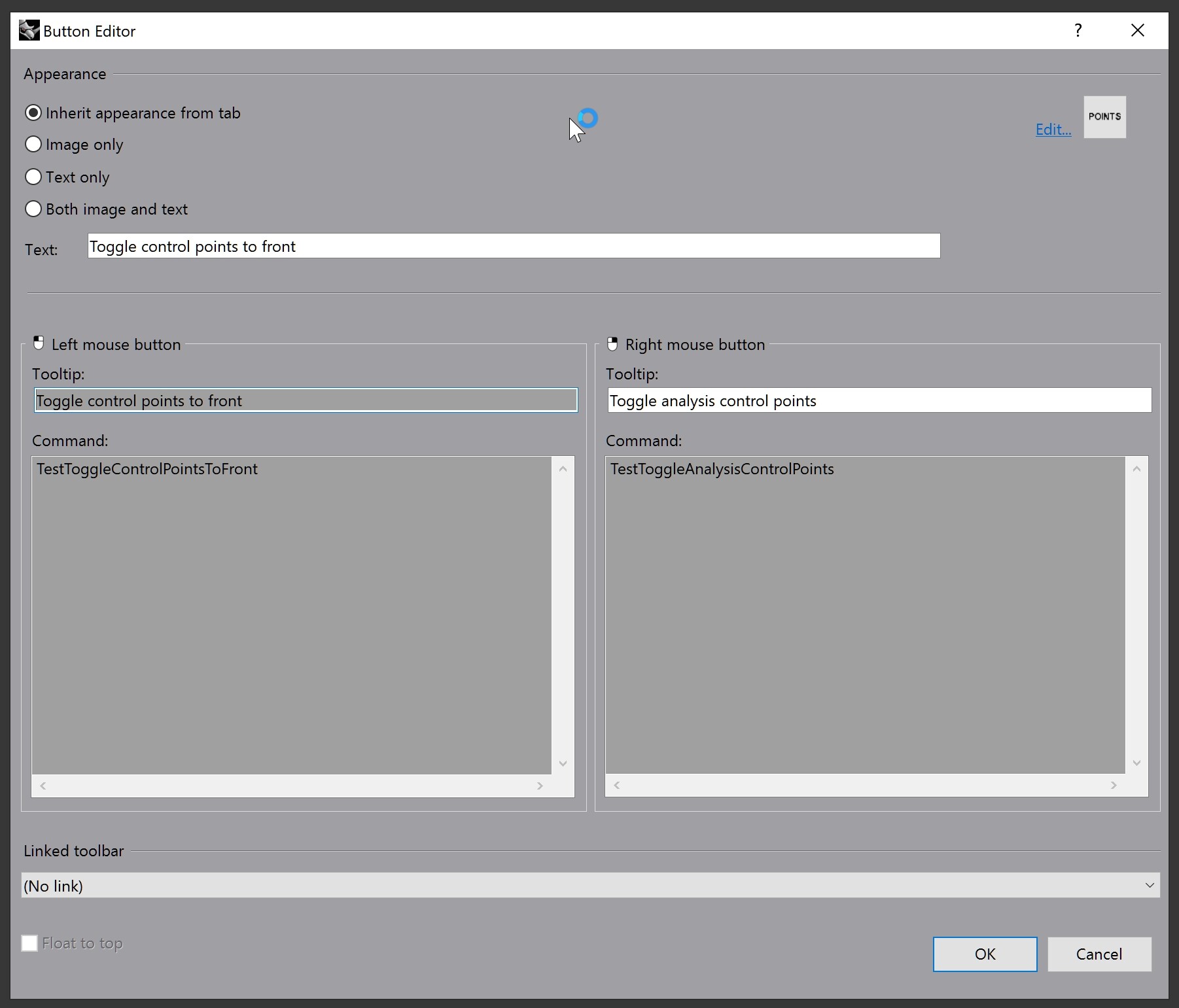
Rhino has these two test commands to toggle the wireframe’s visibility:
Icon 32x32:

Text: Toggle control points to front
Tooltip for the left mouse button: Toggle control points to front
Command: TestToggleControlPointsToFront
Tooltip for the right mouse button: Toggle analysis control points
Command: TestToggleAnalysisControlPoints
1 Like
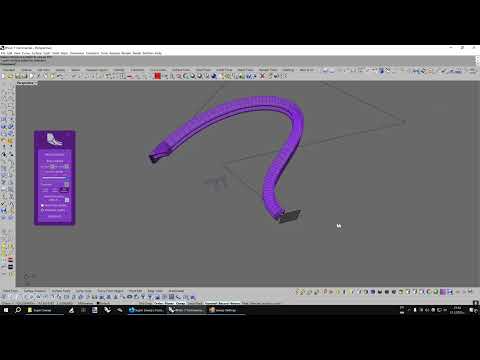
IMPORTANT: First, you have to run the ! _Block command to convert the closed curve profile into a block, then it can be selected as a profile.
Download the Super sweep plug-in from here:
https://www.food4rhino.com/en/app/super-sweep
How to use:
4 Likes
Hi all,
Just created a script for chamfering surface corners..
ChamferSrfCorner.py (7.8 KB)
It may be usefull on structural modelling..
5 Likes
Just posting the similar script for filleting surface corner (also featured in the 1st post), in case that Rhino users want to collect both of these useful scripts:
FIlletSrfCorner.py (9.0 KB)
5 Likes
here is a powershell script that closes Rhino, builds the grasshopper plugin that you are working on, starts rhino and opens a rhino and grasshopper file
Summary
# Set error preference to stop on the first error.
$ErrorActionPreference = 'Stop'
# Ensure PowerShell console can display UTF-8 characters.
try { [Console]::OutputEncoding = [System.Text.Encoding]::UTF8 } catch {}

# --- User Configuration ---
$Rhino3dmPath   = "PATH_TO_FILE"
$SolutionFolder = "PATH_TO_PROJECT_DIR"
$GrasshopperGH  = "PATH_TO_GRASSHOPPER_FILE"

$RhinoExe       = "C:\Program Files\Rhino 8\System\Rhino.exe"
$Configuration  = "Debug"

# --- Robust Rhino Shutdown ---
Write-Host "==> Closing any running Rhino instances..."
$procs = Get-Process -Name Rhino -ErrorAction SilentlyContinue

if (-not $procs) {
    Write-Host "==> No Rhino instances found to close."
} else {
    foreach ($p in $procs) {
        if ($p.HasExited) { continue }
        Write-Host "--> Attempting to close Rhino PID $($p.Id)..."
        try {
            $p.CloseMainWindow() | Out-Null
            if ($p.WaitForExit(4000)) {
                Write-Host "    ...PID $($p.Id) closed gracefully."
            } else {
                Write-Warning "    ...PID $($p.Id) did not respond. Forcing termination."
                $p.Kill()
                $p.WaitForExit(2000)
                Write-Host "    ...PID $($p.Id) terminated."
            }
        } catch {
            Write-Warning "    ...An error occurred while closing PID $($p.Id): $($_.Exception.Message)"
            try {
                if (-not $p.HasExited) {
                   Write-Warning "    ...Attempting to force-terminate PID $($p.Id) as a fallback."
                   $p.Kill()
                }
            } catch {
                Write-Error "    ...FAILED to terminate PID $($p.Id). It may require manual closing."
            }
        }
    }
    Write-Host "==> Rhino shutdown process complete."
}

# --- Guard clauses to check for file and folder paths ---
if (-not (Test-Path $RhinoExe))       { throw "Rhino.exe not found at: $RhinoExe" }
if (-not (Test-Path $Rhino3dmPath))   { throw "3DM file not found: $Rhino3dmPath" }
if (-not (Test-Path $GrasshopperGH))  { throw "GH file not found: $GrasshopperGH" }
if (-not (Test-Path $SolutionFolder)) { throw "Project/Solution folder not found: $SolutionFolder" }

# --- Build the .NET project ---
Write-Host "==> Building .NET project in $SolutionFolder ..."
$buildOutput = & dotnet build $SolutionFolder -c $Configuration --nologo 2>&1
$exitCode = $LASTEXITCODE

$buildOutput | ForEach-Object { Write-Host $_ }

if ($exitCode -ne 0) {
    Write-Host "==> dotnet build failed (exit code: $exitCode)" -ForegroundColor Red
    throw "Build failed. Please see the errors above."
} else {
    Write-Host "==> Build succeeded."
}

# --- Create RhinoPython bootstrap script ---
Write-Host "==> Writing RhinoPython bootstrap script (UTF-8)..."
$pyPath = Join-Path $env:TEMP 'rhino_bootstrap_gh.py'

$pythonScript = @"
# -*- coding: utf-8 -*-
import Rhino
import rhinoscriptsyntax as rs
import os

rhino_file = os.path.normpath(r"$Rhino3dmPath")
gh_file    = os.path.normpath(r"$GrasshopperGH")

Rhino.RhinoApp.WriteLine("[bootstrap] 3DM Path: {0}".format(rhino_file))
Rhino.RhinoApp.WriteLine("[bootstrap] GH Path : {0}".format(gh_file))

if os.path.exists(rhino_file):
    Rhino.RhinoApp.WriteLine("[bootstrap] Opening 3DM file...")
    Rhino.RhinoApp.RunScript('-_Open "{0}" _Enter'.format(rhino_file), True)
else:
    Rhino.RhinoApp.WriteLine("[bootstrap][WARNING] 3DM file not found. Skipping.")

try:
    Rhino.RhinoApp.WriteLine("[bootstrap] Loading Grasshopper plugin...")
    rs.Command('_Grasshopper', True)
    gh = rs.GetPlugInObject('Grasshopper')

    if gh and os.path.exists(gh_file):
        Rhino.RhinoApp.WriteLine("[bootstrap] Opening GH document...")
        gh.OpenDocument(gh_file)
        gh.HideEditor(False)
        gh.Enabled = True
        Rhino.RhinoApp.WriteLine("[bootstrap] Grasshopper document loaded and enabled.")
    elif not gh:
        Rhino.RhinoApp.WriteLine("[bootstrap][ERROR] Could not get Grasshopper plugin object.")
    else:
        Rhino.RhinoApp.WriteLine("[bootstrap][ERROR] GH file not found at: {0}".format(gh_file))

except Exception as e:
    Rhino.RhinoApp.WriteLine("[bootstrap][ERROR] An exception occurred: {0}".format(e))
"@

Set-Content -Path $pyPath -Encoding UTF8 -Value $pythonScript

# --- Launch Rhino ---
$runScriptArg = '/runscript="_-RunPythonScript ""{0}"""' -f $pyPath
$argsList = @('/nosplash', '/notemplate', $runScriptArg)

Write-Host "==> Launching Rhino with arguments:"
Write-Host ("`"$RhinoExe`" " + ($argsList -join ' '))
Start-Process -FilePath $RhinoExe -ArgumentList $argsList
4 Likes
Drag strength toggle that aligns to the active Cplane. The LMB command resets the Gumball and turns off the drag strength.
Icon:

Icon inside RAR to preserve the quality:
Drag strength.rar (1.7 KB)
LMB Tooltip:
Drag strength 100%
LMB Command:
!_SetRedrawOff '~_Dragmode _CPlane '_Gumball _On '~_-DragStrength _ShowDialog=No _DragStrength=100 _Enter '~_GumballAlignment _CPlane '_EnterEnd _SetRedrawOn
RMB Tooltip:
Drag strength 10%
RMB Command:
!_SetRedrawOff '~_Dragmode _CPlane '_Gumball _On '~_-DragStrength _ShowDialog=Yes _DragStrength=10 _Enter '~_GumballAlignment _CPlane '_EnterEnd _SetRedrawOn
P.S. You can set a different percentage for the RMB command in case that the 10% are too fast for you.
Move UVN toggle that aligns the Gumball to the object.
Icon:

Icons inside RAR to preserve the quality (two icons: 2% and 5%):
Move UVN 2.rar (2.3 KB)
LMB Tooltip:
Move UVN 100%
LMB Command:
!_SetRedrawOff '~_Dragmode _UVN '_Gumball _On '~_-DragStrength _ShowDialog=No _DragStrength=100 _Enter '~_GumballAlignment Object '_EnterEnd _SetRedrawOn
RMB Tooltip:
Move UVN 2%
RMB Command:
!_SetRedrawOff '~_Dragmode _UVN '_Gumball _On '~_-DragStrength _ShowDialog=Yes _DragStrength=2 _Enter '~_GumballAlignment Object '_EnterEnd _SetRedrawOn
1 Like