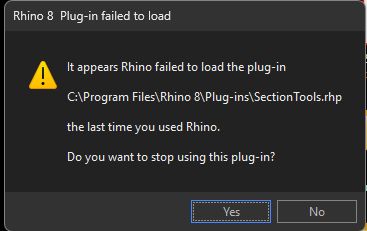
Rhino 8 Crash on opening interface

Hello Community,
Today I encountered a strange issue. Rhino 8 was working perfectly last night, but this morning I couldn’t open it. I’m using version 8.21.25188.17001.

Here’s what I’ve tried so far to troubleshoot — unfortunately, the latest version still won’t launch properly:

  1. Restart the computer:cross_mark: Failed
  2. Repair and reinstall Rhino:cross_mark: Failed
  3. Repair .NET, reinstall graphics driver, then reinstall Rhino:cross_mark: Failed
  4. Install an earlier version (8.7):white_check_mark: Success
  5. Update 8.7 to 8.21:cross_mark: Failed
  6. Open 8.21 in Safe Mode:warning: Success with warning:

LoadPlugIn cannot be called while a plug-in is being loaded.

  1. Manually load all plug-ins in Safe Mode:white_check_mark: Success (no crashes)
  2. Open 8.21 in Safe Mode again, disable/remove all plug-ins and packages, restart:cross_mark: Fail:

Originally crashed while loading the first plug-in; now it crashes when creating viewports.

  1. Open 8.21 in Safe Mode again:warning: Success with same warning:

LoadPlugIn cannot be called while a plug-in is being loaded.

At this point, I’m stuck and not sure what to try next. I’d really appreciate any help or suggestions to get version 8.21 working again.

Thank you!
Rui

Here are my system info:
Rhino 8 SR21 2025-7-7 (Rhino 8, 8.21.25188.17001, Git hash:master @ 2e05bb7e11ec03aa58cc543d92330d59df05d32b)
License type: Commercial, build 2025-07-07
License details: Cloud Zoo

Windows 11 (10.0.26100 SR0.0) or greater (Physical RAM: 32GB)
.NET 8.0.18

Computer platform: LAPTOP - Plugged in [100% battery remaining]

Non-hybrid graphics configuration.
Primary display and OpenGL: Intel(R) UHD Graphics (Intel) Memory: 2GB, Driver date: 7-24-2024 (M-D-Y). OpenGL Ver: (null)
> Integrated graphics device with 4 adapter port(s)
- Windows Main Display is laptop’s integrated screen or built-in port
- Secondary monitor attached to adapter port #1

Secondary graphics devices.
NVIDIA RTX A2000 Laptop GPU (NVidia) Memory: 4GB, Driver date: 6-26-2025 (M-D-Y).
> Integrated accelerated graphics device (shares primary device ports)
- This device is not being used

ATTENTION:
Safe Mode is enabled. Graphics device usage and OpenGL information cannot be collected.

OpenGL Settings
Safe mode: On
Use accelerated hardware modes: On
GPU Tessellation is: On (but disabled due to other settings)
Redraw scene when viewports are exposed: On
Graphics level being used: OpenGL (null) (primary GPU’s maximum)

Anti-alias mode: 4x
Mip Map Filtering: Linear
Anisotropic Filtering Mode: High

Vendor Name: Unknown
Render version: (null)
Shading Language: (null)
Driver Date: 6-26-2025
Driver Version: 32.0.15.7348
Maximum Texture size: n/a
Z-Buffer depth: n/a
Maximum Viewport size: 16777472 x 16777216
Total Video Memory: 4 GB

Rhino plugins that do not ship with Rhino

Rhino plugins that ship with Rhino
C:\Program Files\Rhino 8\Plug-ins\Commands.rhp “Commands” 8.21.25188.17001
C:\Program Files\Rhino 8\Plug-ins\WebBrowser.rhp “WebBrowser”
C:\Program Files\Rhino 8\Plug-ins\rdk.rhp “Renderer Development Kit”
C:\Program Files\Rhino 8\Plug-ins\IdleProcessor.rhp “IdleProcessor”
C:\Program Files\Rhino 8\Plug-ins\RhinoRenderCycles.rhp “Rhino Render” 8.21.25188.17001
C:\Program Files\Rhino 8\Plug-ins\rdk_etoui.rhp “RDK_EtoUI” 8.21.25188.17001
C:\Program Files\Rhino 8\Plug-ins\Toolbars\Toolbars.rhp “Toolbars” 8.21.25188.17001

Here are some of the warnings I received during the above process.


Hi Ray -

Could you post that system info when you are running 8.7 in normal mode?
When Rhino crashes, does the Rhino crash reporter pop up? If so, please always send in that report.
-wim

Hi Wim,
The crash reporter did not appear. I’ve installed all available system updates for the PC. I will upload the updated system information for version 8.22, followed by the details for version 8.7.

  • Rui

8.22
Rhino 8 SR22 2025-7-15 (Rhino 8, 8.22.25196.13001, Git hash:master @ 6ae300ea9482f9444fc9dc79cf52a528e1f505c5)
License type: Commercial, build 2025-07-15
License details: Cloud Zoo

Windows 11 (10.0.26100 SR0.0) or greater (Physical RAM: 32GB)
.NET 8.0.18

Computer platform: LAPTOP - Plugged in [100% battery remaining]

Non-hybrid graphics configuration.
Primary display and OpenGL: Intel(R) UHD Graphics (Intel) Memory: 2GB, Driver date: 7-24-2024 (M-D-Y). OpenGL Ver: (null)
> Integrated graphics device with 4 adapter port(s)
- Windows Main Display is laptop’s integrated screen or built-in port
- Secondary monitor attached to adapter port #1

Secondary graphics devices.
NVIDIA RTX A2000 Laptop GPU (NVidia) Memory: 4GB, Driver date: 6-26-2025 (M-D-Y).
> Integrated accelerated graphics device (shares primary device ports)
- This device is not being used

ATTENTION:
Safe Mode is enabled. Graphics device usage and OpenGL information cannot be collected.

OpenGL Settings
Safe mode: On
Use accelerated hardware modes: On
GPU Tessellation is: On (but disabled due to other settings)
Redraw scene when viewports are exposed: On
Graphics level being used: OpenGL (null) (primary GPU’s maximum)

Anti-alias mode: 4x
Mip Map Filtering: Linear
Anisotropic Filtering Mode: High

Vendor Name: Unknown
Render version: (null)
Shading Language: (null)
Driver Date: 6-26-2025
Driver Version: 32.0.15.7348
Maximum Texture size: n/a
Z-Buffer depth: n/a
Maximum Viewport size: 16777472 x 16777216
Total Video Memory: 4 GB

Rhino plugins that do not ship with Rhino

Rhino plugins that ship with Rhino
C:\Program Files\Rhino 8\Plug-ins\Commands.rhp “Commands” 8.22.25196.13001
C:\Program Files\Rhino 8\Plug-ins\rdk.rhp “Renderer Development Kit”
C:\Program Files\Rhino 8\Plug-ins\rdk_etoui.rhp “RDK_EtoUI” 8.22.25196.13001
C:\Program Files\Rhino 8\Plug-ins\Toolbars\Toolbars.rhp “Toolbars” 8.22.25196.13001

8.7
Rhino 8 SR7 2024-5-13 (Rhino 8, 8.7.24134.03001, Git hash:master @ 215e2aecc0d8fbc7e0448df10b8ce818dac77137)
License type: Commercial, build 2024-05-13
License details: Cloud Zoo

Windows 11 (10.0.26100 SR0.0) or greater (Physical RAM: 32GB)
.NET 7.0.20

Computer platform: LAPTOP - Plugged in [100% battery remaining]

Hybrid graphics configuration.
Primary display: Intel(R) UHD Graphics (Intel) Memory: 2GB, Driver date: 7-24-2024 (M-D-Y).
> Integrated graphics device with 4 adapter port(s)
- Windows Main Display is laptop’s integrated screen or built-in port
- Secondary monitor attached to adapter port #1
Primary OpenGL: NVIDIA RTX A2000 Laptop GPU (NVidia) Memory: 4GB, Driver date: 6-26-2025 (M-D-Y). OpenGL Ver: 4.6.0 NVIDIA 573.48
> Integrated accelerated graphics device (shares primary device ports)
- Video pass-through to primary display device

OpenGL Settings
Safe mode: Off
Use accelerated hardware modes: On
Redraw scene when viewports are exposed: On
Graphics level being used: OpenGL 4.6 (primary GPU’s maximum)

Anti-alias mode: 4x
Mip Map Filtering: Linear
Anisotropic Filtering Mode: High

Vendor Name: NVIDIA Corporation
Render version: 4.6
Shading Language: 4.60 NVIDIA
Driver Date: 6-26-2025
Driver Version: 32.0.15.7348
Maximum Texture size: 32768 x 32768
Z-Buffer depth: 24 bits
Maximum Viewport size: 32768 x 32768
Total Video Memory: 4 GB

Rhino plugins that do not ship with Rhino

Rhino plugins that ship with Rhino
C:\Program Files\Rhino 8\Plug-ins\Commands.rhp “Commands” 8.7.24134.3001
C:\Program Files\Rhino 8\Plug-ins\rdk.rhp “Renderer Development Kit”
C:\Program Files\Rhino 8\Plug-ins\RhinoRenderCycles.rhp “Rhino Render” 8.7.24134.3001
C:\Program Files\Rhino 8\Plug-ins\rdk_etoui.rhp “RDK_EtoUI” 8.7.24134.3001
C:\Program Files\Rhino 8\Plug-ins\NamedSnapshots.rhp “Snapshots”
C:\Program Files\Rhino 8\Plug-ins\MeshCommands.rhp “MeshCommands” 8.7.24134.3001
C:\Program Files\Rhino 8\Plug-ins\RhinoCycles.rhp “RhinoCycles” 8.7.24134.3001
C:\Program Files\Rhino 8\Plug-ins\Toolbars\Toolbars.rhp “Toolbars” 8.7.24134.3001
C:\Program Files\Rhino 8\Plug-ins\SectionTools.rhp “SectionTools”

This looks .Net related. Lets try repairing your redistributables and .netcore

1 Like

Hi Japhy,
Thank you so much! It is .NET issue. I followed your instruction from another post to repair the .NET. It seems I need to repair different items.
Best,
Rui

Hi Rui,

Could you possible share the instructions you followed to fix this issue? Its spreading like a decease at our office these days, and i’m getting desperate to find the cause. Exact same problem as described here: Rhino 8.21 chash on start-up during the loading plugin-phase.
I tried to repair stuff in the menu shown by Japhy, but it changes nothing so far.

Edit:

Found the best, to the point to-do in this thread: Rhino Cycles won’t load issue
This has solved the issue at the majority of our users. We still have a few V-ray/enscape issues, but these may be a product of desperate attempts to get Rhino running again. So i will not assume that those are common issues yet.

1 Like

Hi Hny,

We had the same issue with three machines in the office, but all were fixed using Japhy’s method. Hopefully, this solution works for you as well.

Best,

Rui

This issue appears to be related to Windows updates. This morning, Windows automatically installed an update, and after the update, the same problem occurred again…