Send me models that need performance improvements and I will locate the bottlenecks and either fix Rhino or find a way to make it go faster.
What I won’t do is make stabs in the dark based on speculation or assumptions.
Send me models that need performance improvements and I will locate the bottlenecks and either fix Rhino or find a way to make it go faster.
What I won’t do is make stabs in the dark based on speculation or assumptions.
Sure. But I bet it didn’t have two dozen lights. It’s the lights Brenda. It’s the lights!
Andrew, I will send another file to experiment with, soon. I just finished rebuild/reinstalling the system, and shooting videos at the new workspace.
I have the same diner scene open on my new 12-core 3900x. Cycles on my GTX1080 just isn’t responsive, but with CPU rendering, I can rotate the camera. AFAIK, the GTX 1080 is PCIe3, and the old MB had it as well.
Once Cycles is rendering, my old 2600x was perhaps half as fast as my GTX 1080; my 3900x is at least twice as fast as the GPU at rendering. With 12-cores /24 buckets, I am quite pleased with my processor purchase.
Though, material changes are still disappointing multi-minute affairs. At the default Cycles sample depth, Cycles can render faster–than it can change the material.
I will try experimenting with Cycles surface lighting to eliminate the spotlights.
jdhill, As I stated, for several reasons, extracting rendering meshes eliminates some of Rhino’s benefits.
Of course, but if one has to get a job out, it can be a viable option, and worth mentioning imho, as it’s not particularly obvious.
Have you turned off advanced GPU lighting and shadows in the Raytraced display mode?
Note that this will turn off shadows in Raytraced as well, just FYI.
Drat…I forgot about that
It’d be nice if in the case of realtime display integration this could be decoupled: shadows/lighting of the OpenGL vs shadows/lighting of the actual engine integration. I’m sure @Joshua_Kennedy would kinda need that too.
I have more problems with Cycles. I can go the the menu, but if I choose properties, it just keeps rendering, away. Sigh. And that’s on CPU rendering, as well. I wondered if Holomark could have affected anything, but I wiped Rhino and did a reinstall.
BTW, many, many offices and business have more than 24 lights showing.
I don’t think HoloMark is affecting Cycles in such a way.
The lights is again just a drawback of the current Rendered mode implementation for handling OpenGL lights. It’d be great if it were better of course 
Hi Brenda and happy new year!
Holomark2 should not be able to affect anything as all it does is adding a few display modes.
And I do agree that 24 lights are way too few in 2020. I mean, I use more than 24 lights in my realtime models with no problem so it makes me wonder if the issue with “many” lights in Rhino is related to Rhino not supporting fall off, so all meshes has to be checked against every light, no matter the distance to the light.
(But that is just speculation)
Edit: And as Nathan says it’s related to Rhino’s OpenGL stuff, if it’s forward rendering or not I do not know. But it is possible to handle lights better so let’s hope the future is bright for many lights  !
!
I like the Path Tracing Sample counter and timer. Nice little thing to have in the realm of offline rendering.

Final Quality - 16 minutes - GPU Rendering - GTX 1070
Can we specify in the Rhino/Document properties what consist of Low/Draft/Good/Final Quality?
Better history/recent renderings (with thumbnails!) are needed to better navigate between many renderings and easily compare them.
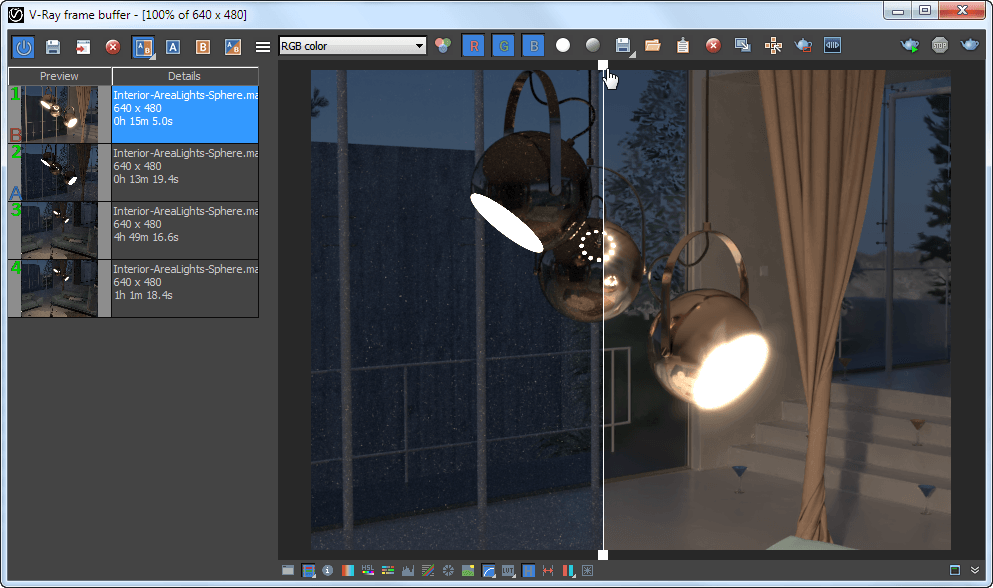
Something similar to moving bar between A/B render as in V-ray would be handy to have.

And please add camera exposure (and auto exposure too) so we don’t have to adjust all lights to compensate when moving from indoors to outdoors or day to night.
Maybe something for @andy, @lars and @DavidEranen to further investigate.
There will be denoising capability available at some point, but not as part of Cycles itself - although that still is an option for the less near future.
Currently not. But I’ve logged https://mcneel.myjetbrains.com/youtrack/issue/RH-56505 to make it happen.
Do you have a screenshot or mockup how you’d envision this?
Cycles has quite a big collection of render passes. It should be possible to add these as channels to the Render Window output. Saving these as one nice EXR isn’t done yet, but should also be possible.
Currently yes, there was a day it was possible, but it was also a bit less stable. Maybe in the future, who knows. For heavy scenes the usability of Rhino doesn’t improve having an render session in progress.
Something for @andy and @lars to tweak methinks.
It should work automagically
That I have already on my not-near-future list ( https://mcneel.myjetbrains.com/youtrack/issue/RH-38985 )
I don’t have V-Ray right now. Please check this video around 0:48

Overbright or too dark areas sometimes are difficult to spot. This feature helps to highlight them and manipulate your picture or exposition to avoid that. In our Rhino Render window it should be placed somewhere near to Black/White Point Tone Mapping.
Mine doesn’t  Camera is set around 10m from the spiky sphere, room is 6m wide. No strange units of the scene.
Before we have all the fancy tools to manipulate images in the Render Window, export option in 32 or 16 bits is needed so we have as much information as possible to work with in postproduction.
Overriding material option is also much needed at the stage of preparing scene lighting. Also it boosts productivity a lot, because test renders are made much faster. With that we can focus on one problematic material/part of the scene without loading heavy stuff like glass materials, subsurface, etc.
What is your model unit setting?
edit: actually, try turning on the ground plane and see if you get better depth map.
Centimeters. Ground plane was turned on in show shadow only mode, changing it to normal doesn’t seem to help. I would upload this testing scene but for some reason it weights 400 MB…
Later I will look into other scenes and write again if problem occurs.
Please move it to the near-future-list now that it is integrated as the built in renderer!!! 
I needs to be in place for the v7 launch IMHO.
So, for now, there is nothing like shutter speed? If I want less bright render I need to dim the whole world?
I think it would beneficial if Rhino used some kind of real-world light units for lights. I hardly care which ones, candles, candela, incandescent watt-equivalent, lumen…or firefly abdomen units or whathaveyou. I would rather have burn bright than lights that are dynamic to one another.
While I don’t do pro lighting, I should think that the ability to do so is important to pros who do lighting, who also might want a program to do so.
Perhaps for exposure, a S-shaped fudge-factor setting would help people with light burn. I believe that many cameras emulate film by using such a curve.
In several video games such as Half-Life, the level designers placed temporarily 3D objects in the world that had gamma test textures on them.
~
[ Although it’s still a Cycles WIP thing: I cannot get small emissive lights bright enough, and if I do, the texture is lost. A 120mm diameter emissive fixture with 100,000 units of surface/emissive lighting–barely marks the ground 2 meters away. More lights are required. ]