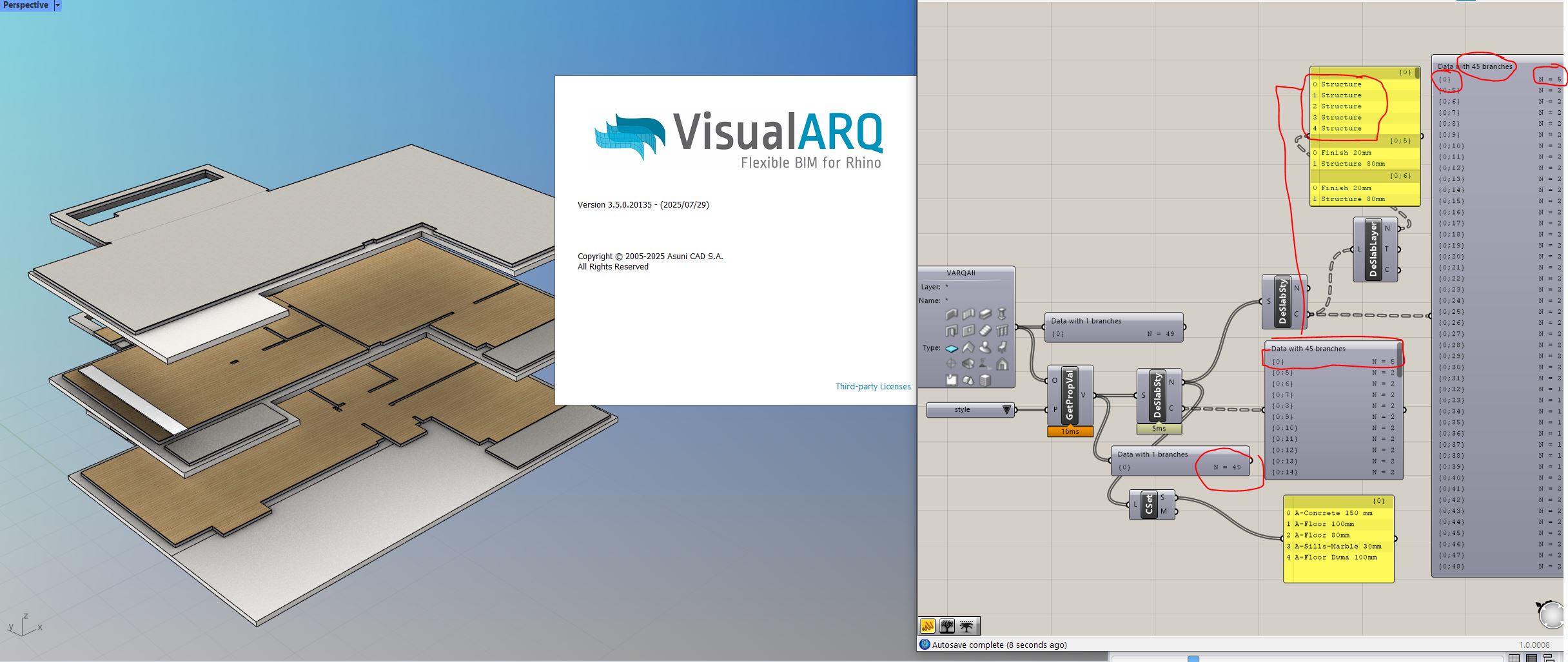
deconstruct slab style outputs weird tree structure, where besides the weird tree branch paths numbers [0], [6] etc, output C slab style components has unexpected items count in the first branch, since no slab has six layers named Concrete 150mm.
Hi @ng5_Alex,
Thanks for reaching out.
To better understand what’s going on with the deconstruct slab component and verify whether it’s a bug or just unexpected behavior, could you please share the 3dm Rhino model and .gh Grasshopper definition files?
Regarding the extra slab layers i cannot recreate the issue with VA defaults, thus i attach a file with the slabs only ( i cannot share the working file with all the items). slabby.gh (14.0 KB) slabs.3dm (8.6 MB)
So in my understanding, Branch [0] that now has 5 items ie the layers of the one layered concrete 150mm slab, should be [0;0] with N=1, [0;1] with N=1, [0;2] with N=1, [0;3] with N=1 and [0;4] with N=1, then both layers and tree branches paths would be ok.
See also the output tree paths that still happens with default items.
edit. Disregard the original observation about the slabs count, they are 50 in the original file but i intentionally deleted one slad from the uploaded file, thus 49 is the correct number of slabs.
Hey Alex, Just a heads-up, you might be waiting a little while as it’s the big hot Summer season (July/August) in Spain so over there things are definitely on “siesta mode,” so timing isn’t exactly on your side, patience is key right now!
Also, that branch path [0] instead of [0;0]… very curious. I’ve never seen anything quite like that before. Is it coming from a specific component in GH? Feels like a little mystery (bug) to solve while we wait. Hope you’re doing well and not pulling your hair out over data trees!
Since i am not get any official answers or follow ups, i will report myself for others that might face similar issues, especially since many design scenarios are to be resolved in grasshopper.
Unfortunately the bug is still there in the new 3.5 release
Deconstruct slab outputs wrong tree structure, branch paths and branch items.
I found a way to demonstrate what happens, you can see in the following video.
It seems that issue happens when you have one layered slab styles in two or more consecutive levels. If that’s the case branches are merged, branch items mixed, or tree structure is complete lost resulting in unpredictable and not logical outputs. Also if the first slab is one layered the first branch path is one dimensional.
p.s.I doubt this is a feature and not a bug, but if that’s the case please someone explain me the logic.
Hi @ng5_Alex Excuse the late reply (back from holidays). I guess this is a bug. I’ll report it to the development team and get back to you when it’s fixed.
i tested version 3.7 RC2 and the tree structure is still bugged.
i examined further to see if all items are bugged, and my quick tests reveals that it is the walls and the slabs that have this issue. The other types seem to be ok. I added in my working file many styles per element and i made sure these were added in multiple levels, because somehow it seems to me that levels are related to the issue (see previous post).
Also i thought maybe pipeline component is to blame, but same thing happens if i reference the walls.
Hi Alexandros, this is still pending to be revised. But it is scheduled for a VisualARQ 3.x update. I’ll let you know when there are news about any progress on it.
Interestingly, if i reference those walls with vanilla gh query model objects component, things are somewhat improved with only one missing branch,still without the appropriate branch paths.
items 0 and 1 from the referenced wall list, are joined in the model because they have the same style, but when deconstructed the should be maintained as separate. Here instead of separate, their layers are merged into a single branch, while branch path 0;1 instead of empty gets out of existence.