Grasshopper GUID input

Hello,

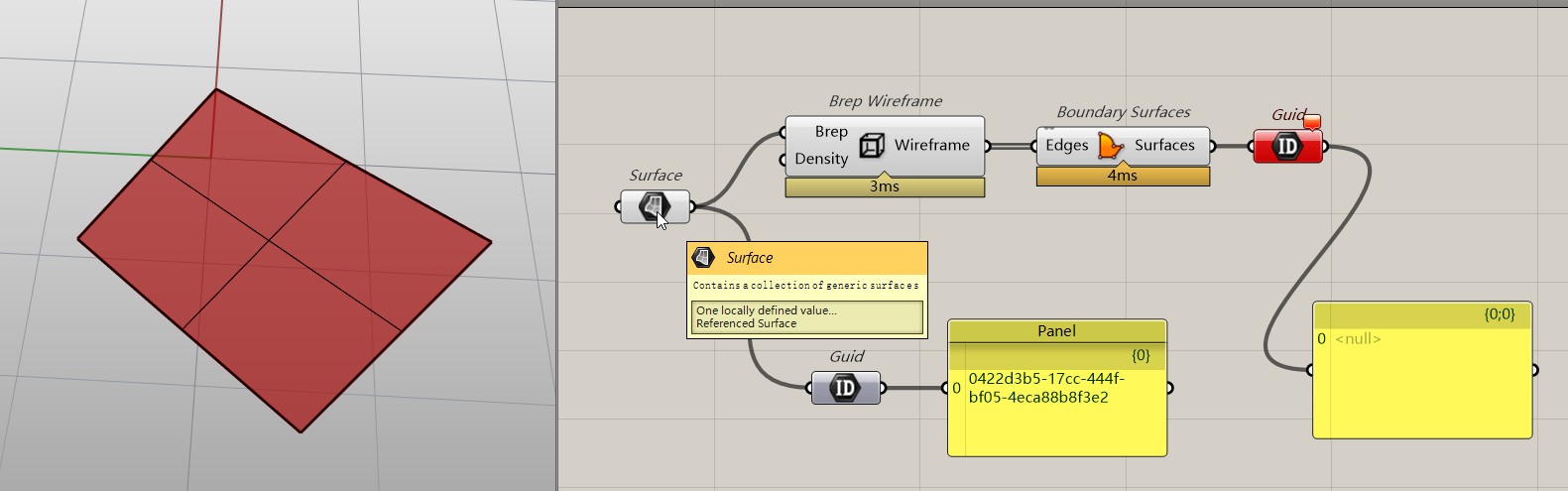
I am still finding my feet with GH. I am trying to get the GUID of a Rhino object in GH. The GUID component shows a null value. It is possible that the null value is due to my lack of understanding of the component interaction.

I found Script Component Guid input which appears have resulted in a fix for the same problem.

I understand that I need the GUID as input to the Python script, which I am hoping will turn off isovcurves for an object in the model.

Regards, Garry.

GUID.3dm (7.8 MB)

GUID.gh (9.1 KB)

Because only objects cretaed within Rhino or refercenced from with Rhino can obtain a GUID

Here’s a discussion thread that might be helpful.

@coffsoft for what it is worth, the select rhino object/s components in DKUI return the GUIDs of the objects referenced in Rhino:

Cheers

DK

@kiteboardshaper I am guessing that DKUI has access to the GUIDs of objects which were created in Rhino, but not of those which were created in GH.

Regards, Garry.

I have just discovered that GH can obtain the GUID of an object which was created in GH. That is easy enough β€˜after the event’. The next challenge is to find a way in GH to identify the Rhino object which created in GH as soon as it has been created, as part of the GH component chain. Working on it…

Regards, Garry.

Hello,

I found the code suggestion below, which hints at a solution to obtaining the GUID within GH.

In order to get this code snippet running, it needs one or more namespaces to be imported. I have searched, but cannot determine which namespace(s) are required. I found the page below which is a comprehensive list, but still cannot find GetSingleComponent. PersistentDataCount and hasattrdata are probably in the same namespace. Any help would be appreciated.

Namespaces !

Regards, Garry.

The debug panel in the code snippet provides a clue.

However, Grasshopper.Kernel.Parameters Namespace does not show Param_Brep.

Regards, Garry.

GUID.3dm (6.0 MB)

GUID.gh (15.9 KB)

This might also help:

@AndersDeleuran I appreciate your help. I am still seeing the same error after importing the namespaces in your code. Clearly I am missing something important.

Regards, Garry.

GUID.3dm (6.0 MB)

GUID.gh (14.1 KB)

There’s two things that are important here:

  1. You can reference Rhino objects in Grasshopper using a Guid parameter.
  2. You need to set the script context explicitly when fiddling with Rhino objects from Grasshopper.

So something like might work for you:


251101_SetIsocurveDensity_00.gh (7.8 KB)

@AndersDeleuran Your point 2 is what I am trying to get past. I think that I overlooked a key phrase in the quoted clip below. The key words are assigned by the user, which suggests that the Brep might have to be set manually after the object has been created by GH. In the hope that it can be automated within the Python script, I will ping @clement

I have updated the GH. It now shows both my code and yours in green groups where they operate as expected when the Srf and Breps are set manually. It also shows both my code and yours in red groups where the GetSingleComponent is failing. I really hope that it is just a matter of knowing what namespaces are required imports. I am hoping that after baking the Srf4Pt component, Python can take things forward.

Regards, Garry.

GUID.3dm (8.3 MB)

GUID.gh (31.2 KB)

Hi @coffsoft, this is probably some old python 2 code which might not run anymore in Rhino 8.

GetSingleComponent is likely a custom function which justs iterates all gh doc components and returns the first component matching the name (or nickname). PersistentDataCount seems to be attribute or property of the found component. I don’t know if this name is still valid. The hasattr(data, β€œReferenceID”) is a build in python function which does not need to be imported.

Yes, i guess it only works if the ids are Rhino object ids which must be assigned manually to eg. a Brep component.

_

c.

@clement Thank you for the clarification. I will work within that framework.

Regards, Garry.

I’m probably not understanding the problem. But if the goal is to add Breps to the Rhino document from Grasshopper and turn off their isocurves, something like this should do the trick:


251102_BakeSetIsocurveDensity_00.gh (16.0 KB)

@anders Wow! That is the goal. It is working as required, with 2 exceptions:

  1. The button will not accept True status. When pressed, True flashes in the Panel, but the status returns to False on release. I cannot see any reason for that behaviour. Perhaps it is a Mac gremlin.
  2. When I open the GH document, the referenced objects are duplicated in Rhino. That also happens each time the Python script is run. At first, I thought that the isovcurves were not being cleared, but then I noticed multiple instances, with only the original retaining the isocurves. Again, I cannot see anything that would cause duplication.

That is wonderful progress. Much appreciated - again.

I can see the reason for the duplication. The Add is working on the Breps list. I am trying to work out what form of Find is required instead of Add. I have tried FindGeometry and FindId. Both need the GUID, not the Brep. I am wondering whether this is the same end of the road again. I hope that it is once again my lack of knowledge, and that this really is close to a solution, but my hopes have dropped in the last 15 minutes.

Regards, Garry.

GUID.3dm (7.8 MB)

251102_BakeSetIsocurveDensity_00.gh (19.7 KB)

Could be a Mac issue, but either way I almost always use a Boolean Toggle when doing this kind of stuff (e.g. to prevent the canvas from hanging up). So maybe see if that works better on the Mac side too.

If I understood you correctly, one can track the brep guids across Rhino sessions by saving their guid/the baking component guid to the persistent Grasshopper document table, and then deleting previously baked stuff before adding new stuff. Something like:


251102_BakeSetIsocurveDensity_01.gh (14.7 KB)

I don’t like how I’m mixing RhinoCommon with rhinoscriptsyntax here. Ands would probably clean things up and just use RhinoCommon in practice, but it does seem to work.

@AndersDeleuran The deletes are not working. I will look further into it tomorrow. Thank you.

Regards, Garry.

No worries. Hope you figure it out.

Also, here’s a version without rhinoscriptsyntax:


251102_BakeSetIsocurveDensity_02.gh (15.8 KB)

@AndersDeleuran It appears that the list of GUIDS in addedIDsJson is from an earlier execution of the code. Initially upon loading the GH document, it would be empty, so no deletions would occur during the opening execution. That would leave 2 copies - the original and those created by the script. Subsequently, each time the Python script is run manually from GH, the objects created by the previous execution are deleted, then a new set of objects is created. Once again, that leaves 2 sets of objects - the original and those created by the latest execution.

I have included some debug Print statements to produce the output below. Taking as an example the large foreground surface, before opening the GH document, Rhino shows that its GUID is 1f6c8615-889a-4564-a365-066738691888. The GUID remains in the model, never being deleted by the script.

In the output from the second execution below, you will see that addedIDsJson and hence brpID for the deletion use the values stored in addedIDs from the first execution.

It appears that the delete could occur just before the add. I think the delete should use brp instead of brpID. The delete might have to be done after the add if it will cause the geometry to no longer be available for the add. I am having trouble finding the correct syntax for the object reference to be used in the delete command. In the course of trying different syntax, I have reintroduced rhinoscriptsyntax.

Output from the first manual execution of the Python script:

('addedIDsJson: ', '[

β€œ6b9483e6-0558-44ca-aebd-181878a12482”, β€œd1c9d2a7-6e4c-4bd2-838e-2d3b41f9d5a5”,

β€œe0b70e43-d29c-46ec-967c-01ac3e3c9811”, β€œ6e2e8a5d-6e60-42a8-8e59-ef8214de65cb”,

β€œ033a5da4-39bf-4ce8-b993-61dd5af7188b”,

β€œ879ea363-7192-49c2-bf1d-0f97730a0143”

]')

('brpID: ', β€˜6b9483e6-0558-44ca-aebd-181878a12482’)

('brpID: ', β€˜d1c9d2a7-6e4c-4bd2-838e-2d3b41f9d5a5’)

('brpID: ', β€˜e0b70e43-d29c-46ec-967c-01ac3e3c9811’)

('brpID: ', β€˜6e2e8a5d-6e60-42a8-8e59-ef8214de65cb’)

('brpID: ', β€˜033a5da4-39bf-4ce8-b993-61dd5af7188b’)

('brpID: ', β€˜879ea363-7192-49c2-bf1d-0f97730a0143’)

('addedIDs: ', [

β€˜51d0478b-8350-4c49-8e29-d973f2bf51b5’,

β€˜01a7017f-a3fe-4e35-860f-1717b5b6853c’,

β€˜a8f346c6-15a2-460e-b096-b8b4f9b8df67’,

β€˜8546f59d-5c6c-4a32-b821-8391de545cf8’,

β€˜df06194f-ca7a-415e-a673-07122567fa44’,

β€˜9440a22b-f46f-4c2c-b76f-631d7e2474fb’])

Output from the second manual execution of the Python script:

('addedIDsJson: ', '[

β€œ51d0478b-8350-4c49-8e29-d973f2bf51b5”,

β€œ01a7017f-a3fe-4e35-860f-1717b5b6853c”,

β€œa8f346c6-15a2-460e-b096-b8b4f9b8df67”,

β€œ8546f59d-5c6c-4a32-b821-8391de545cf8”,

β€œdf06194f-ca7a-415e-a673-07122567fa44”,

β€œ9440a22b-f46f-4c2c-b76f-631d7e2474fb”

]')

('brpID: ', β€˜51d0478b-8350-4c49-8e29-d973f2bf51b5’)

('brpID: ', β€˜01a7017f-a3fe-4e35-860f-1717b5b6853c’)

('brpID: ', β€˜a8f346c6-15a2-460e-b096-b8b4f9b8df67’)

('brpID: ', β€˜8546f59d-5c6c-4a32-b821-8391de545cf8’)

('brpID: ', β€˜df06194f-ca7a-415e-a673-07122567fa44’)

('brpID: ', β€˜9440a22b-f46f-4c2c-b76f-631d7e2474fb’)

('addedIDs: ', [

β€˜5160a732-6527-4324-ba3c-44a1964ed01d’, β€˜3cec5ad9-6d2a-4af1-93ec-e3998b7d3fb0’,

β€˜7ee9db7e-80a5-4423-b496-a7415b3c8f95’, β€˜973cb7c3-7d0f-438e-83be-c4627cdbd58c’, β€˜f45f5ea5-5b5d-4281-8db9-d8b8ec837406’,

β€˜2d8aebce-f0dc-40f0-a612-3270aa597bf5’

])

Regards, Garry.

GUID.3dm (7.8 MB)

251102_BakeSetIsocurveDensity_03.gh (10.9 KB)
When saving the guids to the Grasshopper document value table, the component will remember and delete what was added across Rhino/Grasshopper sessions. If you only want to delete things within a single session, you could do something like this:


251103_BakeSetIsocurveDensity_00.gh (15.8 KB)

Other than that I’m having a bit of a hard following. It often helps to write down as tersely, explicitly and stepwise what the code is supposed to be doing. Also just for myself I find that to help clarify/simplify things.