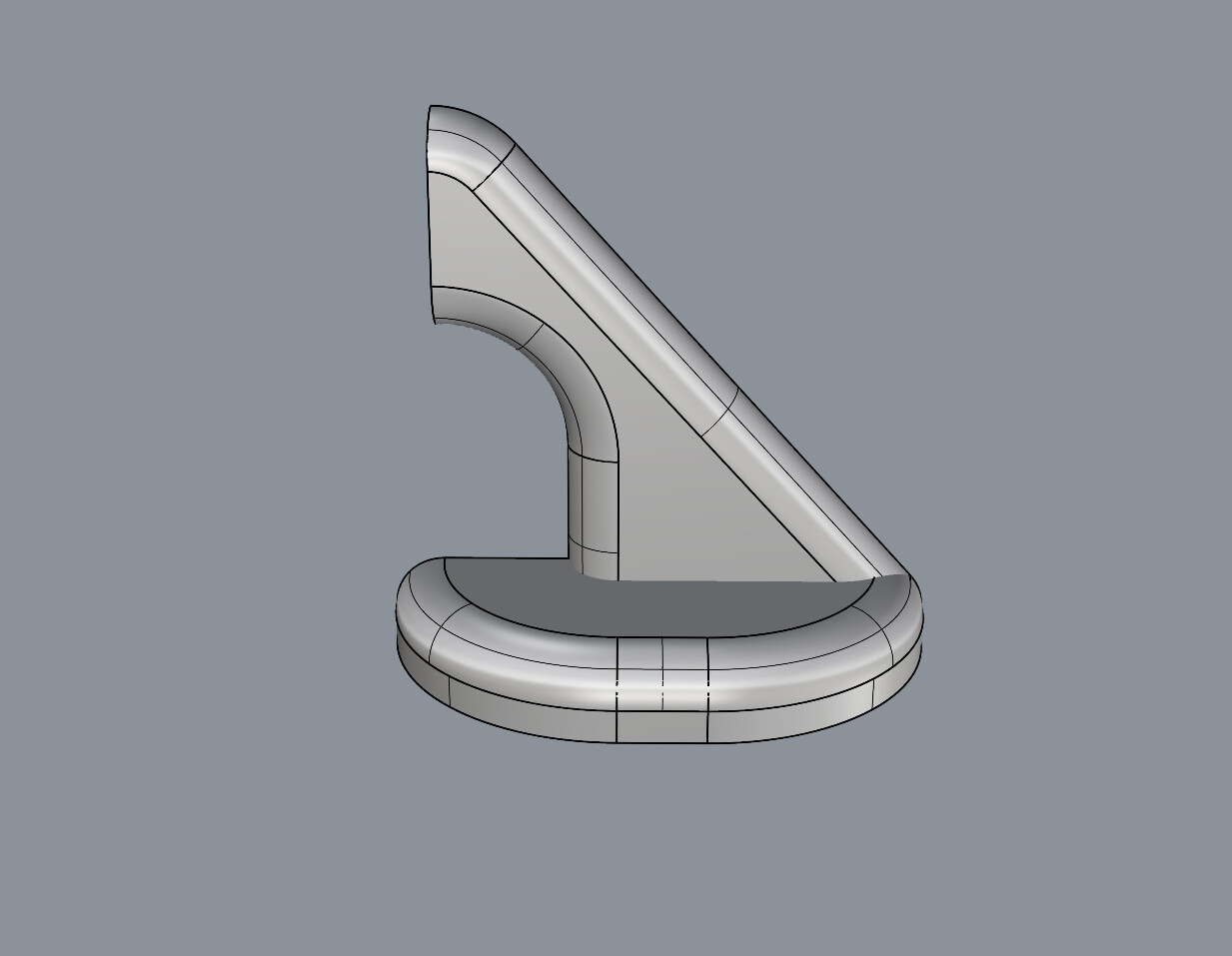
A fillet is a surface with a circular (arc) cross section that connects 2 base surface. When those 2 base surfaces become tangent to each other then the only mathematically correct fillet solution is for the fillet to come to a point.
Its difficult to understand what you are claiming should be taught to students instead of the correct fillet solution. I suppose students could be taught to never make surfaces that become tangent. In Tom’s example that might look like this: handleNoTan.3dm (1.9 MB)
But even if a student is taught to avoid pointy fillets they still need to be taught how they are made before they can understand how to avoid them.
The big problem with Rhino is that Rhino often makes buggy surfaces when trying to fillet two surfaces that become tangent. This means that except special cases ( as in Tom’s example) Rhino will often make a defective pointy fillet. This is a Rhino bug that has been around since Rhino version 1. The origins of this bug is that Rhino is not very good at calculating the intersection when two surfaces become tangent and that surface to surface intersection failure translates into a defective pointy fillet.
I don’t see this as a Rhino bug. I get data from many other sources that produce the same. Rolling ball fillets ending in a point result in stacking control points, a problem which has caused me issues. Any Nurbs surface has four edges, not three. What should be taught is that with “distancebetweenrails” fillets stay four sided, even if very small. Surface (fillet) boundaries are far more defining a shape then fillet values.
True, in Rhino.
I’ve seen objects from other CAD programs where fillets ending in points were trimmed surfaces.
No stacked CVs there, but regular four sides surfaces, just trimmed into a ‘triangular’ shape.
Don’t know … might be a good idea ( for McNeel ).
Correct that all NURBS surfaces have four sides, BUT one, two or three sides can have zero length. A sphere is a simple example of a NURBS surface with two zero length sides.
The appropriate type of fillet depends on design intent. If an object is to be manufactured with the fillets milled using a ball mill then the rolling ball fillet which has constant radius is the correct choice, not the distance between rails which has variable radius.
May be a good idea although problems can occur when two trim curves become tangent.
but this special case is also not solved proper with the current approach - and would also mean, for the current solution (4th edge -length = 0) that two other edges are parallel - which is also not a nice solution.
nice challenge, I’m quite sure it will give some people a headache… Some finicky microedges I had to solve but other than that it seems to look like your drawing: handle_sg.3dm (1.5 MB)
The problem you were having with edges is probably due to the fact that some of the pointy fillets don’t actually come to a point. This is a Rhino bug that has been known for more than 20 years.After more than 20 years it becomes clear that Mcneel has no intention of ever fixing this bug (or any other of the fillet bugs). There only goal seems to be to convince users that filleting is hopeless in Rhino and anybody who wants functioning fillets should go elsewhere.
The enclosed file shows where the fillets should come to a point but do not. You need to be in a parallel viewport to be able to zoom in close enough to see where the problem is. handle_with_bad_fillets.3dm (488.7 KB)
You can use setpt command to fix pointy fillets fails like these.
I allways thought these were rounding errors…
Happens quite often when trimming corners of surface patches.
Usually this is fixable with replaceedgde with select curve option (using a curve that represents the desired edge).
Surely if it is fixable manually that must mean it is fixable as a functioning command?
i think so too. i already linked the corresponding link above:
at least it should be possible to call _filletSrf and add/select a target point.
see this topic
you may want to add something at this topic, so it might pop up again with higher priority.
Getting a bit off-topic, but interestingly, see attached sw file. It appears that sw’s fillets are less constant radius than Rhino’s, when you extract isocurves from the more dense ones of the fillet surfaces. handle_sg.SLDPRT (500.2 KB)
dear @dmoyes - thanks - i will post some kind of solution - not sure if i find time to do a video tutorial - put i will post a .3dm file that shows the main steps. did you see my starting point in this post:
ill post something like this with a (at least in my eyes) right approach within the next weeks - but lets see how this topic is developing - i still like what people are contributing. - kind regards -tom
When you say “these were rounding errors” by these do you mean pointy fillets failing or edge joining failing?
Anyway, I can’t see either one being due to rounding errors. Edges and vertexes should be calculated to a tolerance that is many orders of magnitude from where rounding errors come into play.
In the example Gijs posted the fillets that are supposed to come to a point come to an edge instead that is about 1000 times smaller than the file tolerance, but that still is a long ways from where rounding errors come into play.
The developers who work on this know that if their algorithm can create a surface with an edge which has a length that is 1000 times smaller than the file tolerance and that will be likely to cause joining problems especially when they also know there is no corresponding neighboring edge available to join it to. Even if the edge that is supposed to be collapsed to a point is is a bit larger,they know its a guaranteed fail when it comes to joining. They know this, but they don’t care because they are confident that they have convinced all Rhino users that fillets are something you don’t need.
So you are supposed to think - if fillets fail that is because you were stupid enough to try to use them.
Actually, the edges are really well with tolerance, but whatever you did to get them to join got Rhino to believe and report that the edges were wildly out of tolerance.
I don’t see that crashing Rhino here. Have you submitted a crash report? If so, I’ll go and find it. Found it, thanks.
What I see is that it works reasonably well and “almost” if you ShrinkTrimmedSrf all surfaces prior to FilletSrf. For me, that means there’s still work to be done to make this work as expected.