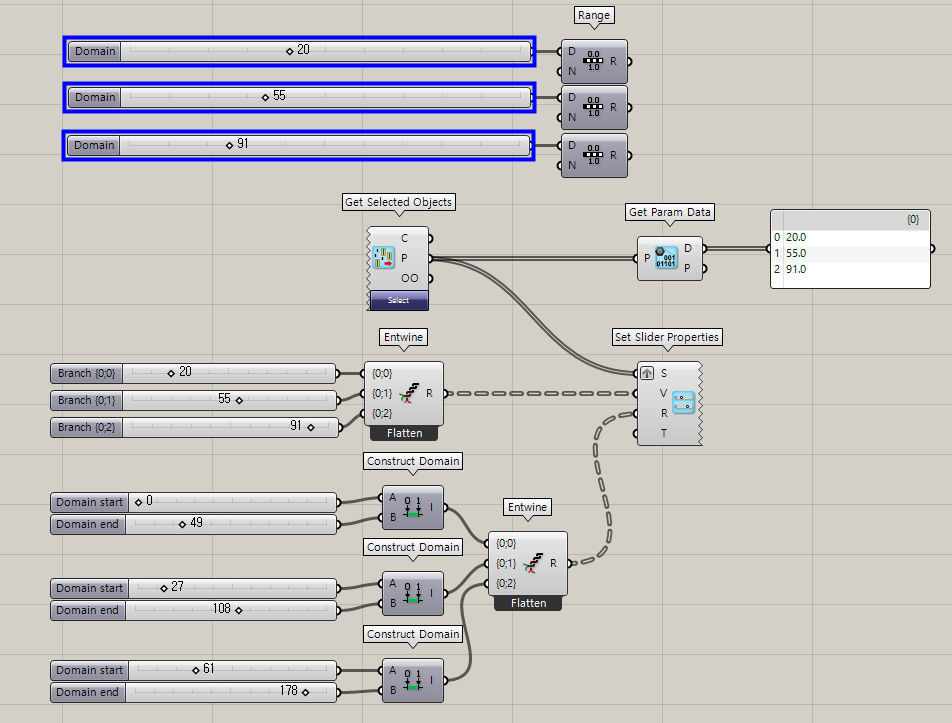
I am necromancing this thread with a degree of trepidation and the fear that any further comments on it will be dismissed by @DavidRutten out of hand, but I specifically registered to the McNeel forums reply to this post and hope that with adequate finesse, I can convice David to give it a second thought.
I’ll start by emphasizing why I find the idea of this component important: repeatedly I have fallen into the situation where a “Domain Slider” is exactly what I need, but do not have. This the situtation where out of preceding logic, I have a range of values to choose from, and use the work-around of remapping to a domain of 0 to 1 so that I can pan through the results with a number slider. The problem is, that while I can get a rough idea of what’s good real world measure of things, I can never zero in on the exact value I want. For example I’m playing around with the slider and see that an angle of 30° is with in range values I can get. Great! I’ll take that! So now I’m fiddling around with the slider to find the value between 0 and 1 that directly translates to 30°, but to no avail, because, of course, Math; no mapping exists within the stepping accuracy of the slider that directly corresponds to 30°. And this is important because I’m not doing abstract shapey-shapey, I’m trying to construct a real world object that relies on rounded units and components that exist only in certain sizes.
Now I’m not a programmer, so I hope I understand David’s questions and well enough that I’ve provided sensible answers to them here:
What happens if a null domain is provided?
Input null, output null. I am assuming that since components such as the “Insert Items” component without an Items list input can produce nulls, forwarding nulls out of a “Domain Slider” wouldn’t be a problem?
As an indication of the circumstance, the slider grip could disappear. In the “Edit…” dialogue of the slider, the “Numeric domain” and “Numeric value” would remain editable, but grayed out. These values would be used for the number slider if no domain is given, superceded, but not changed by the domain input if a domain input is given, and, as mentioned previously, ignored by the slider if provided null.
What happens if a singleton domain is provided? Note that domain whose absolute length is less than the accuracy of the slider may as well be singleton.
If a singleton domain is provided, the grip remains fixed and immovable in the center of the slider. If the slider accuracy is less than the domain length, it will only toggle left or right to the lower and upper bounds of the domain. Even when the slider accuracy is greater than the domain length, hitting the lower and upper bounds of the domain should be a thing when dragging the slider grip fully to the left or the right. So, for example, if given a single digit post decimal precision on a rational number and a domain of 3.65 to 7.43, the slider should snap 3.65, 3.7, 3.8,… 7.4, 7.43.
How should decreasing domains be handled? Make them automatically increasing, backwards sliders?
I am not sure what you mean by this and a “backwards slider”, but it seems to be a question closely related to your last. Any change in the input domain should influence the slider in the same way that going into the slider editing dialogue of a regular “Number Slider” component and changing the min. and max. values of the slider does.
What happens if you provide more than one domain to a single slider?
… An error? Look, I think all we are envisioning here is a regular number slider that takes a domain to define on the fly what we would manually have to go into the number slider to change. A number slider that automatically remaps to a given domain. When you slap down a regular 'ol number slider it doesn’t produce a list of values. If the user wants to map a value to multiple domains, let it be their job to split the domains apart and feed them into separate “Domain Sliders”.
Think of the nightmare in terms of the graphical interfacing when trying to get a “Domain Slider” to accept multiple domains alone. What are you going to do? Superimpose grips on a single slider line? Let the component explode with hundreds of slider lines for each domain given to the slider? No, no, no… K-I-S-S. Keep it Simple, Stupid. :x
What happens if the domain changes? Does the slider value remain as unchanged as possible, or should the slider factor remain constant?
See above. It should be the slider factor that should remain constant, not the value since the value can be mapped to a value outside the bounds of its original domain. Also, a “Domain Slider” should only accept rational numbers since that’s what domains usually turn out to be and you don’t have to deal with a soft type-conversion. Although you could.