in the area highlighted in yellow, i am having difficulties adding thickness to the gyroid in general
gyroid unit 2.gh (20.7 KB)
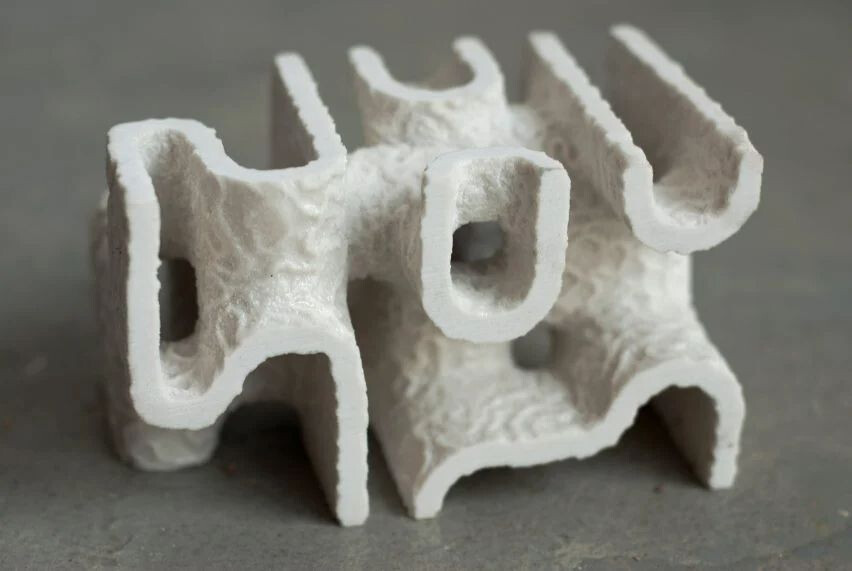
so that it looks like this 3d printed gyroid where it has base thickness and there are “reaction-diffusion” indentations on this base thickness.
Hello
I wonder why you bump along Z.
Here a way of doing. I reuse my Mesh Bump, it remaps height to 0 1 then to Min to Max. So if Min =-1 and max =-1.2 it means a bump in the other side
You can join all the meshes
Could be better with triremesh and some subdivision and also use of “1-value” for the opposite bump
Dendro could also be used but will suppress some details
gyroid unit 4.gh (30.8 KB)
And others changes, equation in Nautilus is much faster ! 0.5 s vs 28 s !!!
No need of quadremesh, triremesh is better for this kind of things.
gyroid unit LD.gh (21.4 KB)
Also possible to simplify the points generation
Edit 2 : isopod is surely a better way of doing now
but it is also possible to thicken using the components you used. The idea is to use 2 isosurfaces and use mesh iso splitting
gyroid unit thickness.gh (14.0 KB)
4 Likes
this is extremely beautiful, not only did I learn a lot from the newly added components, but I also appreciate more how amazing computational design is from a mathematical point of view.
after a long session of chatGPT I managed to understand the logic behind the steps that you have done.
also, now i see the absurdity of using Z vector for extrusion, it messed everything up