Sure — here’s a clearer, more polished version of your forum post. I’ve kept all the technical meaning but improved readability and structure:
Hello,
I’m trying to understand how the FBX exporter determines object order when using the following layer structure:
Testlaag
    01
        A
        B
        C
    02
        A
        B
        C
    03
        etc.
For each 0X layer I use the Duplicate Layer and Objects function, which turns 01 into 01-copy, and then I rename that layer to 02.
To create layers 03 and 04, I duplicate 01 and 02, which gives me 01-copy and 02-copy, and then I rename those to 03 and 04. To create layers 05 to 08, I repeat the process by duplicating layers 01 through 04, and so on.
After creating a larger number of layers, I export the file to .fbx and open it in Rhino. This is where I run into an issue: I can’t figure out how Rhino determines the order of the exported objects.
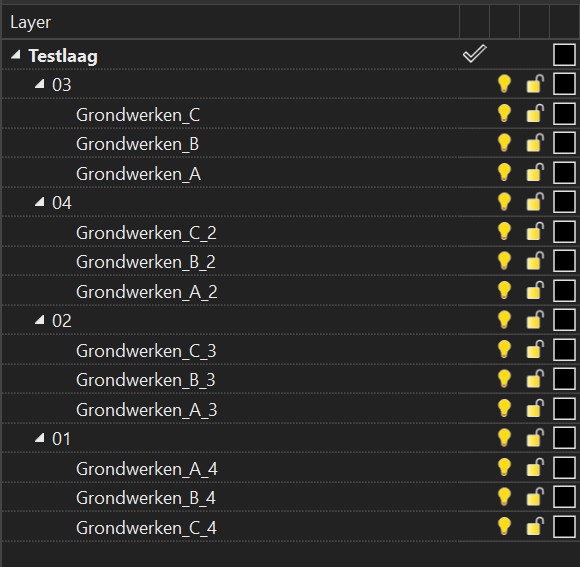
Based on the attached screenshot, the order I get is:
03 → 04 → 02 → 01
I understand that the .fbx format does not support full hierarchical layer paths, which is why Rhino appends a “2” to the second set of sub-objects (e.g., 04 → A_2, B_2, etc.).
Could someone please explain how Rhino is deciding this export order?
If you’d like, I can also help make the question more concise or more technical depending on your target audience.
Could someone please explain how Rhino is deciding this export order?