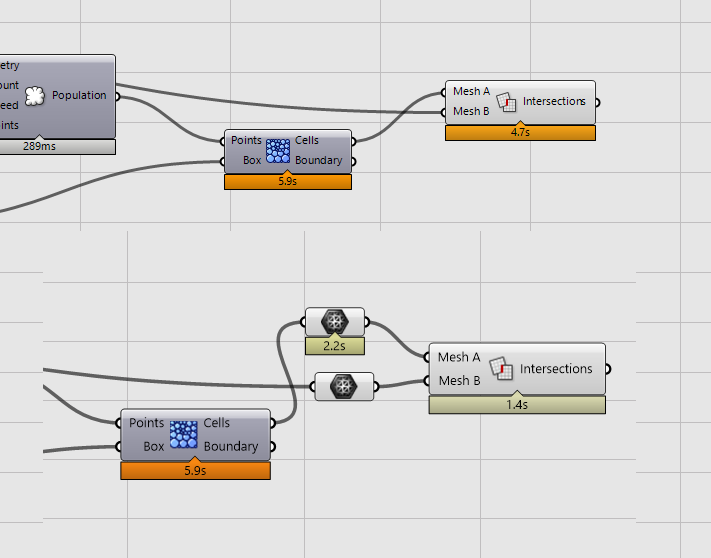
Hi to all
is there a way to make MESH | MESH INTERSECTION faster or parallel ?

meshmesh intersection.gh (6.8 KB)
Hi to all
is there a way to make MESH | MESH INTERSECTION faster or parallel ?
the parameter is just an example to do the computational speed test, what I need is to speed up the intersection mesh operation
One point @martinsiegrist is that as you input a brep there is an implicit conversion to mesh that takes time.
Here a 3x speed up
Or you can make a c# script (not optimized, without using DataTree …) But it is more fast.
private void RunScript(List<Mesh> meshes, Mesh mesh, ref object A)
  {


    Line[][] tab_tab = new Line[meshes.Count][];

    Parallel.For(0, meshes.Count,
      index => {
      Line[] tab_lines = Rhino.Geometry.Intersect.Intersection.MeshMeshFast(meshes[index], mesh);
      tab_tab[index] = tab_lines;
      });

    List<Line> lst_lines = new List<Line>();

    foreach (Line[] lines in tab_tab)
    {
      lst_lines.AddRange(lines);
    }

    A = lst_lines;
  }
Or using Mesh Mesh
 private void RunScript(List<Mesh> meshes, Mesh mesh, ref object A)
  {
    Polyline[][] tab_tab = new Polyline[meshes.Count][];
    double tol = Rhino.RhinoDoc.ActiveDoc.ModelAbsoluteTolerance;
    Parallel.For(0, meshes.Count,
      index => {
      Polyline[] intersections, overlaps;
      Mesh overlapsMesh;
      Rhino.Geometry.Intersect.Intersection.MeshMesh(new List<Mesh>{meshes[index], mesh}, tol, out intersections, false, out overlaps, false, out overlapsMesh, null, System.Threading.CancellationToken.None, null);

      tab_tab[index] = intersections;
      });

    List<Polyline> lst_lines = new List<Polyline>();

    foreach (Polyline[] lines in tab_tab)
    {
      lst_lines.AddRange(lines);
    }

    A = lst_lines;
  }


[meshmesh intersection (1).gh|attachment](upload://xnWkQb7JXN79WgNvtZbF9QSzgZD.gh) (8.7 KB)thank you @laurent_delrieu
the script works fine, this is how I use it.
meshmesh intersection v2 .gh (70.4 KB)
I was trying to speed up the 3d voronoi and intersection operation.
with this system and with your script the time was reduced a lot!
All good, many times in this forum the problems are due to wrong commands used and the goal is not always clear…
Hi Laurent, thanks a lot for sharing the code, using your code I managed to replace Brep Plane Intersection by converting Breps to Meshes and reduced the time from 90 minutes to 15. I wanted to ask though if there is (for example in the paid version of your Nautilus add-on) a method to cut meshes with planes even faster? In my case it’s a list of 5000 breps to cut with a single plane 350 times…
Of course 15 minutes looks much better than 90, but it’s still quite a time-consuming process, and since it’s about cutting with planes, I still hope that there will be some even faster way.
In smaller tests the difference in favor of your method was higher, e.g. 20 times faster, so the results may depend on many factors, but it was faster than the native Mesh | Plane component.
Hello,
I don’t know if there is something fastest, I have no tool for that. Just some thought sometime it is fastest to work with a big mesh instead of many meshes (join the meshes).
Mesh Iso splitting could perhaps be used. Iso value is the signed distance to plane and iso cut is at 0. I will make a test.
Mesh Iso Splitting is quite fast but some other process not (deconstruct) !
Thanks, I’m playing with it, will get back with the speed comparsions or issues.
EDIT:
It’s very promising, speed gains are big, but to be precise I must take into account needed pre-processing of the geometry and post-processing. - as you showed, some things like deconstruct may take a significant time.
Component tooltip says that “for each iso value, lines are put on a brach of a datatree”.
Mesh | Plane might be 15x slower, but it’s returning data with sub-branches for each mesh used and it’s a very good thing to have. Without that, some further operations might be not possible or they will be 80x slower as shown here.
Fast Intersection.gh (1.9 MB)
I just had a use case for this, and I got @laurent_delrieu’s code to work nicely with DataTrees.
This expects a single mesh in the mesh parameter and a tree with each branch containing a single mesh in the meshes parameter.
And then the output is a tree with branches matching the meshes parameter, containing a list of all the edges from that intersection.
public class Script_Instance : GH_ScriptInstance
{
    private void RunScript(Mesh mesh, DataTree<Mesh> meshes, ref object intersections)
    {
        DataTree<Polyline> outtree = new();
        IList<GH_Path> paths = meshes.Paths;

        double tol = Rhino.RhinoDoc.ActiveDoc.ModelAbsoluteTolerance;
        System.Threading.Tasks.Parallel.For(0, paths.Count,
            index => {
                Polyline[] intersections, overlaps;
                Mesh overlapsMesh;

                GH_Path path = paths[index];
                IList<Mesh> originalMeshList = meshes.Branch(path);
                if (originalMeshList.Count != 1)
                    throw new Exception("Expected only one mesh per branch");

                Rhino.Geometry.Intersect.Intersection.MeshMesh(
                    new List<Mesh>{originalMeshList[0], mesh},
                    tol,
                    out intersections,
                    false, out overlaps,
                    false, out overlapsMesh,
                    null,
                    System.Threading.CancellationToken.None,
                    null);

                outtree.AddRange(intersections, path);
            });

        intersections = outtree;
    }
}
(And after doing all that I realised that I could actually just use the builtin Mesh | Plane intersection component for what I wanted, and it seemed to take about the same time)
Hello @mbartlett & @laurent_delrieu,
I’ve tested this code with a large mesh (around 7 million vertices) and noticed that, for small meshes, the execution times are similar. However, for large meshes, the C# component takes significantly longer compared to the native component, which is almost instantaneous.
Do you know if the native component applies any kind of simplification in its procedure?
This forum is full of performance solutions which are only based of calling the same code in parallel. These simple and quick improvements are only working in two cases:
A.) The operation can be executed in parallel and is also used correctly by the user (Parallel execution can also slow down due to extra work to set up extra tasks/threads)
B.) Grasshopper/Rhino hasn’t been updated to also perform some sort of parallel execution internally (Meaning you loose performance just by executing a similar thing in a less efficient script component)
True performance optimisations, if related to the algorithm, need to tackle the algorithm. And unless someone rewrites mesh-to-mesh intersection or uses a third party algorithm for it, chance are actually high to worsen the problem.
Maybe I’m not explaining this clearly. I’ve attached an example.
As you can see, when the number of points increases, the C# code takes significantly longer to run. However, it should take approximately the same time as the native component, since the behavior is supposed to be identical.
mesh mesh intersection.gh (7.1 MB)
This is a wrong assumption. Because even if you call the same underlying functionality by script, the execution can be significant slower due to piping data inefficiently. The Profiler in GH is not helpful, because it shows you the execution of the entire component, but gives no information about what actually took so long. I had components which were slow due to copying data. Btw, this is what a script component does in the beginning in comparison to a precompiled component. It takes the input and copies the data. This can be worse than executing the actual algorithm. It does the same for the output.
While I agree with what Tom said, I can say that I also noticed .MeshMesh method is slow.
I don’t know which method is used inside the Mesh|Mesh GH component…
I edited the code with:
mesh mesh intersection.gh (7.1 MB)
Thanks Riccardo.
Regarding .MeshMeshFast, is it possible to join the lines inside the C# component in order to obtain the same result as the native Mesh | Mesh component?
Yeah.
mesh mesh intersection 2.gh (7.1 MB)
It is even faster!? 
Orientation is randomly different from Mesh|Mesh output.
Thanks, Riccardo.
However, I have noticed that, when the number of meshes increases, the script returns highly inconsistent results, and sometimes it even produces null results.
mesh mesh intersection 3.gh (7.1 MB)
mesh mesh intersection 3.gh (7.1 MB)
Seems like Rhino.Geometry.Curve.JoinCurves doesn’t like to be inside a Tasks.Parallel.For loop.
Also, with proper tolerance of 0.0001 results seems better than original Mesh|Mesh … ?
That works perfectly, Riccardo.
Thank you very much.